

Screenwise Panel gets attention because it promises something simple. Earn rewards just by using your devices normally. No surveys, no tasks, no offers. Just passive income.
Sounds good until you remember what “passive” actually means here. They track your online activity. Everything you browse, search, click. That’s the trade.
Programs like this always work the same way. You get small rewards. They get data about how you use the internet. The question is whether what you earn justifies what you give up.
I tested it to see if that exchange makes sense. Wanted to know what it actually does, how the tracking works, what you can realistically earn, and whether the rewards are worth your privacy.
This review covers exactly that. What Screenwise Panel is, how it works behind the scenes, what you’ll earn, and whether you should sign up or skip it.
What is Screenwise Panel, and how does it work?
Screenwise Panel is Google’s market research program. Ipsos runs it. They’re one of the larger data analytics companies around.
It’s legitimate. You get actual rewards for participating. Not huge amounts, but real enough that it’s not a scam.
The earnings come from letting them track your browsing activity. That’s how it works. You install their software, it monitors what you do online, and you get paid for that data. You give them access to your browsing habits, they give you rewards.
Now, whether that trade makes sense depends on how comfortable you are with Google (through Ipsos) watching your every click. Some people don’t mind. Others find it invasive. I can see both sides, honestly.
The question isn’t really “does it work?” because yes, it does. The question is whether you want to participate in that kind of monitoring for whatever they’re offering in return.
Sharing your data
You earn from Screenwise Panel by sharing data. That’s it. After you join, they ask you to install what they call “metering tools” – could be a browser extension, mobile app, or some other device that tracks what you do online.
When I tried it, they were using a Wi-Fi router to collect everything. That can change depending on what campaign they’re running, so don’t assume it’ll be the same setup.
Once I accepted their offer, Ipsos mailed me the router for free. Came with instructions. I followed them exactly (probably should have skimmed first, but I didn’t want to mess it up and have to start over).
After I got the hardware working, I set up the metering tools. These track the data you’re sharing. The router sits in the background, monitors your online behavior, gathers it all anonymously, and sends it to Ipsos. They review what you’ve shared and credit you with points.
Sounds simple enough. What bothered me was they don’t tell you how many points you’ll earn for the data you hand over. I earned about $1 while I was testing it. Looked around at what other members were saying, and that seems average. So it takes a while to build up anything useful.
I was mainly using my laptop, sometimes my phone. You might earn more if you connect several devices to the router, but they’re vague about how the reward system works. That bothered me. Still does, honestly. It’s one of the panel’s biggest problems.
Once you’ve set everything up, you don’t have to do anything. If you like passive earning, this could work. It feels invasive, even though they claim your data stays anonymous. I couldn’t shake that feeling.
If you want other passive income options, I’ve also reviewed Proxyrack Peer, ByteLixir, Earnapp, and Pawns. Pawns is my favorite – I’ve received multiple PayPal payments from them without problems, which matters most.
How do people get paid?
Okay, so you earn points. Now what?
The website says you can redeem them for prepaid cards, gift cards, and various products. Sounds simple enough. The problem is they don’t tell you how any of this actually works. How many points do you need for a specific reward? What’s the minimum threshold to cash out? I searched the site when I tested it and came up empty. No clear numbers. No breakdown of the redemption process.
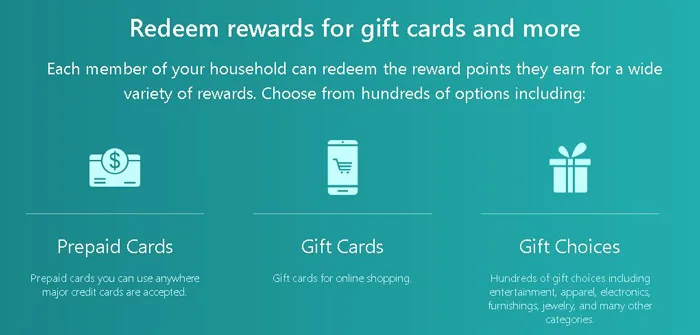
This bothers me because it’s basic information. If you’re asking people to share their data, the least you can do is explain how they get paid.
I had to rely on what other members reported, which isn’t ideal. According to them, the first time you withdraw, you need $25 worth of points. That’s high. Much higher than most sites in this category. You’ll earn points for a while before you see anything.
What makes it slightly better (again, according to other users) is that after your first withdrawal, the threshold drops to $5. That’s more reasonable and closer to industry standard.
I can’t verify these numbers myself because the platform doesn’t make them visible. But if what others say is accurate, the system works fine once you understand it. Getting to that first $25 takes time. It’s not impossible to reach, but it does mean you’ll wait longer for your first payout compared to other options.
If you prefer sites that pay out quickly, this probably isn’t your best bet.
How much can you earn?
The site won’t tell you how much you’ll actually earn. I looked everywhere for clear numbers. Nothing. They explain the concept but skip the practical part completely.
So I connected my devices and waited. Points came in slowly. Very slowly. Getting to the payout threshold took longer than I expected, and I wasn’t even sure what that threshold was until I got close to it.
Most tracking platforms I’ve used work this way. You trade your data for small amounts that build up gradually. Screenwise Panel follows the same pattern. The earnings aren’t impressive.
If you need money soon, this won’t help. If you’re fine with something running quietly in the background while you do other things, it might be worth setting up. Just don’t expect much.
How to get support on Screenwise Panel
The website has no FAQ section. No help page either. If you want to figure something out on your own, you’re out of luck.

They do give you three ways to contact support. You can fill out their contact form, send an email to their support address, or call their hotline. The phone number is posted on the Contact Us page if you want to speak with someone directly.
That covers the basics. You can reach them if you need to.
The website itself explains almost nothing about how the panel actually works. Which means you’ll probably need to contact support just to understand basic features. And since there’s no FAQ to check first, every question has to go through their team.
It works, but it’s inefficient. A simple help section would solve most of this. As it stands, they’re set up to answer questions, but they could’ve prevented a lot of those questions in the first place.
Support exists and it’s accessible. That’s accurate. But the absence of self-service resources is noticeable.
Can anyone join Screenwise Panel?
Screenwise Panel works on invitations only. You can’t sign up whenever you want.
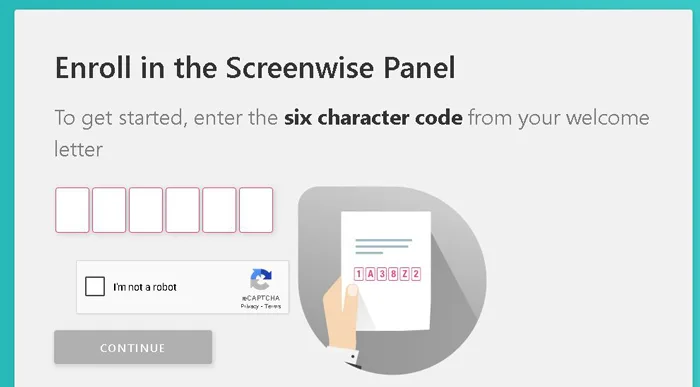
I got my invite after joining iSay, one of their partner survey sites. But they never explained how the invitation system actually works (probably because it’s inconsistent). From what I could piece together, they send invites in batches, not continuously. I signed up for iSay and then… nothing for a while. Eventually the email appeared, but I can’t tell you exactly what triggered it.
The invitation comes with a code. You need that code to register. During signup, you tell them which devices you use and where to ship the router. Shipping is free, which is good because you’re essentially letting them monitor your internet activity for points.
When the router arrives, you follow their setup instructions. Mine were clear enough, though I had to restart the process once because I missed a step about connecting specific devices first. Once everything is running, the system works passively. You use your devices normally, they collect data in the background, you earn rewards.
The waiting, though? That’s what gets you. You can’t control when invites go out, and they don’t tell you if you’re even on a waiting list. You just have to be a member of one of their partner platforms and hope.
Can you use it on your phone?
Yes, but with specific requirements.
You need a smartphone for the setup itself. They ask you to install tracking apps (they call them “meter tools“) that monitor your data sharing. Without a mobile device, you can’t complete this step.
Once you’re set up, you can use your phone to earn. The constraint is that it has to connect to the router Ipsos sends you, not your regular mobile network. So if you rely on mobile data when you’re out, you’ll only earn when you’re home and connected to their Wi-Fi.
What this means: if you were planning to earn passively while traveling or shopping on mobile data, that won’t work. You’re limited to earning when you’re connected to their specific router.
Advantages and Disadvantages of Screenwise Panel
Advantages
- Earn passively once you set everything up
- Router arrives free, Ipsos covers shipping costs
- More connected devices can mean higher earnings
- Threshold drops to $5 after first withdrawal
Disadvantages
- Invitation-only panel
- First payout requires $25
- Low earnings, about $1 using laptop and phone
- Monitors everything you do online constantly
- Must use their router, not mobile data
Is Screenwise Panel LEGIT or SCAM?
Screenwise Panel works. It’s legitimate. You share your browsing data, they pay you passively.
But it’s invite-only. If you didn’t get invited, that’s where this ends.
And the privacy issue is real. They track what you do online. If that bothers you, skip it. If you’re fine with companies seeing your activity, then maybe it’s worth considering. Just know the money comes in slowly. You won’t see much for a while.
I’d only join if both things are true: you got an invitation, and you’re comfortable sharing that level of data. Even then, don’t expect quick returns.
If you want something that pays better and doesn’t require an invite, look for platforms with stronger earning potential and less intrusive tracking. They exist, and they’re open to everyone.
If you’ve tried Screenwise Panel or have thoughts about it, feel free to share below.