
WriterAccess says you can earn real money as a freelance writer. I’ve heard that claim before, and I’ve learned to check before I trust it.
I spent time actually testing this platform, reading through its structure, and looking at how pay works in practice. What I found is a mixed picture. There are genuine opportunities here, and the payment setup is clear enough once you get past the initial learning curve. But a few things will matter a lot depending on who you are and what you’re looking for.
I looked at the earning structure and the payment tiers so you can figure out quickly whether this platform fits your situation. No guesswork needed.
What is WriterAccess, and how does it work?
WriterAccess is a content marketplace built specifically around writing. Businesses post jobs, freelance writers pick them up and complete them. The comparison that keeps coming up is Upwork or PeoplePerHour, and it fits well enough: same general model, just narrowed down to written content.
It pays real money. That is worth saying because this space is full of platforms that technically pay but make you feel a bit silly for trying. WriterAccess is not in that category. Payments happen. I checked that before going any further.
Whether it is actually worth your time is a different question, and it comes down to understanding how the earning structure works before you sign up for anything. So that is where we are going next.
Freelance Job orders
Once you’re in, the member dashboard shows all available job orders. WriterAccess isn’t only for writers. Designers, illustrators, photographers, videographers are all here too. But the earning process follows the same basic structure regardless of what you do, so understanding the writing side covers the essentials.
Finding work to apply for is straightforward. You browse the listings, click one that looks worth your time, and read the full details before committing. To apply, you click “View” and then “Checkout this Order” and send a proposal for the topic. The client reviews it and, if they approve, you start working.
What I didn’t notice at first was the one-hour checkout rule. Once you claim an order, the clock starts immediately. You have one hour to read through the instructions and confirm you can actually deliver. Let it lapse unreserved past that window and a penalty may apply. Cancel after the grace period and WriterAccess logs it as a “dropped order,” which can reduce your star rating or get your account terminated. Claiming an order you’re not sure about is a real risk, not a minor inconvenience.
How many orders you can hold at once depends on your history on the platform. You start with one. After completing at least 10 orders, that number expands to 5. They call these slots “garages.” I had to read that twice.
Once you have an order, you work toward the deadline. If you need more time, you can request an extension ahead of the deadline, not after. Miss it without flagging it first and you’re looking at no payment, a rating drop, or worse. The client can also request revisions if the work doesn’t meet requirements. The job order states how many free revisions are included. Anything beyond that needs to be renegotiated. When a revision request comes in, you have 48 hours to complete it.
To submit, you go back to the job order page and hit “Save and Submit.” You can write in your own word processor and paste the content into the platform when you’re ready. The client reviews the submission. If it passes, the status moves to “Completed” and payment is released to your account. If revisions are needed, the 48-hour window applies again and the review restarts after you resubmit. I found it took a couple of orders before that cycle felt natural rather than something to mentally map out each time.
The process has more moving parts than most freelance platforms. That’s actually worth something: the structure creates transparency and makes disputes easier to handle. But if you’re new to this, tracking grace periods, garage limits, revision windows, and submission steps simultaneously is a genuine load. It smooths out. It just takes a few orders to get there.
As for how much work is available, there was a decent amount showing when I tested the platform. Feedback from other writers points to a significant drop in job order volume since AI content tools became widespread. That’s not surprising, but it is worth factoring in before you invest serious time building a profile here.
How do you get paid?
The payout setup here is one of the things I actually checked carefully before committing any time to the platform. No threshold to hit before you can access your money. That was the first thing I wanted to confirm.
Every completed job order gets credited to your WriterAccess account balance. From there, the platform processes withdrawals automatically, twice a month. The two payout dates are the 4th and 19th. The 4th covers orders submitted before the end of the previous month. The 19th covers everything submitted by the 15th. WriterAccess tallies the totals on those dates and transfers the funds directly to PayPal. It can take a few more days after that for the money to actually appear in your account.
I tracked the timing myself. For the first cycle, the money tends to arrive between the 7th and 9th. For the second, between the 22nd and 24th. Consistent enough that once you see the pattern, you can plan around it without thinking too hard.
There is an immediate withdrawal option, but it costs a flat $7 fee. I saw that and quietly set it aside. On a small payout, $7 is not a rounding error. It is a real chunk of what you earned. The scheduled system makes more sense unless you are in a situation where waiting genuinely is not an option.
The automatic processing is the part I appreciated most, not because it is exciting, but because it removes a step I have had to do manually on other platforms. No login required to trigger a payout. No minimum balance sitting there blocking access to your own money. It runs on its own schedule and you just wait.
PayPal as the transfer method also helps. It is one of the more accessible options globally, and most people already have an account set up. Not every platform uses it, so it is worth noting.
If you want other platforms with a similar payout structure, FreeCash, GG2U, Attapoll, and Earnapp all pay through PayPal as well.
How much money can you make?
Your rating is the number that runs your life on this platform. I noticed that early on. Every completed job gets scored by the client: Met, Below, or Exceed Expectations. Stay at Met or above and work keeps arriving. Slip below that and the orders thin out. No drama, no warning. Just fewer jobs showing up.
Writers earn between $0.02 and $0.10 per word. Designers land between $25 and $200 per project. The star rating on each job order determines where in that range you fall. In my opinion, those numbers don’t hold up well against other writing platforms. Not bad for a first freelance gig, but not something to build a long-term income around.
Then there’s the 30% fee. WriterAccess keeps 30% of whatever a client pays. You take home 70%. The platform is free to join, so that’s how they cover costs. I understand the logic, but 30% is steep. That one number, more than anything else, is why I’d call the earning potential here mediocre. If the fee were lower, the overall picture would look noticeably better. As it stands, not quite.
If you’re just getting started in freelancing, that structure might feel fine for now. But with experience and a real portfolio behind you, you’ll find lower fees on other platforms. Or skip the middleman entirely and go after clients directly. You keep everything that way.
How to Get Support on WriterAccess
I went to the FAQ first. That’s always my first move before bothering anyone. And to be fair, it covered most of what I needed. Not everything, but enough to answer the obvious questions without having to submit a ticket or hunt down a contact form.
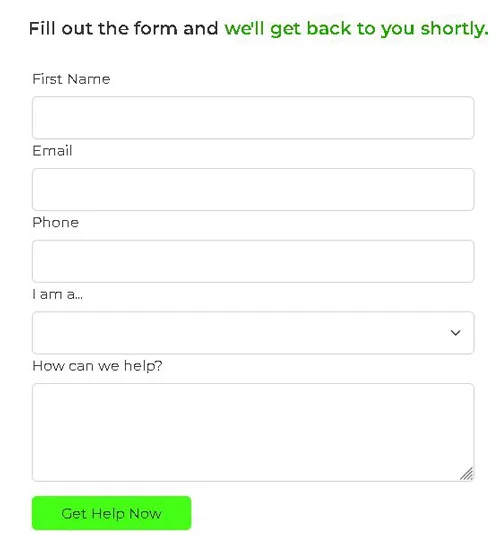
When the FAQ didn’t have what I needed, I found the Help Desk. You submit a support ticket there for anything platform-related. It’s straightforward (a form, a category, a description) and I didn’t have to dig deep to find it. Job-related issues work differently though. The site steers you toward messaging the client directly through its internal messaging feature rather than routing everything through support. They’re fairly explicit about that. Direct communication with the client is the preferred path for anything tied to a specific assignment.
I’ll admit the dispute mediation detail caught my attention a little. Not every freelance platform steps in when a job goes wrong between a writer and a client. WriterAccess does. That’s a small but meaningful thing if you’re going to rely on a platform for steady income and something eventually goes sideways, because it will.
Overall, the support setup is decent. Not impressive, but solid enough that you won’t feel completely on your own.
Who can use WriterAccess?
WriterAccess only accepts applicants based in the US. No exceptions that I could find. If you’re outside the US, this one closes before it opens, regardless of your skills or experience.
It’s also not a writers-only platform. Designers, illustrators, photographers, and videographers can all apply. That said, from what I’ve observed, writers tend to find more consistent work there than anyone else.
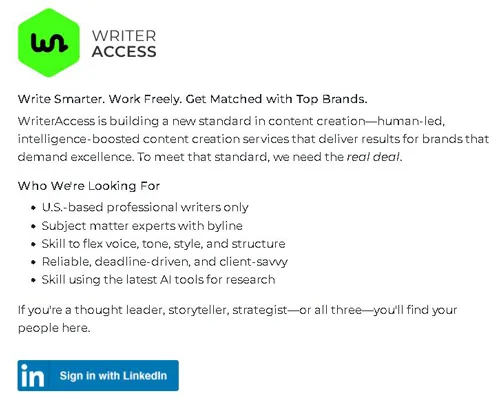
Getting in starts with LinkedIn. You link your profile, fill out a form that asks for that same link plus a resume, and submit. It felt more formal than I expected for a freelance platform. Not difficult, just precise about what it requires. I made sure my resume was current before uploading because the application asks for both, and I didn’t want to send in something outdated.
Then you wait. Up to 7 business days for a review decision. Sitting with that uncertainty after submitting was mildly frustrating, honestly. If you’re in a position where you need income soon, that timeline is worth factoring in before you commit time to the application. This is not a platform that gets you working the same week you sign up.
If they accept you, onboarding comes next. The platform walks you through how everything works before you can touch any job listings. Only after completing that step can you start claiming work and earning.
Patient process. More gates than you might expect. But once you’re in, the structure is clear.
Can You Use It On Your Phone?
Mobile gets you one thing: you can scroll through available job orders. That’s it. The actual work, claiming orders, writing pitches, submitting anything, all of that needs a proper computer. It’s not a design oversight. Given what the work actually involves, a phone just isn’t built for it.
And even when you’re ready to claim a job order, I’d still say stay on the computer for that part too. Presentations matter. A small typo or a rushed sentence because you were squinting at a screen can quietly cost you the job. From what I’ve seen, writing your pitch carefully on a full keyboard is one of the more direct ways to improve your chances of actually landing something.
Is WriterAccess legit?
WriterAccess works. It’s a legitimate platform, payments are real, and the work is there if you get through the door.
The application process takes time. I won’t pretend otherwise. If you need to earn quickly, this particular platform will frustrate you before it helps you. That’s not a flaw in the system exactly, it’s just a mismatch between what the platform is built for and what some people need from it.
For someone just starting out in freelance writing, it actually makes sense as a first step. Pitching clients cold when you have nothing to show them is harder than most guides admit. WriterAccess gives you a structure to work within while you figure things out: how to write to a brief, how to hit a word count without padding, how to build samples that mean something later. I’d say it’s a reasonable place to learn without feeling thrown into the deep end.
Experienced writers are a different story. If you already have a portfolio and some track record, you’ll probably find the rates here limiting. Direct clients and higher-paying platforms tend to reward that experience better. At that point, WriterAccess starts to feel like working below your level, and that gets old quickly.
It’s not the best freelance platform out there. It’s also not one I’d dismiss outright. It depends entirely on where you’re starting from.