

Freeplay pays you for playing games, taking surveys, and completing small tasks. Rewards come in the form of cash or gift cards.
Platforms like this can work. I’ve tested enough of them that I no longer automatically get excited about every app that promises a few dollars for a few minutes a day. Some actually pay out. Others just waste your time for nothing.
Freeplay is no exception to the rules of the category. It’s worth knowing how it works and what others have experienced before you install it.
What is Freeplay and how does it work?
Freeplay is a Get-Paid-To app. You complete tasks and earn rewards.
The rewards actually come through. It’s legitimate. However, before you install it, it’s worth knowing exactly what you’re getting into.
Earn money by playing games
On Freeplay, you can earn points by playing mobile games. The section isn’t called “Play Games,” but “More Ways to Earn,” which threw me off a bit the first time I looked for it. It’s not a major issue, but if you don’t know where to look, you might miss out on the opportunity.
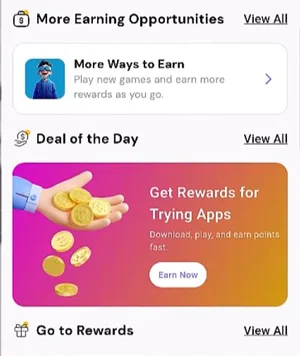
Once you’ve found it, choose a game, install it, and from then on, you have to open it from the Freeplay app, not directly from your phone. If you skip this step, the platform won’t track your progress, and you won’t get anything for your effort.
Each game comes with a set of tasks. Usually, it involves reaching a certain level or hitting a milestone in the game. Sometimes there are also tasks involving in-game purchases, which typically offer the biggest rewards of all.
It’s worth paying close attention to these paid tasks. Not all of them are worth the reward, and the ones that are worth spending money on are pretty rare. You have to figure out for yourself if it makes sense.
You’re not forced to finish a game from start to finish. If the remaining tasks aren’t worth the effort, move on to another one without any problem.
The rewards are generally lower than what more well-known platforms like Earnopolis, Pawns or EarnStar offer. It’s something to consider when deciding whether to install the app.
Complete free offers and random tasks
The section is called “Deal of the Day,” which doesn’t really tell you what you’ll find there. If they had simply called it “Offers,” you’d know right away what to expect. They chose to do it differently.
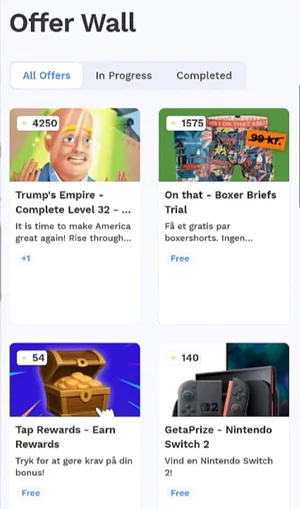
What you’ll find are paid offers that come from an offer wall Freeplay works with. The tasks are almost always the same. You install a mobile app or play a game on your phone until you complete what’s listed in the offer.
Each offer has a list of specific steps. You must follow them exactly, because the system won’t credit your reward if anything is missing. There’s no negotiation, no room for error. Either you’ve completed everything, or you get nothing.
The problem is that there are fewer offers compared to other GPT platforms. It’s not something you can make up for with hard work. There’s simply less money available in this section, no matter how diligently you work.
The third method is surveys, hidden in a section called “Shopping Habits Survey” (not “Surveys,” as you might expect). Once you get there, click on it, and all the surveys available at that moment will appear.
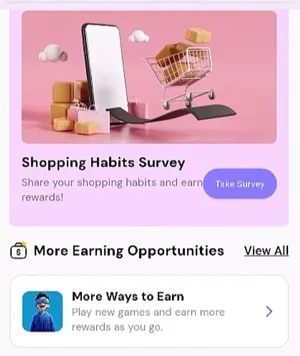
First, you go through a series of screening questions. If your profile matches what they’re looking for, you get to the actual survey. If not, you move on to the next one. I came across a few surveys in a row that I didn’t qualify for, which isn’t exactly motivating when you’re just starting out.
If you finish a survey, the reward comes. How much you get is another question. Most surveys pay below average compared to similar platforms.
How do you get paid?
Freeplay’s payments section is strangely designed. You go there to see what and how much you can withdraw, but the platform hides everything until you’ve earned enough points. Not the withdrawal options, not the minimum threshold, nothing. I looked for something that would tell me what I was working for, but it wasn’t there.
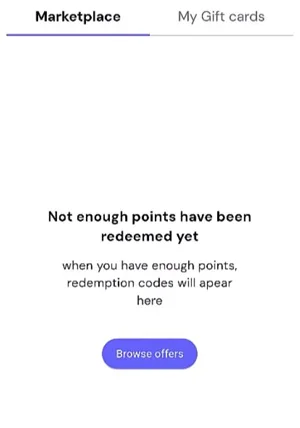
On any other GPT platform, I’ve seen this from the very first second. You go to the payments section, and the options are there, with the minimum threshold next to each one. With Freeplay, it works the other way around. You have to reach the threshold to find out what the threshold is, which is a completely illogical cycle.
I never got there. The reason comes next.
If you want transparency regarding withdrawals from the start, ySense and GG2U are options that display all of this clearly. And both pay via PayPal.
How much money can you make?
The earnings on Freeplay are low. You run the numbers in your head, and it just doesn’t add up. I’ve tested other platforms that pay several times more, and even then, it’s not serious money. On Freeplay, you don’t even get that far.
I never reached the withdrawal threshold. The earnings were so low that I wasn’t even interested in checking what payment options were available.
The app made things even worse. It’s not clear where to start (I spent a good few minutes looking for the survey section), and on a platform that already pays so little, that’s all it takes to give up on it.
How to get support on Freeplay app
I searched the app for a help button, an FAQ section, anything. I couldn’t find a thing.
I found the support email address on their Google Play page, not in the app. It’s [email protected].
It seemed ridiculous to me that I ended up on Google Play just to find out how to contact the support team for an app I already had open on my phone. A contact link somewhere in the settings, an FAQ with the most common issues. Both are missing.
Who can use Freeplay?
Freeplay doesn’t say anywhere which countries it supports, neither on the website nor in the app. From what I’ve seen, it seems to work pretty much everywhere.
To sign up, you have to install the app first. You can’t do anything from the browser. The first time you open it, it asks for your phone number. Not an email, not a password. Phone number first.
I get the SMS verification, it’s not the first platform to ask for it. But asking for it first, even before email, on a platform I’ve never used before? No. I don’t recommend it because of that.
Can you use it on your desktop?
Freeplay is only available on mobile. The website is there, but there’s nothing to do on it. It’s just a page that tells you to download the app, and that’s it.
The app works on Android and iOS.
The experience within it is different. When you enter the sections explaining how to earn money, there’s no explanation. You don’t know what to do. You click, and only then do you understand. Every other app I’ve tested shows you this right from the first screen. Freeplay doesn’t, and after a few minutes using it, I still haven’t found a good reason for that.
Is Freeplay app LEGIT or SCAM?
Freeplay works the same way as many apps in this category. You play games, complete offers, take surveys, and in the end, you get a few bucks. The problem is that “a few bucks” is an accurate description, not a figure of speech. The earnings are low, and the platform isn’t user-friendly even when you’re in the mood to give it a try.
I wouldn’t recommend it. Not because it’s a scam, but because there are apps that pay much better for the same kind of effort and don’t make you struggle with the interface to find what you’re looking for. If you’re going to invest your time anyway, at least make sure it’s somewhere where you feel like you’re actually getting somewhere.
If you’ve tried Freeplay and your experience was different from what I’ve described, I’d love to hear about it. Leave a comment below.