

Honeygain says something I’ve heard before: leave the app running, share the internet you’re not using, and money comes in. You don’t do anything. You just don’t turn it off.
I’ve seen a lot of apps make that promise. Most of them are either outright scams or so watered down that the earning part is barely real. Honeygain is neither of those things, but that doesn’t settle the question of whether it’s worth it.
The idea works on a simple mechanic. Companies need real residential internet connections to test things, collect data, run market research. Honeygain sits between those companies and people willing to lend their connection. You share, they use it, you get paid. No input required beyond keeping the app open.
I’ve used it long enough to have a proper sense of how it actually behaves. It’s not a scam. But “not a scam” is a low bar, and I’d rather tell you what it is and isn’t before you decide anything.
What is Honeygain, and how does it work?
Honeygain came out in 2018. The idea is simple enough to be a little suspicious at first. You install their app, it runs in the background, and it shares your unused internet connection with businesses that need it. You don’t do anything else.
Those businesses use it as part of a residential proxy network. It sounds technical. From your end, there’s nothing to manage. The app just sits there.
It’s in more than 150 countries, and the member base has been growing at 30% each month. That’s a real number, not just padding. Whether the earning side keeps up with the growth is worth checking.
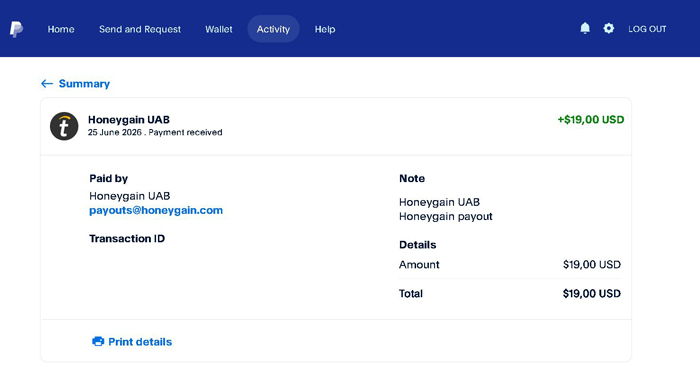
I’ve been paid by it more than once. I’ll show proof later. The legit question, at least, has a clear answer.
What it pays, and what actually affects that, is where things get more interesting.
Make passive income online
You download the app, install it, and leave it running. That’s genuinely the whole process. The software runs in the background, shares some of your unused internet bandwidth with Honeygain’s clients (they use it for web intelligence and content delivery), and you earn from it. No input needed after that.
It works on Android, iOS, Linux, Mac, and Windows. When I first tried it, that list was much shorter. The range has grown, which matters if you want to use it across devices.
And using multiple devices is worth considering. Honeygain recommends it because more devices means more bandwidth shared, which means higher earnings. You can connect up to 10 in total. The limit per network is one device per IP address. It used to be two, and they changed it. So if you want to run it on two or three devices, they each need their own connection. Worth knowing before you set anything up.
If you only have one device or one connection, that’s fine. You’ll earn less than the maximum, but you’ll still earn. I wouldn’t lose sleep over not optimising it.
On privacy: Honeygain says their software doesn’t touch sensitive data. What they do collect is your email address, payment information, and device details like your IP address, operating system version, and device model, plus basic network information. The software itself uses a small slice of your bandwidth and device resources, nothing else. No access to credit card numbers, social security details, or anything like that. That’s their claim, and nothing I’ve seen contradicts it.
Honeygain Content Delivery
Content Delivery is a separate switch in the Honeygain settings. You enable it, and then it uses your connection to deliver things like videos, images, audio, and IPTV. Same idea as the main feature, just a different use for your bandwidth. You still do nothing.
It does need a stable connection, and it only runs on Windows and macOS. Worth checking before you get excited about it.
I enabled it and then sat in a queue. That is the part nobody mentions upfront. Spots are limited, so you might turn it on and not earn from it straight away. You can see in the app whether you are earning or waiting. If it shows a queue, you just wait. There is no way to skip it.
When it does connect, you earn 6 credits per hour. That stacks on top of whatever you are already getting from regular bandwidth sharing, which is the whole point.
One more thing: it is not available everywhere. Around 30 countries have access to it right now. If the option does not appear in your settings, your country is not on the list yet. They are planning to expand it, so it is worth checking back. Until then, the regular sharing still runs. That alone is not bad.
Refer Your Friends
Honeygain’s referral program is simple. You get an invite link. Someone signs up through it, installs the software, and you earn 10% of their daily earnings. Not 10% taken from them. Honeygain pays that separately, out of their own pocket. Your referral keeps everything they earn.
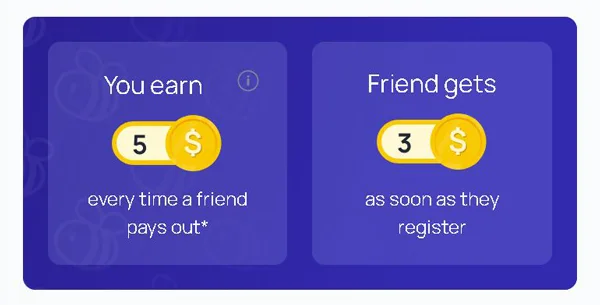
Sharing the link takes about thirty seconds. You can post it on Twitter or Facebook, or send it by email if that suits you better.
The 10% is not going to feel like much with one or two people. I won’t pretend otherwise. But if you have a group of people interested in this kind of earning, or an online following with any overlap here, it adds up in a way that’s hard to ignore over time. More active referrals, more daily earnings feeding your cut.
It’s one of those features I’d say is worth using from the start, even if the returns feel small at first. You’re not doing extra work for it. The link exists, you share it once, and it keeps running in the background.
Honeygain Payment Proof in PayPal
How to withdraw money from Honeygain?
Getting paid out of Honeygain is less straightforward than it used to be. Two options existed before: PayPal or Bitcoin. Bitcoin is gone now. They pulled it without much fanfare, and I am not going to pretend I am not a little annoyed by that, even if I had already stopped using it. The fees they charged for Bitcoin withdrawals were extreme, so I had moved on anyway. Still.
What they added instead is a crypto called JumpToken, or JMPT. And I have actually started using it myself, which tells you something.
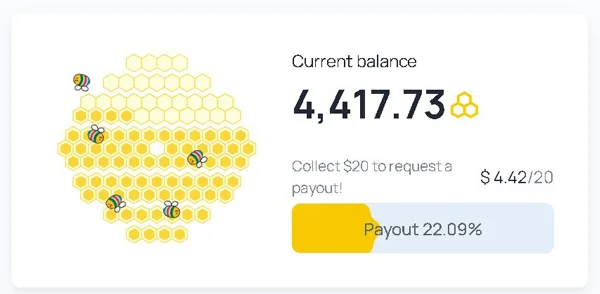
With PayPal, you need $20 in your account before you can withdraw anything. JMPT has no minimum at all. You can pull out whatever you have, whenever you want, and you get a 10% bonus on top of your earnings for using it. That bonus launched at 50% when the JumpTask mode first came out. It has since dropped to 10%. There is no guarantee it stays even at that level, so I would not count on it long term.
The PayPal withdrawal fee is 15%. JMPT charges nothing. That is not a small gap, and I do not think Honeygain is subtle about which option they want you to pick. The whole setup points toward JMPT. I find the PayPal fees genuinely hard to stomach. You have already done the work, you have already waited to hit the threshold, and then 15% disappears on the way out. It is a lot.
For what it is worth, converting JMPT into other cryptos after withdrawal is not complicated. I send mine to my Metamask wallet and go from there. If you prefer Bitcoin or something else, that route is still open, it just takes an extra step.
Now, how you actually earn. Honeygain counts the bandwidth you share in megabytes. Every 10MB earns you 1 credit, and every 10GB earns you 1 USD. That is the rate. It is not fast. Reaching $20 through passive bandwidth sharing takes time, and there is no way around that. If getting paid out quickly matters to you, I would point you toward ySense, HeyCash, or Timebucks instead, because Honeygain is not that.
Once you do request a payout, it can take up to 7 business days to arrive. I asked their support about it. They said they are not planning to speed it up. JMPT pays out straight away, PayPal does not, and I suspect that is not a coincidence. It is not the end of the world to wait, but do not hit request and then check your account an hour later expecting to see anything.
How to Move JMPT to Your Own Wallet
Moving your JMPT to MetaMask is possible, and it opens up what you can do with what you’ve earned. Staking, DApps, other Web3 uses. The tokens are yours to move around.
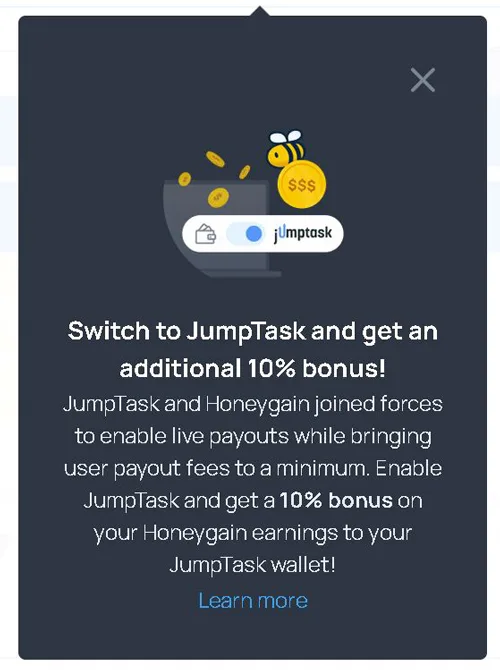
You’ll need a MetaMask wallet first. App or browser extension, either works. Once you have it, find the “Add Token” option inside the wallet and enter the JMPT token address. JumpTask’s official website has it.
Then go into Honeygain, pick JMPT as your payout option, and enter your MetaMask address to complete the transfer.
One update from November 2024: transfers to MetaMask now go through your JumpTask account, not directly from Honeygain. Both platforms walk you through it in their own guides, so check those before you start. The process changed, and skipping that step will cause problems.
How much money can you make?
Earning anything worth mentioning from Honeygain means using more than one device. One phone or one laptop will bring in something, but not much. The platform is built around scale.
You can connect up to 10 devices. Each one needs its own network connection, its own IP address. One device per network. It used to allow two per IP and that changed, which matters if you were planning around the old setup.
Ten devices sounds like a lot. And it is, unless you already have a phone on its own mobile data plan sitting next to a laptop on home wifi. That’s already two networks without any effort. Two devices, two IPs, no extra cost.
Honeygain’s own calculator puts earnings at around $30 per month if you share 10 GB of data per day. I looked at that number for a moment. 10 GB a day is not a casual figure. That’s a serious amount of data moving through your connection every single day, and whether you have that to spare depends entirely on your plan.
If you’re paying per gigabyte, run the numbers before you install anything. You could end up spending more on data than you earn back. On an unlimited plan, the calculation is different. The app runs quietly, you ignore it, and money accumulates. Not a lot. But you’re not doing anything either.
That’s the honest version of what Honeygain is. Passive, low-effort, low-yield. Install it, connect what you have, and check back after a month. Your actual connection speed and number of devices will tell you more than any projection.
How to Earn Honeygain Credits
Sharing your internet connection gets you credits. Every 1MB earns you 0.2 credits. So 5MB earns you 1 credit, 10MB earns you 2, and 1GB adds up to around 200.
Each credit is worth $0.001, one thousandth of a dollar. To collect $1, you need 1,000 credits. Roughly speaking, that means 5GB of shared data equals about $1. I find it easier to hold onto that one number than to do the conversion in my head every time.
The figures above treat 1GB as 1,000MB, not the precise 1,024MB. Close enough for practical purposes, and Honeygain works the same way.
How to Get Support on Honeygain
The FAQ is there from the moment you log in. I’ve found it covers most of what you’d actually want to know, which saves a bit of back-and-forth.
If something isn’t there, the contact form on the website is how you reach the team. Not through the app. The app doesn’t have one, which I didn’t notice until I went looking for it. You have to go through the site.
I’ve contacted them a few times. They replied each time, which I wasn’t entirely sure would happen. No obvious delays, no being ignored.
They’re also on Instagram, Twitter, and Facebook. I check in there occasionally for updates. The pages get used, which isn’t always the case with smaller platforms.
Support works. Not much more to say about it.
Can Anyone Join Honeygain?
Honeygain takes sign-ups from pretty much everywhere. The only real requirement is an internet connection. No specific country, no special setup.
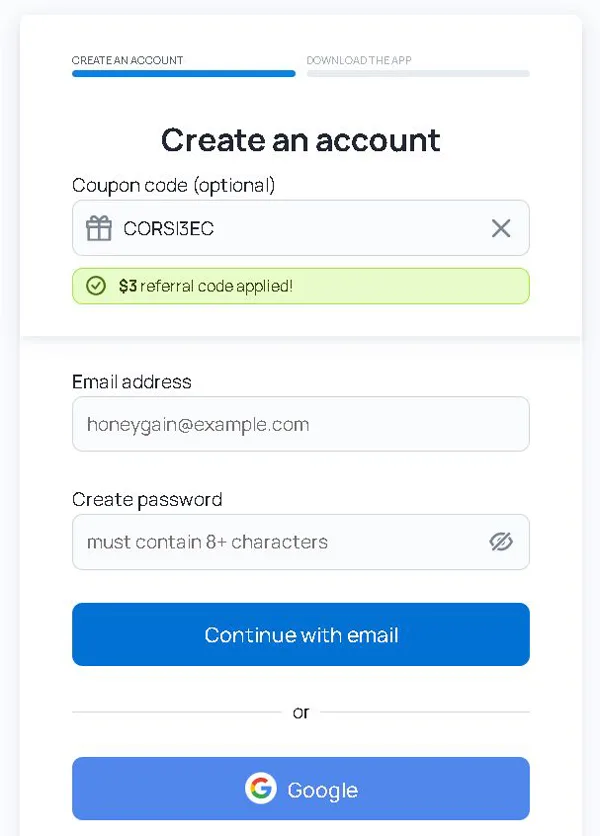
Registration is a form and a confirmation email. You click the link, and you’re in. I’ve seen more complicated processes for things that matter far less.
The age thing is a bit vague on their end. They say you need to be of legal age in your country, whatever that number is where you live. Under that, and you’d need a parent or guardian to give the go-ahead. Not unusual for platforms like this, but worth knowing before you start.
How much you earn is a different story. It varies depending on where you are, because the demand for internet traffic isn’t the same across the board. Some countries pay better. If you happen to be somewhere Honeygain doesn’t perform well for you, there are other options: Earnapp, GetGrass, ByteLixir, and Pawns all do something similar.
Can You Use It On Your Phone?
Honeygain runs on both computers and mobile. It started on Android, and iOS came later.
On Android, you won’t find it on Google Play. You have to download the APK, which you access from inside your Honeygain account once you’re logged in. An APK is a manual install file, the kind you use when an app isn’t going through the official store. It sounds more complicated than it is. Honeygain gives you a step-by-step guide the moment you click the download link, and it walks you through the whole setup.
Honestly, I wish it were on Google Play. That one extra step of downloading an APK outside the store is small, but it’s the kind of thing that makes you pause. It adds a little friction that shouldn’t be there.
The other thing to keep in mind is the battery. The app runs in the background while it shares your connection, and that costs you between 5% and 8% of your battery per day, depending on how old your device is. Worth thinking about if your phone is already on borrowed time by afternoon.
Is Honeygain Safe for PC?
Honeygain is safe to run on a PC. It is not a virus, it does not read your files, and it has no access to your browsing history. I know those are the first questions people have, so let me get them out of the way.
What it does is use your internet bandwidth when you are not using it. Companies doing web intelligence work, things like pricing research, ad-fraud checks, brand monitoring, SEO tracking, use that bandwidth to pull data from the web. Your connection becomes part of their infrastructure. That is the whole model.
Battery drain is real but modest. Somewhere between 5% and 8% per day, and the lower end of that applies to newer devices. I would not blame Honeygain if your laptop starts running warm. In my experience, that tends to be the stack of other apps sitting underneath it. Leave any device on long enough in a warm room and it will heat up regardless of what is running.
The one situation where Honeygain does cause a genuine problem is if you use survey sites or paid task platforms at the same time. Honeygain keeps a steady, constant pull on your bandwidth, and those other sites sometimes read that as suspicious traffic and block your IP. It does not happen with regular browsing. It happens with platforms that are watching for bots, and survey sites watch for that closely. If that is not part of how you earn online, you will not notice the issue at all.
Trustpilot has a decent number of Honeygain reviews if you want to read what other people actually experienced. YouTube has walkthroughs too, if you prefer to see the app before installing it.
Is Honeygain worth?
Honest disclaimer before reading: it doesn’t make you rich. I knew that going in, and I still installed it, mostly out of curiosity about whether it would add up to anything worth mentioning.
The setup takes minutes. You install the app, it runs in the background, and that’s genuinely it. No tasks waiting for you, no surveys, no check-ins. I kept expecting something to do and there wasn’t anything. That part was accurate.
The payout threshold is the main obstacle. It’s high enough that on a single device, you’re waiting longer than feels comfortable before you can withdraw. I checked the balance more often than I should have, which tells you something about how slow the accumulation is. Not devastating, just slow.
It started making more sense to me as a background earner sitting alongside something else. If you’re already on other reward sites and your phone or computer is running anyway, Honeygain just ticks away on top of that. The wait bothers you less when you’re not counting on it for anything specific.
But as a main earner, no. The ceiling is too low. You can’t effort your way to more from it because there’s nothing to do. The amount you make is tied to your bandwidth and your devices, and both of those have hard limits.
There’s a list of ten apps worth looking at if you want something with better payout potential and a lower withdrawal threshold. They’re available in most countries, which helps if location has been a barrier before.