
Mirex Network’s promise seemed too simple to me at first. You press a button once a day and the app mines LUM (Lumira tokens) on its own for 24 hours, and the money adds up even when you’re not sitting at your computer. For anyone looking for some extra money without much effort, that sounds really good. That’s exactly what made me worry it was a scam.
I tried it myself, and I can tell you up front that I was wrong. Mirex Network is trustworthy.
But that doesn’t mean it’s a good idea to sign up straight away. There are a few things worth knowing first, and in this review I’ll tell you all of them: why I think the app is trustworthy and not a scam, what you can expect from it, and whether it’s right for you. It’s better to know this now than to go in blind and be disappointed after you’ve created an account.
Read everything I found first. And only then press the button!
What is Mirex Network and how does it work?
When I heard you can mine crypto with one click, I was almost sure that somewhere along the way I’d be asked for money. That wasn’t the case. Mirex Network is a trustworthy platform, and it doesn’t ask you for any investment at the start. You open the app once a day, tap the button, and it mines LUM (the Lumira tokens) on its own for 24 hours. And I liked that, because my money stayed where it was.
But the LUM you collect aren’t worth any money yet. There’s no set date for when they’ll be publicly traded, so no one can tell you when you’ll get anything concrete out of them. What you collect now is a long-term bet. Maybe it’ll be worth something someday, but you won’t make quick money here.
And there’s something else. Trust is one thing, the time you put into the site is another. To know if it’s worth it, you need to see how it works, and that shows most clearly in the earning methods. That’s where you see how much time and effort it asks of you to collect anything.
I’ll go through them one by one below.
Mining Lumira
Mining on Mirex Network asked only one thing of me: not to forget about it. A session lasts 24 hours, and when the timer reaches zero, it doesn’t restart on its own. You have to open the app, claim what has built up, and press the button again. I thought that until I came back, it would at least keep running at the base rate. But the rewards stop completely and nothing builds up. And that’s why I open the app every day, to check whether my cycle is actually running.
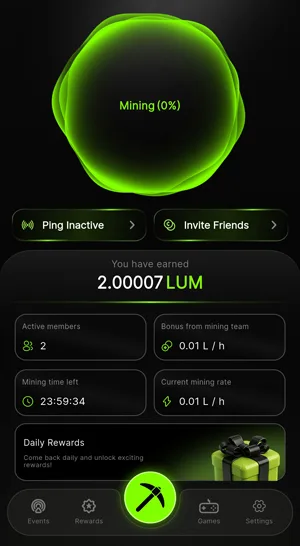
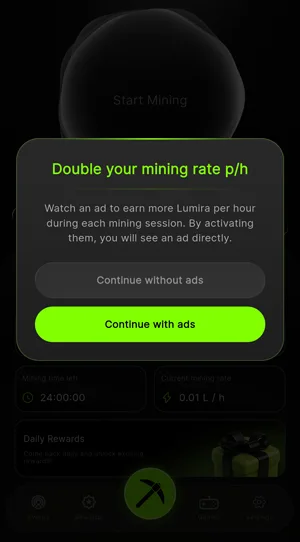
Getting started is simple. You open the official mobile app, tap “Start Mining”, and that starts a cloud mining timer, which runs automatically for 24 hours. Right after you tap the button, the app gives you 2 options. With “Continue without ads”, you stay at the base rate. With “Continue with ads”, you watch an ad and your hourly rate doubles for the whole cycle. I like this trade, because you sit through a single ad and collect twice as fast, without paying anything.
What builds up is Lumira, a community utility token, which you’ll see in your account under the name LUM.
You can also raise the rate with help from friends (I’ll tell you about the referral program later on). When you manage to bring in new people and form active mining teams with them, the app shows you how many “Active members” you have. A separate bonus, “Bonus from mining team”, depends on the size of the team. It’s added to the base rate, and the sum of the two gives the rate you mine at in real time. In my account, on October 23, 2026, there were 2 active members and the team bonus was 0.01 L / h. I multiplied that by the 24 hours of a session and got an extra 0.24 L. Not much, sure. But it comes from just 2 people, and it’s added every hour without me doing anything extra.
We all forget about a button now and then. For that, the app has “Ping Inactive”, which sends a notification to the team members who haven’t restarted their daily session. I liked that it’s easy to reach, right on the main screen.
I’m more careful with the external Web3 wallet. I keep it disconnected from the launchpad site while I’m not using it, because that way my wallet stays safe.
I’ve also tested other cryptocurrency sites and apps: AdBTC, Timebucks, and FireFaucet. I think the reviews of them will help you if this interests you.
For someone starting from scratch, this route costs nothing and it’s simple: you open the app and tap a button once every 24 hours. The whole process runs in the cloud, so the phone’s processor isn’t strained. And I’m glad the phone isn’t made to work hard for a few tokens.
Playing games
When I first opened the “Games” section in the bottom bar of the mobile app, I expected to find games I could start right away. What I found was a prize wheel, which works, and a few interactive arcade games, which are still to come.
The games sit below the wheel, in a separate subsection also called “Games.” In my app there are two, “Fruit Merge” and “Block Blast.” The list depends on the country you live in, so you might have more. Both have a green “Play” button, right next to the “Coming Soon” label. And as it turns out, a green “Play” button doesn’t mean there’s a game yet.
The project’s administrators said in the official community announcements that these games will expand the play-to-earn side of the platform. They want to bring in simple arcade games that keep you playing, where you collect extra utility tokens when you reach certain milestones, not only when you tap a static button. I like the idea, because a game asks for at least a little involvement. But for now it’s their plan, and I have no way to verify it.
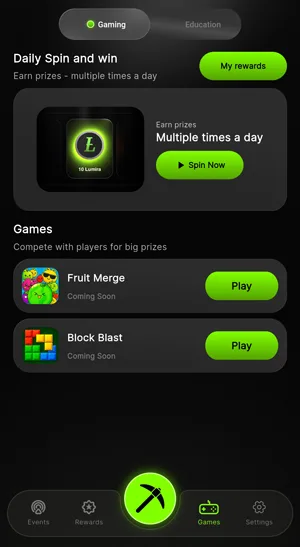
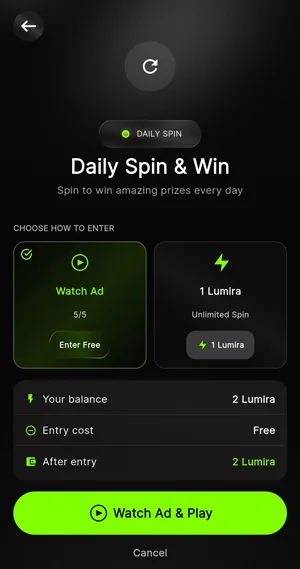
Until then, the only thing that works is “Daily Spin and win,” the wheel the app says lets you win prizes several times a day. To enter the draw, you have 2 options. With “Watch Ad,” you watch an ad and don’t pay any tokens. You tap the green “Watch Ad & Play” button and you get 5 free spins a day, no more.
The other option is “Unlimited Spin.” You skip the ads, but you pay 1 Lumira token for each try, and you can play as many times as your balance allows. This is where I get stingy. Tokens from mining don’t come easily, and you’d be spending them on a wheel where nothing matters except luck. If that risk doesn’t bother you, it’s your choice. To me, 5 ads a day seem like a lower price than one token per spin.
Before you confirm, the screen changes based on the option you picked and shows your starting balance, what the entry costs you, and how much you’ll have left after it. It’s a small thing, but I liked it, because you see the math worked out before you tap. It’s worth checking the text at the bottom, “After entry,” so you know for sure whether you’re getting in for free or spending tokens. If the number there is lower than your starting balance, you picked the paid option.
There’s one more thing to watch out for with the ads. If your mobile internet isn’t stable, the ad can stop and you lose one of the day’s 5 free tries. It’s a pity to waste one when there are so few, so check your connection before you tap “Watch Ad & Play.”
If you’ve just joined Mirex Network, this is the simplest part of the app. You don’t need any gaming skills and you don’t have to know anything beforehand: you watch a few short ads and your token balance for the day grows a little. But while the arcade games are still in the works, the wheel is all you have. With the free tries, your tokens stay untouched for whatever else comes to the network.
Refer a friend
There are 2 people on my Mirex Network team right now, and both of them are mining (I mentioned this above as well). Under “Total Team Members” it says 2/2, and under “Bonus from mining team” I have exactly 0.01 L/h. For each invited person who has a mining session running, I get 0.005 Lumira per hour, added to my rate right away. I have 2 active people, so 2 times 0.005.
To bring someone onto your team, you tap “Invite Friends” or “Invite members” in the main menus and get a unique sign-up code. The person who signs up with your code shows up automatically in the dashboard, under “Total Team Members”. And they get something too, one time only: a welcome bonus of +1 Lumira in their wallet balance. I liked that the invited person doesn’t walk away empty-handed either.
When I joined the program, I thought a person brought onto the team would add to my rate for as long as they stayed signed up. It doesn’t work that way. The program is called “Mining Team”, and it ties your daily rate to how active the people you invited are, so the bonus isn’t fixed and changes depending on who’s online. The app splits the team into “Active Miners” and “Inactive Miners” and calculates the extra rate only from the first list.
And what happens when one of them forgets to log in? Each person on the team has a 24-hour timer. While it’s running, you get their 0.005 L/h. When it hits zero, that person moves straight to “Inactive Miners”, their contribution disappears, and your bonus drops. I’m afraid this is where most of the time goes, because your rate is in other people’s hands and you have to keep bringing them back. For this, the dashboard has a big alert button, “Ping Inactive”, which sends your friends a push notification straight to their phones so they open the app again and restart their timer.
The bonus comes from what people do in real time, not from an automatic token payout, and that’s where the counting errors you notice in your earnings come from. I read in the Google Play Store reviews that for some people, the “Active Miners” list doesn’t update in real time. Friends show up as inactive on the dashboard even though they’ve already tapped their button, and the team bonus you earned gets stuck for a while. It’s a shame to have your rate drop because of someone who started their session on time.
To lose as little as possible, you check the “Mining Team” list a few times a day and tap “Ping Inactive” as soon as someone’s session has expired, you give your code directly to people who open the app every day, not to those who only play around with it now and then, because your extra rate depends entirely on them showing up, and if the bonus looks smaller than you expected, you ask your friends to check on the main dashboard screen whether their session is actually running.
The program doesn’t ask you for any money. You don’t get a commission percentage, the way you usually do with referrals; instead, you and your friends work together to raise the hourly rate for the whole team. But that means a lot of talking. You’ll have to remind your team often to stay active, or the bonus can drop to zero.
For 0.01 L/h, I have to look after two other people every day. A lot of work for such a low rate.
Mirex Network events
When I opened the events section on Mirex Network, I expected something different from each project. I found 9 active tokenization events, and they’re all actually the same airdrop-style crypto giveaway, repeated 9 times.
Each project promises exactly 100,000,000 tokens (100 million). The amount sounds big, but for me it means nothing until I know what a single one of these tokens is worth. And when I see it identical across all 9, it makes me more cautious, not more excited.
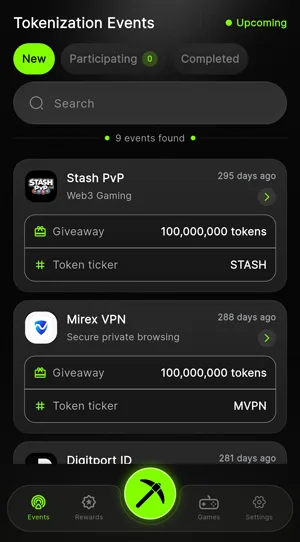
The only thing that changes from one event to the next is the sector. The platform says there are startups behind them in real-world assets (RWA) and technology:
- Digitport ID (DPID), digital identity
- Easy Books (EASY), financial management
- Treasure Hunters (THZ), adventure games
- Apprenties (APPR), careers
- Trust Between (TRUST), secure connections
- Swiss Garage Network (SGN), help with cars
- Mirex Fitness Clubs (MFC), fitness (the furthest from crypto, if you ask me)
- Stash PvP (STASH), Web3 games
- Mirex VPN (MVPN), private browsing
The list looks varied, and at first glance I liked that. But a fitness club and a Web3 game get the same amount, through the same kind of giveaway, and I find it hard to believe that two businesses this different need the same thing. Also, two of them carry the platform’s name. Until I see what each startup does, for me they’re just 9 names put on top of the same giveaway.
How do you get paid?
When I watched the Lumira (LUM) balance grow in the dashboard, I’d think about the price the platform set for the listing, $0.20 per token. But that price is a reference point they announced for the launch, not a value you can cash out. Right now, the balance doesn’t buy anything.
And you can’t take it out either. The network is still in an infrastructure testing phase, before mainnet, and public distributions are locked, so you can’t sell the tokens and you can’t withdraw them to a bank card, as a transfer in regular currency, through online payment systems, or as digital gift cards. I also looked in the app for a way to withdraw to an external wallet, but that’s closed too until the planned migration to mainnet and until identity verification (KYC) starts.
Alongside LUM there’s also Mirex ($MRX), the platform’s premium native utility coin, which is completely separate. MRX had a public presale at an initial price of $1.92 per token, on BNB Chain, and it trades on PancakeSwap, a decentralized exchange. One has a sale price and a market where it trades. The other only has a promised price.
What can you do until then? Collect points for verification. The company doesn’t open verification to everyone at once. It rolls it out gradually, with limited sign-ups, and early access is handed out through a local lottery. In Spin & Win, the daily module in the app, you collect special points called KYC Points, and with them you enter an automated draw on the blockchain, where you can win a spot for early account verification at random. It bugs me a little that the first step toward money comes down to luck. But if you want an invitation sooner, you’re better off collecting KYC Points every day from the free games so you move up than waiting for general access.
I have no way to see whether anyone has gotten money from it, because so far no one has been able to. There’s no verified proof of payment from users online, and no transaction statistics either. What you can follow is the network’s official news channels. There you can find out how many of the 10 required community token allocation events have been completed.
I’m not one to assume the worst, but I’m worried about sites and profiles outside the platform that promise to get around the lock and withdraw your tokens early. They’re unauthorized operations. And as long as the tokens are locked for everyone, I don’t see how someone from outside could unlock them.
Anyone just starting out on Mirex Network should know that it’s a long-term accumulation project with no liquidity right now. All of us collecting tokens here have something completely virtual in our dashboards that can’t be spent or withdrawn. You can treat this stage as a first lesson in asset tokenization. Until the network gets past the 10-distribution threshold and the migration to mainnet, the balance isn’t an amount you can count on.
The time you give the app right now would come to $0 if you cashed it out. That’s why I look at it as a video game and don’t put it in the same category as a job or an investment. And if money does show up after mainnet, I’ll enjoy it then.
How do you ask for help?
I expected to find a simple contact option in the settings, with a person on the other end. I opened the account dashboard and tapped the “Settings” gear, the last icon on the right of the bottom navigation bar. That’s where the account options are, but the entry you reach when you look for help is “FAQ’s”. It opens an automated menu, “FAQs”, built for common problems, with technical answers set in blocks that expand when you tap them. The questions are split into 4 groups:
- Getting started: “What is Mirex Network?”, “How do I start using Mirex Network?”, “Is Mirex Network free to use?” and “Why did Mira Network rebrand to Mirex Network?”.
- The in-app market: “What is $MRX?”, “What is MRX used for?”, “How can I participate in the MRX Fair Launch?” and “Is MRX a utility token?”.
- Community mining: “What is Lumira ($LUM)?”, “How does Lumira mining work?”, “Is Lumira mining free?”, “How do mining boosters work?”, “How is Lumira connected to the ecosystem?” and “What is the MRX-20 blockchain?”.
- How the platform is organized, the longest group and the one I liked: “What are ecosystem reward events?”, “How do ecosystem participation campaigns work?”, “How do referrals and affiliate rewards work?”, “What types of features are coming to the Mirex ecosystem?”, “Who operates Mirex Network?”, “Where is Mirex Network based?”, “Is Mirex Network legally registered?” and “Why is the project focused on a fair launch structure?”.
I liked that the questions about who runs Mirex Network, where it’s based and whether it’s legally registered are out in the open, in the same app as the ones about mining. But they’re all prewritten answers. They help you as long as your question is one someone else has asked too.
Where is the contact button, then? You go back to the main settings menu, tap “Social media”, and the “Social Media” screen opens, with icons that link straight to YouTube, Instagram, Twitter, Facebook, Telegram and Discord. The “Support” option is on this same screen too, and it sends you to an internal link where you write your request.
And this is exactly the option where people report the app breaking down. In public reviews on the app stores, several unrelated users describe the same thing: they tap “Support”, the app starts to slow down, and sometimes it closes completely. They never get the chance to describe the technical problem they had. That frustrates me. It’s the button you only reach after the FAQ has failed to help you.
What happens to some people after updates seems worse to me. They were trying to log in or recover access to their profile and kept going in circles, because the automated form often showed them an error saying the username doesn’t exist, and the messages they sent through the social media links got no reply. When the app closes, at least you know you need to restart it. When it tells you that you don’t have an account and nobody writes back, you don’t know how to get in anymore.
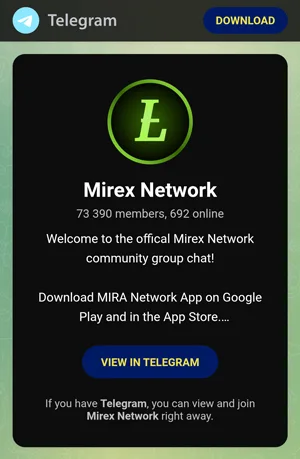
That leaves the other miners. From the settings, you tap “Chat with community” and go straight to their public Telegram group, where the welcome screen tells you that you’ve joined the official Mirex Network community group. It’s an open space where you can ask anything, with community moderators who answer right away. When I joined, on October 23, 2026, the group had 73,390 registered members and 692 people online at the same time. That’s not even 1 percent of the group, but for a simple question, 692 people are enough. And that’s roughly how it works for those of us who mine on apps like this: we help each other.
I’m wary of the people who say they’re moderators, though. You don’t give your digital wallet’s seed phrase or your account security codes to anyone in the group, whoever they say they are.
Because the team rarely sends personalized replies by email, and not right away, it’s worth spending more time going through the FAQ blocks, where the text is long. And if the social media page freezes while loading a link, restart the app and check your phone’s internet connection before you tap again.
For someone just starting out with Mirex Network, the learning part is easy. Everything important is gathered in the settings, and you can read the blockchain rules and mining parameters at your own pace, without any technical knowledge, while the chat shows you the tips that hundreds of active players give on the spot. But if you run into a server bug when registering your profile, the people on the tech team help you very little, and a database error can take a long time to get fixed.
For me, the learning part works well. The account support part doesn’t yet.
Who can use Mirex Network?
When I installed Mirex Network, I expected it to ask for my ID card or a utility bill, since it deals with crypto. It didn’t. For a basic mining profile, you don’t have to send data that sensitive, and that reassured me more than any bonus.
You get the official app from the Google Play Store or the Apple App Store, and you don’t pay anything, not for the app and not for the profile. The form asks for your name, a valid email address, and a strong password, and you can add an invitation code from an active teammate if you have one. The whole process takes under 5 minutes.
But that doesn’t mean you share nothing about yourself. After you submit the form, the app collects your full name, your email, the country you live in, and your IP address at that moment. These are normal details for an account, although, taken together, they show fairly precisely who you are and where you log in from. Then it verifies your email through an email management system they host themselves.
The email you sign up with matters too. Signing in automatically with Google often runs into technical errors, and because of that, it’s better to sign up with a regular email address than through an account from another platform. And write your password down carefully right when you choose it, because their email system can be slow to send the reset code, and you end up waiting for a code that never arrives for a password you could have written down.
Then there’s the invitation code. If you enter it when you sign up and it’s valid, the app immediately adds 1 Lumira token to your balance as a welcome bonus. One token is a small start, but you lose it if you install without a code, so it’s worth finding an active friend’s code first (if you want, you can use mine, “IsabellaRO”).
Mirex Network is available all over the world, or at least in the countries where crypto isn’t banned. And they’re different on VPNs from other platforms, which ban external proxies. The official team explicitly allows using a VPN, and the developers even recommend switching servers if the promotional ads don’t load on your local connection. I liked that they say this openly and don’t leave you guessing what you’re allowed to do.
Can you use a laptop?
At first I thought I’d be able to collect tokens from my computer too, because the official site opens in a browser. But the site is more of a place for information and a gateway to the Web3 sale that comes before listing (presale). Everything to do with earning happens only in the phone app, the only place where the community’s day-to-day work gets done. And the app is available for the two major systems, Android and iOS.
Android users will find it on Google Play under the name Mirex Network and need at least Android 7.0. iPhone or iPad users will find it on the App Store under the name Mirex and need iOS 15.0 or later, on the models that support it. The iOS version is larger, at 170.3 MB, compared with 124.87 MB on Android. The difference isn’t big, but it matters on a phone whose storage is almost full.
Because the real app comes only from Google Play and the App Store, I’m wary of .APK files from unofficial blogs. I’m afraid of what an installer downloaded from there could put on the phone, and it makes no sense to take that kind of risk for a few tokens.
I was also afraid that mining would keep my phone hot and drain the battery. But all the computing is done on their servers, so a session doesn’t strain the processor and doesn’t use much battery. That reassured me, because I need my phone for everything else too. And for the same reason, the app needs very few resources and runs well even on older, cheaper phones, as long as they have at least Android 7.0 or iOS 15.0. For someone just starting out, it’s a good thing they can try it without replacing their phone.
The ratings in the two stores don’t say the same thing. On Google Play the app has 4.6 out of 5 stars from 11,600 ratings, a good average from a lot of people. On the App Store the average is 3.0 out of 5, in the first regions where it was released, and I don’t have the number of ratings for it. The people who use the app give the ratings, and the ratings can change as more people join. To me, the difference says the app still needs work on iPhone.
But whatever the phone, it’s an app in its early days, and it has the problems of a new app. Sometimes the ads load in a loop and never finish, and other times login errors show up after an update. If it gets stuck on a black screen while loading the ad for a boost session, you close it completely from the open apps menu and start it again, so the cache gets cleared. It’s not pleasant when it freezes, but at least you know what to do.
Is Mirex Network LEGIT or SCAM?
What you collect on Mirex Network are LUM coins (Lumira tokens), and these coins aren’t worth any money yet. There’s no set date for when they’ll be traded publicly. I would have liked to see at least a promised date, because without one you have no way to work out what you’ll get out of it.
But what you give in return is very little. You tap once a day and the app mines LUM on its own for 24 hours. You don’t put in any money at the start. And the site is trustworthy. Nothing comes out of your pocket, just one click a day.
Earnings? None for now. Maybe later on, if LUM ends up being worth some money and if it gets traded publicly at some point, but nobody can say that right now, not even me. If you need money now, Mirex Network won’t help you. To me it seems like something for the future, something you leave running without counting on it.
What do you think, is it worth a click a day? If you have questions or comments, or you’ve already mined on Mirex Network, I’m looking forward to reading what you write in the comments!