
On Surveyon, you answer simple survey questions and collect points, which you then redeem for rewards. The app also says it’s fun. A fun survey?
There are a lot of survey apps, and Surveyon is another one. With every app, I check the same things: whether it actually pays, and whether you come out behind once you’ve spent all those minutes on surveys.
I joined Surveyon, tried it from every angle, and compared it to the hundreds of paid survey sites I’ve used, so I can stack it up against them without guessing.
It’s not for everyone. Below, I’ll walk you through the whole app, piece by piece, so you’ll know what to expect and whether it’s worth it for you.
What is Surveyon and how does it work?
Surveyon is a paid survey site that also has a phone app. It’s a real site, and it’s still active.
You fill out questionnaires about products, your habits, and your opinions, and you get points in return. Once you reach the minimum, you redeem your points for PayPal cash or digital vouchers.
The company behind it is dataSpring Inc., a large Japanese market research firm. The company is based in Tokyo, and the site is registered in Japan too. I like that it’s clear who’s behind it.
The surveys are mainly for people living in the Asia-Pacific region, in countries like Taiwan, Hong Kong, Singapore, Thailand, Malaysia, Indonesia, Vietnam, and the Philippines. If you visit from any other country, you only get an “Access denied” message.
There are five ways to earn points. Online surveys come in two types: profile surveys and general ones. There’s also Quickpoll, Daily Check-In, Refer Friends, and Event.
But just because a site is real doesn’t mean it’s worth your time. I think the only way to find out is to look at each earning method and see how much time and work it takes. I’ll go through them one by one below.
Get paid for your opinion
On Surveyon, all the paid surveys are in one tab, Survey. There are four kinds: Profiling Surveys, General Surveys, Bonus Surveys, and Imported Surveys. The last kind comes from outside research companies.
Before you click ANSWER, the card shows you the survey number, how long it takes, when you’ll get the points, and exactly how many you’ll earn. In the official survey lists, rewards range from 10P to a few thousand points per survey.
All the cards look the same. The survey type is at the top, and the survey number (No.) is below it. The first letter of the number tells you where the survey comes from. I’ve listed them below, with examples from my account:
- p: profiling surveys, like p132 or p022
- r: general surveys, like r104337 or r104687
- b: bonus surveys, like b104199 or b104913
- a, c, or d: surveys imported from partner companies, like a34038, c001, or d300170824
The card also shows how long the survey takes. I’ve had surveys that took 1 minute, around 5 minutes, 13 minutes, and 25 minutes. Next to that, you’ll see Real time or Non Real time. Real time means you get the points as soon as you finish. Non Real time means you get them after the survey goes through a check, so you’ll have to wait a bit.
Many surveys start with a few screening questions, where the company checks whether you’re who they’re looking for. If you’re not, or if they already have enough people, the survey ends early. That’s a disqualification.
The imported surveys come from four companies. The first is Cint AB, from Sweden. I found it in the international data transfer agreement and in my account too, on survey c001, which showed the message “Accept Cint Survey Participation.”
Many survey sites use Cint’s system to send out surveys and handle payments. Triaba is the best-known partner and has panels in over 60 countries. Surveyeah sends out surveys across Europe and the rest of the world, and Hiving is a panel that operates in several European countries.
Mobrog, which is both a site and an app, often works with survey networks, including Cint. Crowdology and PollBuzzer are built for international markets and run directly on Cint’s system. And OpinionAPP is the official app where you can see every Cint panel you’ve joined, all in one place.
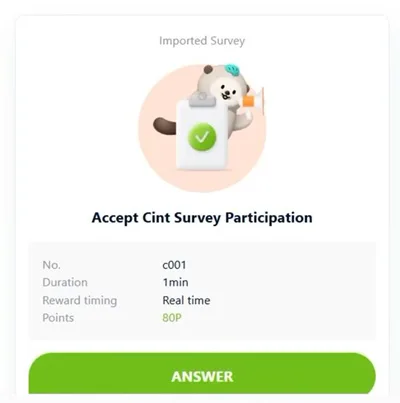
The second is Lucid Holdings, a US company and the one behind Cint/Lucid Marketplace. The surveys that start with d often come from Lucid, such as d300170824 (“Lucky Survey”). Most sites that pay you for surveys and tasks carry Lucid and Cint surveys, like PrizeRebel, Freecash, Surveytime, and OpinionWorld. You’ll often see them on AttaPoll, Poll Pay, and Eureka Surveys too.
The other two, both named in the agreement, are GMO Research from Japan and Prodege from the US. Prodege runs a lot of survey, rewards, and cashback sites. The best known are Swagbucks, InboxDollars, ySense, and MyPoints.
To get surveys from these companies, you have to accept the international data transfer agreement. The agreement gives each company a few details about you, so it can match you with surveys that fit:
- Cint AB: date of birth and gender
- GMO Research and Prodege: date of birth, gender, and where you live
- Lucid Holdings: date of birth, gender, income, marital status, whether you have children, employment status, occupation, department, job title, company size, and the phone you use
Lucid gets much more than the other three. That seems like a lot to me in exchange for surveys.
How many surveys you get varies a lot. On slow days, you won’t get any. On good days, you can earn 4,000-6,000P (40-60 cents). But it’s common to get screened out of 6-7 surveys before you make it into a big one.
The surveys and the site are available in 7 languages, with 11 region settings. English is for Hong Kong, Malaysia, the Philippines, and Singapore. Indonesian is for Indonesia, Malay for Malaysia, Thai for Thailand, and Vietnamese for Vietnam. Traditional Chinese is for Hong Kong and Taiwan, and Simplified Chinese for Singapore.
Surveyon’s own surveys, the general (r) and bonus (b) ones, pay the best and are the most reliable. They pay 1,000-6,000P (10-60 cents) in Real time, and you usually get 10P even if you’re screened out.
The imported Cint and Lucid surveys (c and d) show up more often, and some are big ones worth 6,000P. But in my account, those screen you out with 0P much more often.
If you just want a bit of pocket money, I’d start with the r and b surveys and wouldn’t count on c and d. Profiling surveys (p) take a few minutes, give you 50P for each set of questions, and unlock general surveys that are a better fit for you. And you need to do at least one general survey every 30 days, or you’ll stop getting Quickpoll rewards.
Don’t rush your answers. If you go through the questions too fast, you’ll get screened out on the spot. And keep your details the same in every survey.
I think two good general surveys of 15-25 minutes will get you to the 10,000P ($1) payout more easily than dozens of risky partner links.
Quickpoll on Surveyon
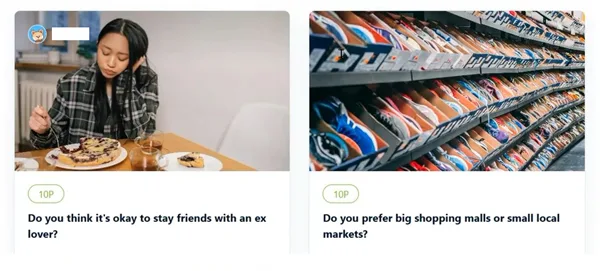
On Quickpoll, you vote in single-question polls on light, everyday topics, and you get a few points for it. Usually 10P per vote. If you vote within the first 24 hours, the points double and you get 20P.
In my account, the Quickpoll tab is in the top menu, next to Survey. There’s also a message there encouraging you to vote, comment, and suggest topics for extra points.
Inside, there are two tabs. Under LIVE QUICKPOLL you’ll find the open polls, with Today’s Quickpoll first and the older ones below it. When a poll closes, it moves to CLOSED QUICKPOLL, where you can see the final results.
Each poll has its own card, and on the card you’ll find:
- Points: 10P or 20P, exactly what you get for voting
- Time: a countdown clock and how long the poll is open for, which is 7 days
- Participants: how many people have voted so far
- Author: shown in the top left corner, either the official daily poll or the name of the member who suggested it
I got 20P for the one asking whether you still keep printed photos or store them digitally. And 10P for two others: whether it’s okay to stay friends with an ex, and whether you prefer big malls or small neighborhood markets.
To vote, press VOTE and pick an answer. You can also comment in the poll’s discussion, or suggest your own question on the /quickpoll/create page.
Until September 23, 2026, any registered member could vote and earn points here without completing any other surveys. But since then, you have to complete at least one regular survey (a General Survey, as the site calls it) every 30 days to get the points. The rule is still in effect this November.
If you go 30 days without a General Survey, you’ll see the message “Oops, this Quickpoll vote will be 0P!” when you try to vote. You can still vote, but you’ll get 0P. Once you complete a General Survey, you start earning points again from the next Quickpoll on. At least it warns you first.
A vote takes about 5 seconds and a single click, and you can’t get kicked out of the poll. But the payout is small, since a 10P vote is worth a tenth of a cent, and a 20P vote is worth two tenths. I think of them as points on top of what you earn from surveys, not as a way to make money.
If you’re opening the app for a survey anyway, I’d also vote in Today’s Quickpoll while the 24-hour clock is still running and the vote is worth 20P. Those are guaranteed points. And if you do General Surveys, the 30-day rule doesn’t even apply to you.
Refer a friend
If you refer a friend to Surveyon, you each get 2,000 points ($0.20), one time only. You only get them once your friend completes their first General Survey. No one gets points just for creating an account.
After that, you get 1% of what they earn every time they complete a General Survey. You only earn this from friends you referred directly, since the program has just one tier.
On the website, the program is called Refer Friends, but in your account it shows up as My Friends. I found it in the top menu under Event, then My Friends. It’s the same in the app. Sometimes you’re taken straight to the /events/entertainment/my-friends page.
On that page, under INVITATION CODE, there are three ways to invite friends:
- URL: a surveyon.com link with your code in it
- INVITATION CODE: your 8-character code, which your friend types in manually
- QR CODE: a code to scan when you invite someone in person, plus buttons for sharing on LINE and Facebook
If your friend uses your link, the code is filled in automatically. If they download the app first, they have 2 weeks from signing up to enter your code.
I think it’s a good bonus to start with. With 2,000 points, you’re already 20% of the way to the 10,000-point minimum withdrawal ($1). And you’ve hardly done anything yet.
You’ll barely see any real money from the 1% commission, though. It only applies to General Surveys, and for every dollar your friend earns, you get one cent. I think posting your link all over the internet to earn an income from invites is a waste of time.
I’d use the code once, when signing up, or invite one or two close friends who want to try survey apps. That way you both get the bonus. The rest of what you need to cash out comes from your own surveys: General Surveys and Bonus Surveys.
How do people get paid?
On Surveyon, you mostly cash out in dollars through PayPal.
Besides PayPal, you can also get digital store vouchers and gift cards, phone credit (Pulsa), or money sent to a local e-wallet. The options on your page depend on the country you signed up in:
- Philippines: PayPal in dollars
- Indonesia: PayPal in dollars, plus Pulsa from Telkomsel or Indosat
- Singapore, Hong Kong, Malaysia, Taiwan, Thailand, Vietnam: PayPal in dollars, plus local vouchers that vary by country
As you can see from the list, PayPal works everywhere, and I’d say it’s also the simplest option.
With PayPal, you can cash out once you have 10,000 points ($1). On the Point Exchange page, choose PayPal 1 USD, then use the Quantity button to withdraw several dollars in a single request. Set it to 3, for example, and you get $3 for 30,000 points.
The money usually arrives in your PayPal account within 3 days. Before you request a payout, check that your PayPal account is verified and set up to receive dollars.
Still, it’s not worth cashing out every time you hit 10,000 points, because PayPal charges a currency conversion fee. On a $1 transfer, you’ll feel it. I’d save up 20,000 or 30,000 points ($2 or $3) and cash them out in one request using Quantity. But I wouldn’t leave a big balance sitting in the app either.
I find payouts on Surveyon simple and reliable. What I like most is the $1 threshold, because you don’t spend weeks on end building up $10 or $20 before you see any money.
How do you ask for help?
If you run into a problem on Surveyon, you have two options. You can write to them through the Send Inquiry form, which you’ll find in the app and at surveyon.com/support/inquiry. Or you can email them directly at [email protected]. There’s no live chat, and no phone support either.
I looked for a customer service phone number on their current official pages and couldn’t find one. They don’t have a Discord server either.
Before you write to them, you can search for the answer in the Help Center at surveyon.com/support/faq. It has a search bar and 6 categories.
In the form, you pick a topic for your issue, enter your email address, and explain what happened.
They list that email as their main support address on their official Facebook page and in the app’s Google Play description, in the version dated October 20, 2026.
You can also complain publicly. Their support team replies to complaints on Google Play and Facebook. On Google Play, they reply as dataSpring, Inc., and I’ve seen verified replies there from September and October 2026. But when it’s about your account, they always send you back to the Send Inquiry form so they can look into it there.
I’ve listed the Help Center categories below, along with what each one covers:
- Survey: points that don’t show up after you finish a survey, delayed points, survey errors, why you get at least 10 consolation points, why you don’t have any surveys, why profile surveys are needed
- Points: how to earn points and cash them out
- Account: changing your profile details, reactivating an account that was deactivated after more than a year of inactivity, the 6-digit verification code sent to your email
- Quickpoll: votes, comments, and the 30-day rule for General Surveys
- Entertainment: Events, Daily Check-In, and the recommendations in My Friends
- Others: privacy and personal data security
The menu in the Send Inquiry form has the exact same 6 categories to choose from.
To me, their support feels basic and slow. Every message becomes a ticket, and nobody promises how soon you’ll hear back.
They’ll help with a locked account or a PayPal withdrawal that didn’t go through. But if a partner survey freezes and you lose points, you’ll rarely get them back.
I wouldn’t get my hopes up, since their cut of each survey is small, between $0.10 and $0.60. And I don’t think it’s worth the aggravation of arguing with support for 20 minutes over an 80-point partner survey that froze.
I’d save tickets for real account or money problems, like a failed PayPal withdrawal or an account locked for inactivity.
And when you take a well-paying General Survey, the kind whose ID starts with “r”, screenshot the survey ID and the end screen. If you ever have to open a ticket through Send Inquiry, you’ll have proof.
Surveyon on Trustpilot
On Trustpilot, you’ll see Surveyon rated 3.9 out of 5, labeled “Great,” with 4 out of 5 green stars. Trustpilot rounds the 3.9 up to 4 stars automatically, and that’s also what its rules say. The score and the stars are at the top of the profile, in plain view.
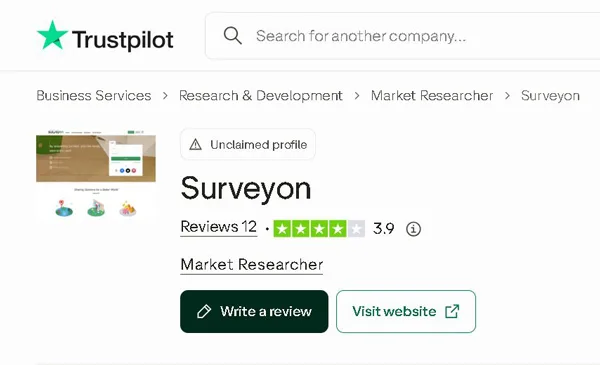
But that score is based on just 12 reviews. And 4 of them were posted in the past 12 months.
Here’s how the stars break down:
- 5 stars: 42%
- 4 stars: 25%
- 3 stars: 0%
- 2 stars: 8%
- 1 star: 25%
In short, 67% gave 4 or 5 stars and 33% gave 1 or 2.
Above Surveyon’s name, the page says “Unclaimed profile.” dataSpring Inc. hasn’t claimed the page and doesn’t reply to reviews there. It has never asked people to leave a review either, so the 12 reviews there were all left unprompted.
Twelve reviews are too few for me to go on by themselves. Especially when Google Play has 74,300.
And a low count is normal, because Surveyon is only available in 8 Asia-Pacific countries, where, unlike in Europe or the United States, people barely use Trustpilot. I wouldn’t take that as a bad sign.
What Trustpilot does tell you is that people actually get paid through PayPal. I’d only use it to confirm the site isn’t a scam. To get a sense of what it’s like day to day, you’ll learn more on Google Play, where it has 4.1 stars, and in the r/beermoneyph subreddit on Reddit.
I think the 3.9 rating matches my own experience with the site. PayPal payouts do arrive, with a $1 minimum, but every now and then you get disqualified halfway through a survey, and email support is slow to reply.
Who can use Surveyon?
You can only sign up for Surveyon if you live in one of the 8 Asia-Pacific countries it officially accepts and you’re over 15, which means 16 or older. Those countries are Hong Kong, Indonesia, Malaysia, the Philippines, Singapore, Taiwan, Thailand, and Vietnam.
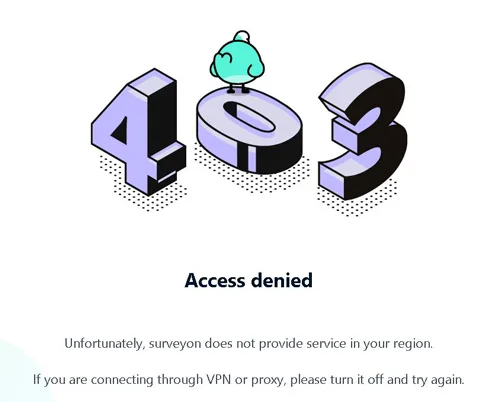
You can’t sign up from anywhere else, including the United States, Canada, the UK, Europe, Australia, Latin America, and Africa.
Some people in India say they’ve downloaded the Android app from Google Play and are using it, even though India isn’t on the site’s official list.
Apart from country and age, you also have to accept the “Terms of Use” and “Privacy Policy,” and you can only have one account. If you open two, you’ll get banned and your account will be closed permanently.
Signing up is free and takes around 2 minutes, either on the site or in the app. I like that it doesn’t ask for any ID.
You can create your account with an email and password, a phone number and password, or directly through Google, Facebook, or Apple ID.
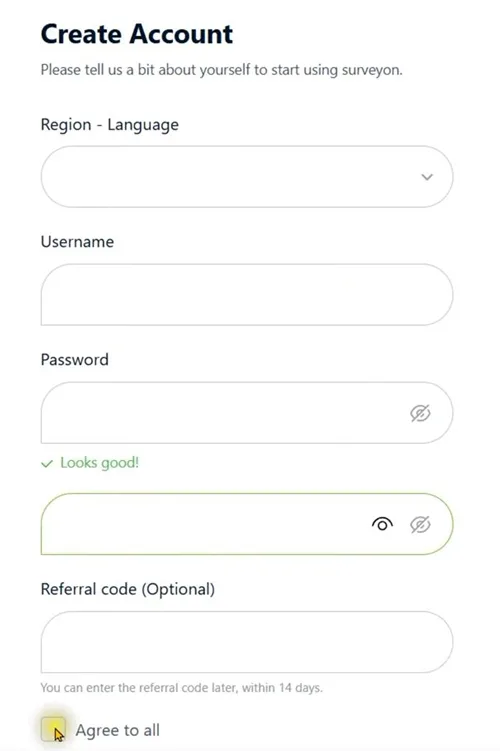
I’ve listed below what the 3 steps ask for. There are 6 required items and one optional:
- Region and language: required, for example Philippines – English
- Username: required
- Password, typed twice: required, and a green check mark shows up when it’s strong enough
- Email address: required, asked for at the email verification step
- Gender (Male or Female): required and final
- Date of birth (YYYY . MM . DD format), typed twice: required and final
- Invitation code: optional
Once you’re past that page, you can’t change your gender or date of birth, not even in the account settings. The welcome box warns you about this in bold.
I’d enter your real gender and date of birth and type the date carefully, because you’ll also need it to unlock your account if you ever take a long break.
To finish setting up your account, press SEND, enter the 6-digit code you get by email, and press VERIFY. Use the same email address as your PayPal account, and cashing out will be easier.
If a friend gives you an invitation code, you can enter it when you sign up or within 14 days of signing up. You’ll get 2,000P ($0.20) once you complete your first General Survey.
Can you use it on your phone?
You can do everything on Surveyon from your phone, because it’s built mobile-first. Use it at surveyon.com in your browser, or install the official app, which is free.
Search for “surveyon – Survey&Rewards” by dataSpring, Inc. You’ll find it on Google Play and the App Store.
On Android, it’s listed under com.d8aspring.surveyon. It has over 5 million downloads and a 4.1 rating from 74,300 reviews, and it was last updated on November 10, 2026.
On iPhone, you need iOS 15.0 or later, and the app takes up 59.6 or 59.7 MB of space on your phone. Version 4.33.0 came out on October 21, 2026. The rating varies by country, from 4.4 to 4.7. The lowest score is 4.4, based on 1,500 ratings.
There’s no app for Windows Phone, HarmonyOS, or Mac. The App Store listing says it’s iPhone-only and hasn’t been verified on macOS.
These ratings look good to me, especially since they come from tens of thousands of people. And you can tell they keep it up to date.
Only install the app from Google Play or the App Store, not from shady sites that offer APK files!
With the app, it’s easier to get to limited-spot surveys in time, because you get the alerts right away. The app also has Daily Check-In and Quickpolls.
I’d use the app every day and keep surveyon.com in my browser as a backup.
Is Surveyon LEGIT or SCAM?
I think Surveyon is a legitimate site, not a scam. It’s run by dataSpring Inc., a well-known Japanese market research company.
Opinions about it are very mixed, and I can see why.
You can get around the site easily because everything is clean and well organized. And for me, the payouts are the best part. You can cash out once you hit a very low threshold, through PayPal or e-wallets popular in the region, and payments come through reliably.
But a lot of people complain about getting kicked out of surveys right at the end, after they’ve answered almost everything. That’s the main downside. Some people also don’t get many surveys, depending on their profile.
Surveys also pay very few points.
I wouldn’t use it as my main survey site. I think it’s only worth it if you need another survey site, and only if you’re patient.
It’s best for anyone living in one of the Asian countries where it’s available who wants some extra money in their spare time. As with any traditional survey site, you’ll waste some time, so you need to be okay with that.
If you’ve already tried the site or have any questions, leave me a comment below. I’d love to hear what you thought of it!