

InboxDollars has been around for years, but that doesn’t guarantee that every activity on the site is worth your time.
And there are plenty of activities. You earn money by taking surveys, completing offers, playing games, shopping online, and a few other things (I’ll go through them one by one below, rather than listing them all here). It’s one of the major sites of this kind. It’s not the only one, because you can find this kind of opportunity on a lot of platforms. I think surveys and small paid tasks are among the best options if you want to make some extra money online, quickly and without spending a dime.
I’ve tested it for a few years and have thoroughly explored what it has to offer.
Real or Fake? Let’s find out together, step by step.
You want to know if this is a real way to make extra money. You also want to know if it’s worth your time or if it’s a site you’re better off staying away from.
I’ll show you what it offers and what to expect from it, so it’ll be easy for you to decide.
What is InboxDollars and how does it work?
2000 was the year entrepreneur Darren Cotter launched InboxDollars, a Get-Paid-To (GPT) website. That’s a long history for this category, and longevity is a good sign. It has since been acquired by Prodege, the company that also owns ySense, MyPoints, Swagbucks, and Poll Pay. But the portfolio alone wasn’t enough for me (a few well-known names don’t guarantee anything on their own). I went to the Better Business Bureau and checked out the company myself. Prodege, LLC has been BBB-accredited since 2010 and has an A- rating. It’s not the highest rating. But it’s not a rating you need to worry about either.
And why does this matter to us, the members? Because there’s now a trustworthy company behind it, with enough resources to continue developing the site. So I can tell you right now that InboxDollars is legit, and you really can make money on it.
But “legit” doesn’t necessarily mean it’s the right site for you, so below we’ll take a look at what it offers and how you can earn money on it, so you can see if it’s what you’re looking for.
Surveys for cash
Your InboxDollars account won’t start without a profile survey, asking for your age, where you live, and your shopping habits, so they can then match you with market research firms looking for a specific audience. I answered everything carefully, because the surveys you get depend on this profile. And I still didn’t qualify for all of them, because sometimes you get cut off right in the middle when something in your profile doesn’t perfectly match the audience required by the company paying for the survey.
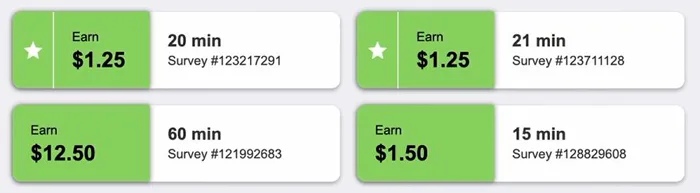
And then, instead of money, you often receive progress toward a Scratch & Win (meaning a chance at a reward later on, not the reward itself), which, after a few minutes of answering questions, isn’t much of a consolation.
How many surveys are there? Not that many, but I looked and found a few—enough to have some to choose from. And you need patience anyway, because by the time you find the ones you can actually finish, you’ll have gone through a few that don’t work out. At least you can see right away how long each one takes and how much it pays, so I always checked the duration before starting (it matters, 25 minutes isn’t the same as 3).
How much you realistically earn depends on which surveys you get and how much time you devote to the site, and the differences are significant:
- You earn between $0.25 and $5 per standard survey, which takes 3 to 25 minutes.
- You can earn $10 to $20, sometimes even more, on surveys targeted at a specific profession or very niche shopping habits. But for the average person, these are rare, so I wouldn’t count on them.
- You’ll make about $15 to $50 a month if you spend 15 to 20 minutes a day.
- You can earn $50 to over $100 a month if you also include cashback shopping, gaming offers, and referrals.
I enjoyed doing them, and I really do think they’re worth it. They’re worth it for the extra money. They’re also worth it because you get to share your opinion, and there really is someone there who wants to hear us. But if you want to make a decent amount, you have to combine them with the other ways to earn money on the site, because you won’t make enough from them alone.
Get-Paid-To Play Game offers
They say that a single game package can earn you anywhere from $1 to over $50.
And you can make good money, I’m not saying you can’t, but that money is only available at the end of levels that take a lot of time and effort to reach. The offers come from sponsored mobile apps that you download through InboxDollars, such as Monopoly Go, Candy Crush, or slot games, and with these, you aren’t paid for how long you play, but for reaching certain levels or stages within a fixed, fairly tight timeframe.
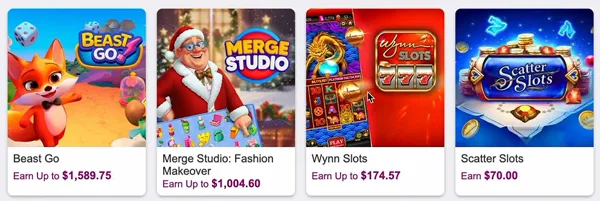
Level 2 in Ant Legion earned me one cent (yes, just one). I waited eight days for it to show up in my account. In Candy Crush Saga, I played for 15 minutes and ended up with zero, because the reward required reaching level 26 and was worth 10 cents. I didn’t even come close (and we all know how quickly 15 minutes fly by in Candy Crush).
So how many levels do you need to reach $50? And how much patience? A lot.
So be sure to read the terms and conditions for each game before you start playing, because that’s where you’ll find the required level and how much time you have.
There’s also a free version, and you have plenty of options on the platform, including card games, strategy games, sports games, and word games. You can play the app’s mini-games directly in your browser, such as Monkey Bubble Shooter, Mahjong Solitaire, Outspell, or Candy Jam. Here, you don’t earn money for each game. You play, a progress bar fills up, and at the end, you receive a digital scratch-off card, “Scratch & Win.” I played for five minutes and received a 2-cent card.
If you’re going to play anyway, I think this is the best option here, and it can actually be fun to earn a little extra cash. If you’re doing it just for the money, you’ll need patience and carefully selected offers.
To compare it with other GPT sites where you can find similar games, I’ve also written blog posts about Timebucks and FreeCash, so see which one suits you best.
Magic Receipts
You need to have the offer activated in your account before you upload the receipt. That’s how Magic Receipts from InboxDollars works, a “add first, then scan” system where you buy specific products from retail stores and earn rewards for them.
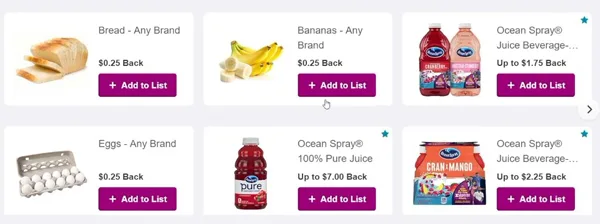
I activated the offers in the Magic Receipts section before heading to the store, because it doesn’t work the other way around.
What’s left on a receipt without any activated offers? One cent (yes, one cent, not a typo), which is what “Any Receipt” gives you for any receipt from a participating store, no matter what you bought.
Here’s the complete process:
- Select the products from the offers and add them to “My List.”
- Buy them from a participating store and keep your receipt, because without it, you won’t be able to scan anything.
- Take a photo and upload the receipt through the app or the website, as long as it’s no more than 14 days old.
- Check off which products from the list are on the receipt.
- Wait for InboxDollars to confirm and credit your reward.
The steps aren’t difficult. But the photo is what can confuse you.
I made sure it was crystal clear, with nothing moving and from top to bottom (the entire receipt, not just the product section), because otherwise they won’t accept it. A very long receipt won’t fit in a single photo, so I took several photos and stitched them together, all from the same shopping trip. I uploaded a single receipt at a time. Two different receipts shouldn’t be submitted together, no matter how short they are.
I made sure the photo included four things:
- the store’s name or logo
- the date printed on the receipt
- the total
- all the products and offers you’re claiming, including those at the bottom of the receipt, where the photo is most likely to be cut off
New offers appear every Thursday at 12:00 a.m. and expire the following Wednesday at 11:59 p.m.
You can only upload a receipt while the offer is still on the Magic Receipts page. It doesn’t matter if the receipt is brand new. It also doesn’t matter if the photo is perfect, because if the offer has expired, you won’t get anything for it.
How many receipts can you submit? A maximum of 10 per week for regular offers.
Premium offers have a different limit, specified in each offer (it varies from one to another). I found them by looking for the star in the upper-right corner on the offers page.
And the store matters, because receipts from non-participating stores aren’t accepted at all.
I don’t buy anything just for a coupon. Magic Receipts is only worth it when an offer comes up for something you were planning to buy anyway, and here I think the odds are good, because InboxDollars updates its offers frequently and there’s plenty to choose from among the items that end up in our cart anyway.
Refer your friends
Ten percent of your friend’s qualifying earnings go to you for life, as long as their account remains active.
This is in addition to the fixed $3 bonus for every person who signs up through your unique link. The condition is that the person must activate their account and earn at least $3 within the first 30 days (it counts what they earn, not what you earn). If they don’t reach that amount, you won’t get the $3.
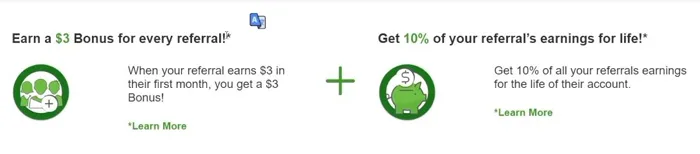
I read the referral terms and conditions from start to finish, because with this percentage, you’d expect more than what’s actually offered. InboxDollars calculates it based only on qualifying earnings and officially excludes the following:
- your friend’s sign-up bonus and new account credits
- bonuses for daily goals, WinIt codes, and profile surveys
- any referral bonuses, including those he earns when he refers other people (so you don’t see anything from what he refers)
- courtesy credits and bonus activities
- promotional multipliers, such as MyGiftCardsPlus bonuses
If your friend earns more from daily bonuses and WinIt codes than from other sources, your percentage will be lower, because those specific items don’t count.
How many people can you refer? How much money can you earn from the program? As much as you want, for both, because there’s no cap. I looked for one in the terms and conditions and couldn’t find it.
And your friend has a reason to join, too. I found a $5 welcome bonus for him once he opens and verifies his account (it says “usually,” so it’s not guaranteed for everyone). That money stays with him, so don’t count it toward your total.
I think many of us would think of our household members when it comes to invitations. InboxDollars allows only one account per person, per household, per mailing address, and per internet connection, i.e., per IP address. It won’t work with someone who lives with you. It also doesn’t work with anyone who uses your Wi-Fi, because their tracking system blocks the referral. The risk is greater than just a lost referral, as your account could be disqualified.
I’ve read the traffic rules just as carefully. Paid search ads, such as Google Ads, are prohibited. The same goes for any manipulative method of promoting your link.
But spam is a different story. If you send mass emails to people you don’t know, your account will be closed immediately.
I wouldn’t take that risk.
Shopping and Cash Back
InboxDollars gives you back between 1% and 40% of your money on online purchases, depending on the store. There are over 1,000 stores (Walmart, Macy’s, Target, Old Navy, Kohl’s, and others, so we’re not talking about obscure names). You shop through their link, the purchase must be eligible, and the amount appears as “Pending” within 30 minutes to 7 business days. But “Pending” doesn’t mean the money is yours yet, because the cashback approved by the store is usually finalized and credited to your account only 30 to 75 days after the purchase or shipment.
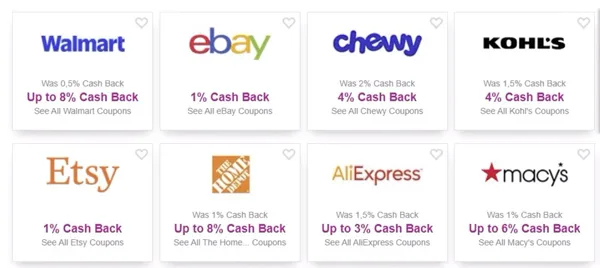
I looked at that number twice, and I think 75 days is a long time to wait for cashback.
What about printable coupons? It’s simpler. I found a bunch on InboxDollars, with discounts and cashback on purchases. You print them out, take them to the physical store, and get the discount there. You don’t make money from this, I’ll admit. Nor do you from online cashback. If you find the right deals, the money you get back is almost as good as a profit. If not, at least you bought what you were going to buy anyway (we all shop, it’s not a luxury).
So it’s worth checking out the offers there, because they give you money back on purchases you were going to make anyway.
How do you get paid?
You actually get your money, and the payments from InboxDollars are real.
You need to earn $15 before your first withdrawal. The threshold used to be $30, and I was honestly happy when I saw they’d lowered it, because reaching $30 used to take some patience. You don’t have to wait as long anymore. You don’t even have to wait until you reach $15 after you’ve received your first payment, because from there the threshold drops to $10 (a recent change made so that existing members get paid faster). I think it’s a major improvement.
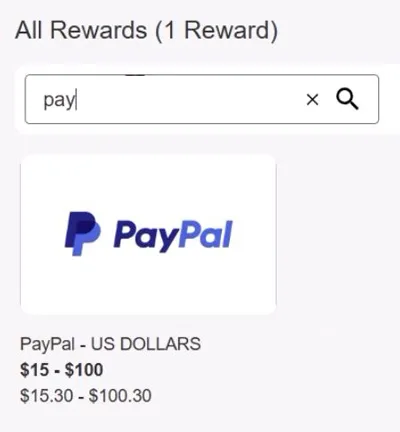
And how do you withdraw your money? You have three options. PayPal sends it directly to your digital wallet, but the first name, last name, and email address in your InboxDollars account must match exactly those in your verified PayPal account, which in turn must be linked to a bank account. The prepaid Visa card comes in either a virtual or physical form. There’s also the InboxDollars e-card, a gift card for major retailers, and when I cashed out, I had a choice of over 200 stores (no, I didn’t count them, it said so right there). But if you’re not interested in PayPal, both the Visa card and the gift cards still give you your rewards in cash.
PayPal is my go-to option for GPT apps because it’s the most convenient, so I was happy when it became available here too (not too long ago).
How long do you have to wait after requesting payment? Up to 10 days via PayPal and between 3 and 5 business days for gift cards.
The most common complaint about InboxDollars was the $30 threshold, which was hard to reach without a lot of patience. But the site offers so many ways to earn money that you can almost always find something to do. It seems they’ve listened, because the threshold was lowered to $15 and then to $10, and I like seeing a platform take our feedback into account and make concrete changes.
How much money can you make?
Fifty to one hundred dollars a month (on average, not guaranteed) is about what you can earn if you spend about an hour a day on InboxDollars.
There’s no guaranteed hourly pay, nor is there even a fixed rate per task. Each task is paid differently, so you have to calculate the earnings for each one individually.
I’ve tried all the ways to earn money, and the amounts look something like this:
- Between 25 cents and $5 for a completed paid survey.
- About 50 cents per qualification survey.
- Between 5 and 25 cents per Scratch & Win card, which you earn through searches performed on the platform.
- A fixed $3 bonus for each person you refer, but you only receive it after they activate their account and earn at least $3 on their own.
- 10 percent for life of everything the person you refer earns. I think the percentage is worth more than the bonus, because you get the bonus just once, while the percentage keeps coming in as long as they’re working.
But with surveys, it’s clear that you don’t know in advance how much you’ll earn. It depends on your demographic profile. It depends on the group the client who commissioned the survey is looking for (two people can end up with different amounts, even though they did the same work).
The $100 prize from Scratch & Win does exist, but only on paper, as the maximum amount. Did I take it seriously? Not at all. Independent tests consistently yielded about 15 cents even on the highest-tier cards, and that’s about what I got every time I scratched one. Doing the math, $100 versus 15 cents means over six hundred times more than what you actually get.
One hour a day for $50 to $100 a month.
Is that a little? As a salary, yes, but as a side gig, not really, since it only takes an hour.
And I think that’s fair for people like us who are just looking for some pocket money. It doesn’t replace a part-time job, let alone a full-time one.
How do you ask for help?
If your issue is related to payment, the chat won’t resolve it. They’ll forward it to the accounting department, and you’ll get a response within 24 hours, generally (they say “generally,” not “always”).
All other issues are handled through LiveChat, which is available 24/7.
I’ve used it on both my computer and my phone, and it works the same on both. If you message at midnight, someone will reply. If you message during your lunch break from your phone, same thing. I think this is one of the best things about InboxDollars, because you don’t have to wait for an office to open.
But before you reach out, it’s worth taking a look at the help section on the website, because a lot of common questions are already answered there. It saves you time, and it saves them time, too. That’s where I started, too.
You can tell they’re doing their best to help you with any issue on the site.
However, you can also lose access to support. What do they consider abuse? Inappropriate language, harassing support agents, or having multiple support windows open at once. I wouldn’t have guessed that last one.
So, if you end up writing to them, keep your tone civil and have only one window open.
InboxDollars Trustpilot
It has a 4.5 out of 5 rating on the App Store, based on 224,000 reviews, and a 4.2 rating on Google Play.
But on Trustpilot, I found something completely different.
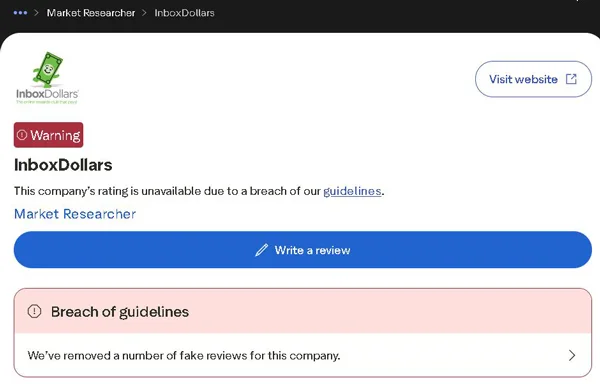
The profile has 47,583 reviews and no rating (the reviews are still there, but the rating is no longer displayed). In place of the rating, Trustpilot has posted a consumer warning stating that the rating is unavailable due to a violation of the rules and that fake reviews have been deleted. What does this mean? It means there were fake reviews, so someone tried at some point to inflate the rating. To me, this seems more serious than any complaint, because once you find out about an inflated rating, you start looking at the rest with a different eye.
And that’s when I started reading the ratings in the app stores differently. I didn’t dismiss them, I just didn’t take them at face value anymore.
I read the positive reviews, and they all praise pretty much the same things, the money you receive directly (without points you have to convert) and the easy tasks, ranging from reading emails to simple games. Payments via PayPal or gift cards actually arrive once they’re processed, and that’s why people trust that the platform is legitimate. The money is real, it’s just not much.
Reviews on Trustpilot and complaints filed with the BBB tell a different story:
- Higher balances, flagged during withdrawal. Small amounts go through without any issues.
- Surveys, with frequent disqualifications. This is where I found the most complaints, with people wasting time on the questions and ending up with nothing.
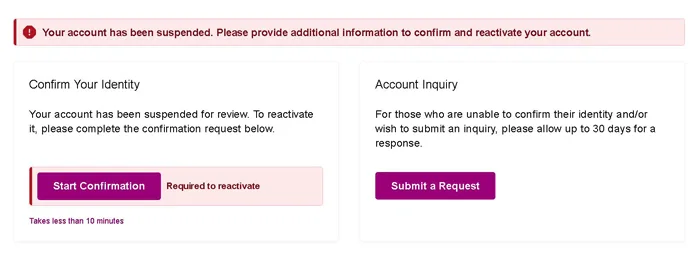
- Accounts suddenly suspended, a complaint that comes up very often.
- The mobile app, which doesn’t track tasks correctly.
- Customer support, which doesn’t respond.
And why such a big difference between the reviews? Because different people are writing them. Satisfied users sign up easily and cash out small amounts early on. The frustrated ones work hard and want to earn as much as possible. The longer you stay in surveys, the more disqualifications you’ll encounter, and the more you accumulate, the closer you get to the balances that get flagged.
I’d cash out often.
This view is based on 47,583 reviews on Trustpilot, 2,712 complaints with the BBB, and 224,000 ratings on the App Store. That’s a lot, but we’re only seeing the people who left a review or a complaint, not all users.
Red Flags you should never ignore
2016. That’s the year of the privacy policy I found in the InboxDollars Help Center.
When it comes to GDPR and CCPA, today’s data protection laws, a policy that old is a major compliance gap. But that’s not the only problem (nor the most serious one, if you ask me).
I found the other four red flags on Trustpilot, the BBB, and also in the Help Center:
Accounts closed without any explanation right before the payment deadline. This is an allegation, not something officially confirmed, but I believe it, because the reports come from multiple independent sources, including the BBB and Trustpilot.
Identity verification via Persona when resetting a password or making a payment.
Fake reviews flagged by Trustpilot, which is why the rating is hidden and a consumer warning appears on the page.
Co-registration, through which your data can end up on other companies’ marketing lists without you realizing it, just because you filled out an offer.
Why did I list them in this order? Because the first two hit you right in the wallet. If they close your account just before you reach the threshold, you’ve worked for nothing. If they ask for your ID to reset your password, you’re giving up sensitive data for a service that, according to users on Trustpilot, isn’t worth it.
And I checked the Help Center to see if verification via Persona is optional. It’s not.
I wouldn’t risk my data here.
Who can use InboxDollars?
InboxDollars does not allow duplicate accounts, and it enforces this rule more strictly than any other from the moment of sign-up.
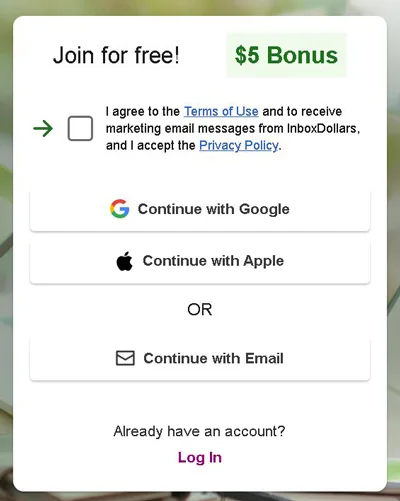
The one-account limit applies across four levels at once:
- The person, with one account and that’s it.
- The household, so if someone in your home already has an account, there’s no room for you (I’m talking about the physical residence itself, not who’s related to whom).
- The mailing address.
- The IP address, computer, or phone you use to log in.
Do you share a laptop with someone who already has an account? Then a second account won’t work on that device. It doesn’t matter that they’re two different people. It also doesn’t matter that each has their own email address, because the limit here is based on the device, not the person.
And don’t try to hide your country with a VPN. It detects it and blocks you, and I wouldn’t risk an account on that.
Registration is open only to those who currently live in the United States and are at least 18 years old (or the age of majority in their state, if it’s different there). The name pretty much says it all. There was a time when it accepted people from other countries as well. But it doesn’t anymore, and in addition to your country and age, you must be a real person, because companies, commercial entities, and automated bots are blocked from signing up, and you must have a personal email address, just one, that’s verified and working.
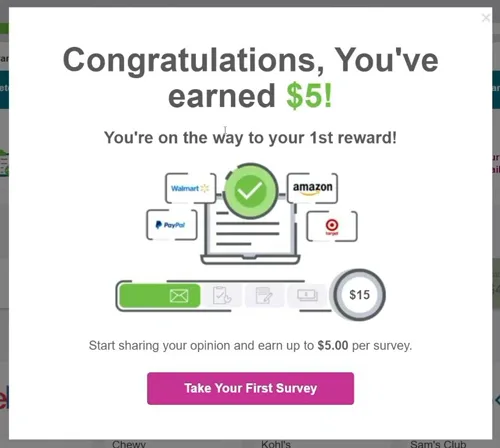
I received five dollars upon signing up, after I completed the form and verified my profile.
I saw the amount in my balance right away.
Can you withdraw it immediately? No, because it’s locked until you reach the first withdrawal threshold. I think it’s fairer to view it as a head start toward that threshold rather than as cash in hand.
The demographic profile questionnaire comes right after activation. I finished it in about 2 minutes, and it’s good that it comes right away, because it determines what you’ll be matched with later.
Can you use it on your phone?
You need a cell phone number from a major carrier, such as Verizon or T-Mobile, if you want to use InboxDollars on your phone without any restrictions.
Some mobile features and the highest-paying offers remain unavailable until you verify your number via text message.
I checked the terms and conditions to see which numbers aren’t accepted, and the list isn’t short. They don’t accept VOIP numbers, Wi-Fi lines, Google Voice, Skype, or one-time-use numbers. But that didn’t bother me, because this verification is exactly what unlocks the high-paying offers. (And I think it’s only natural that they want a real person behind the account, not a number grabbed off the internet and discarded afterward.)
The rest is simple. You can use the official app for iOS and Android or access the site directly from your phone’s browser.
I tried both the app and the website, and found surveys, offers, paid searches, and the other features that let you earn money on both. Does it work on an older phone? The Android app requires version 4.0 or newer, so yes, many older phones are compatible.
And if you’re not always at your computer, it’s good to know that you can earn money from your phone, no matter where you are.
Is InboxDollars Real or Fake?
You actually get the money.
InboxDollars is a real and legitimate platform that has been operating for a long time under Prodege, LLC and processes real payments, so it’s not a scam. I started testing it a few years ago, and since then it has gone through several updates that have made it better. I think they’ve listened to feedback, because now you reach the payout threshold much faster than before.
But that doesn’t mean it runs like clockwork. The experience varies wildly from one session to the next. I’ve been disqualified from surveys left and right, and I’ve completed tasks from start to finish that the bug-ridden tracking system failed to record at all. What I find even more troubling are the account suspensions handed out so freely just when a user is nearing the withdrawal threshold (which is exactly when he’s worked the hardest).
What’s good about it? A simple system with cash rewards and high ratings in app stores. What’s bad about it? Transparency. I looked for the privacy policy and found one from 2016 (I didn’t misread that), plus a warning on Trustpilot about fake reviews.
For people like us who want to earn a few dollars in our spare time, it works, but if you need a steady side income or are very concerned about your personal data, I wouldn’t consider it.
It won’t make you rich. It won’t provide you with a full-time income, so if that’s what you’re looking for, this isn’t the right site for you. With the right expectations, however, InboxDollars works and pays you.
If you’ve used InboxDollars or have any questions, leave me a comment below, because I’d love to see more reviews here, and I’ll reply as soon as I can.