

All you need is the phone in your hand, and that’s about it.
Finding websites that pay isn’t hard: there are thousands of them. The hard part is finding one that pays well and fits your schedule, instead of you having to fit around it. Everyone talks about the same big platforms, and rightly so, because some of them really are good. But the smaller ones are almost always overlooked, as if they didn’t even exist. I’ve checked those out too, because that’s where I’ve always found something nobody else was talking about.
That’s how this list of 7 apps that pay real money came together.
If you have back-to-back classes, they’re a good fit. If you run a small business and are looking for extra income on the side, they’re a good fit. And if you just want to build up your savings a bit, they’re still a good fit.
What do you do on them? Surveys that pay out in a few minutes, plus more creative tasks where you turn a skill you already have into money. You don’t have to leave home for any of them.
I’ll go through them one by one (not all of them are equally generous, as you’ll see).
BONUS: Earn money on your phone with Earnopolis
You create an account and your starting balance is credited immediately, for free. Nothing to pay. Nothing to wait for.
Earnopolis is a GPT site, which means you earn rewards by doing small tasks on your phone or computer.
You can filter offers by device: Android, iPhone, iPad, or desktop. I set the filter before I start anything. It might seem like a minor detail, but it’s not. On plenty of sites in this category, offers that don’t even work on the phone in your pocket get shoved in your face, and you end up scrolling through them for nothing.
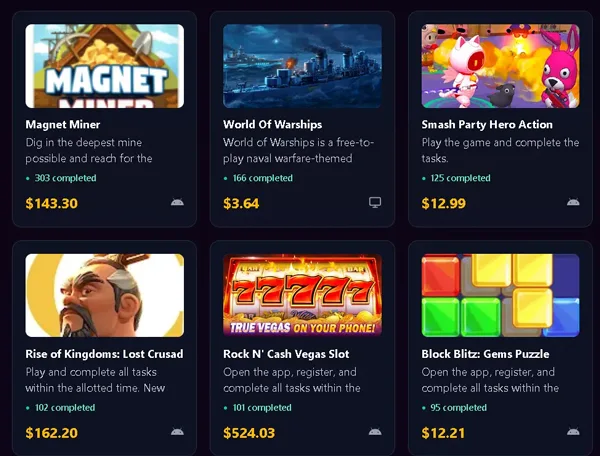
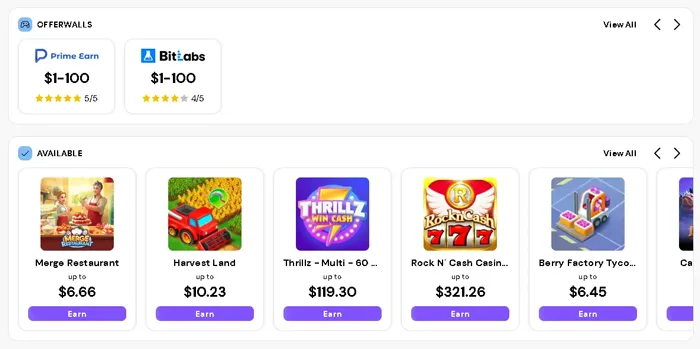
I counted six types of tasks, and they’re all different: some take a single click, while others keep you playing until you reach the required level in the game. Mobile game offers, app downloads, videos, offer wall promotions, and microtasks. Some game offers also require in-app purchases (those pay the best), but in my experience, not all of them are worth the money.
A task you have to spend money to complete isn’t really free anymore.
Surveys work a little differently. You click on one and get a set of screening questions, because the provider wants to see if you’re the right fit for their study. If you qualify, you move on to the actual questions. If you don’t, you try the next one on the list.
And how many clicks does it take to earn your first dollar? It depends a lot on what you come across.
I opened the list of withdrawal methods, and there are plenty of them, but only one has its threshold listed:
- PayPal, starting at one dollar. It’s the lowest threshold I’ve found here, so that’s the one I’d go with.
- Virtual Visa.
- USDC, via Coinbase.
- Amazon, Airbnb, and Apple gift cards, plus over 150 other options (the number available depends on your country).
A dollar is a low threshold, and it really does matter, because otherwise you just keep collecting and collecting without seeing anything in your account. And 150 gift cards? It sounds like a lot until you hit the country filter. But you don’t find out how many are left for your country until you go to cash out.
You won’t make a full-time income here, that much is obvious.
As a modern platform for earning extra money, it looks promising so far.
7 apps that pay you real money for free
The names on this list don’t show up in the rankings you see everywhere. They aren’t the options everyone already knows, and I didn’t mean for them to be. I picked them because they have a verified payment history, a flexible schedule you can adjust to your needs, and realistic earnings, not numbers inflated to make the headline look good. I ranked these apps that pay you real money by how much you can earn with them and how easy they are to use. Legit, as they say (everyone uses that word on their site these days).
How do you make money? None of them requires special skills, so you don’t have to spend time learning anything before you earn your first dollar. The money comes in quickly, and I think that’s what counts when you need it now rather than when you’re building something long-term.
Download them to your phone and see which ones work for you.
Timebucks
You create a free account, log in, and right from the first screen, the ways to earn money jump out at you. The dashboard is clear, with your tasks and the amount you’ve earned laid out in front of you, so you don’t have to dig through menus to see where you stand.
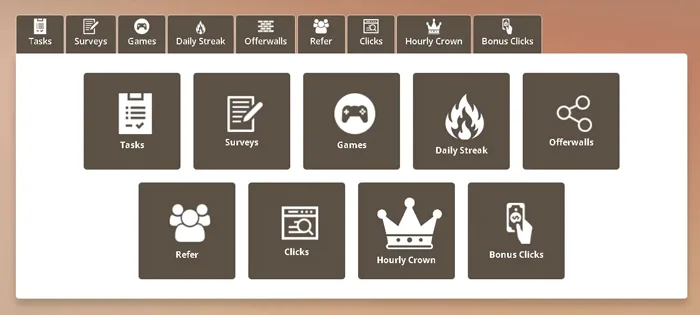
The tasks on Timebucks are simple. You watch videos, take surveys, click on ads, play games, or post on social media, and each task you complete pays you in dollars, not points.
I read the payment terms before I started on any tasks. Payments go out automatically, Monday through Friday, and the minimum payout is $3. If you reach that amount before the daily cutoff, the money is sent to the payment method you chose. Three dollars. You get there quickly, so your earnings don’t sit stuck in your account because you haven’t reached the minimum.
If you want to let more build up before you withdraw, what do you do? You put your payouts on hold and keep earning.
Their payment methods have changed many times, and right now I count eight: Litecoin, Solana, AirTM, Wise, PayPal, Visa, Skrill, and Revolut (so you get crypto, e-wallets, and cards). Not all of them work in every country. So check which options are available in your account before you count on any of them.
I liked that you can see from the start what you need to do and how much you’ve earned so far.
Pawns
Click “Your Balance” in the dashboard, select your country and payment method, fill out the form, and click “Request payout.” Four steps, that’s about it.
But that button won’t do anything until your balance reaches $5.
I looked for a payment method with a lower minimum, but I couldn’t find one.
What varies from one method to another is the processing time, and there are five options:
- ACH: 2 to 4 business days.
- Bitcoin: 24 to 72 hours.
- PayPal: 24 to 48 hours. The app also says the money can arrive within a few minutes, and that does happen, but I wouldn’t count on it.
- Venmo: Same day.
- Gift cards: Instant.
And why would the difference matter when it’s only $5? Because waiting four business days for such a small amount makes you completely forget you even asked for it, and by the time it arrives, it doesn’t feel like anything. Gift cards are the only option that doesn’t keep you waiting at all.
The money comes from surveys, from leaving your internet connection on, from testing apps, and from playing games. Like most apps that pay real money, it adds up slowly, because each task pays only a little.
You can install the Pawns app on Windows, macOS, Linux, iOS, and Android, and you can even run it in Docker (setting up Docker for an app that pays pocket change seems at least a little odd to me). The list of countries goes far beyond the United States, so we’re on it too.
On Trustpilot, it has 8,602 reviews and an average rating of 4.3 out of 5, which on their scale counts as “Excellent.” A 4.3 rating alone didn’t convince me. But a 4.3 rating from 8,602 reviews, 1,447 of them posted in the last 12 months (that’s nearly one in six), did. I also looked at how the company handles complaints, just to be sure. It responds to 96% of negative reviews, usually within 48 hours.
That doesn’t mean it actually resolves them, but it does mean you get a reply.
On Google Play, the rating is lower, at 3.9 stars. What people praise most often is the clean interface, the internet sharing that runs smoothly in the background, and the fast withdrawals via PayPal or crypto.
FireFaucet
FireFaucet doesn’t offer PayPal, and you can’t withdraw regular money in any form. Payments are made only in crypto, either to your wallet or through FaucetPay. The lowest threshold I found was $2.50 (the lowest, not the only one), since each coin has its own minimum.
Is that high or low? For a faucet, $2.50 is a low threshold.
You can withdraw in Bitcoin, Litecoin, Ethereum, Binance Coin, USDT, Cardano, XRP, Tron, Monero, Dogecoin, or Zcash.
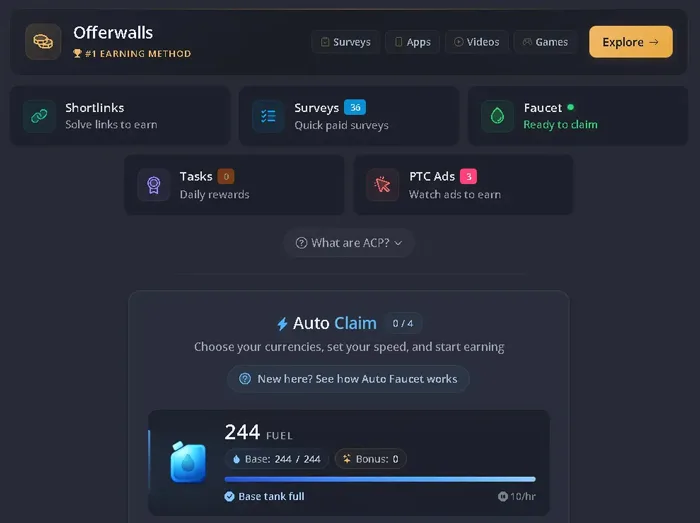
The site says you earn free crypto by completing simple tasks or by letting the auto-claim run on its own in the background. I turned it on and didn’t do anything else with it. It works on the GPT model, meaning advertisers pay for user actions, and part of that money goes back to users as ACP, or Auto Claim Points. Each task gives you XP as well as ACP, and XP levels you up. And as you level up, your claim rate increases, so the same amount of ACP gets you more crypto per cycle. That’s why it’s important to get up to speed right from the start. That head start pays off in everything that comes after.
There are also happy hours, with a 50% bonus on every claim, but they don’t last long, so I think it’s worth planning your sessions around them.
There are 255 reviews on Trustpilot, and I’ve read the ones from long-time users. People say their withdrawals went through without a problem. They praise how long the site has lasted: it has been running since 2018 and has an active user base, in a space where projects often shut down after just a few months. They praise the auto-claim, which does the work for them so they don’t have to keep an eye on it, and the fact that small amounts of crypto don’t require KYC. They also like that they can earn several coins at once without having to click all the time, and I agree with them on that.
Cointiply
Free cryptocurrency: that’s what Cointiply promises. Small amounts of Bitcoin, Dogecoin, Litecoin, and Dash, without having to spend any money (that’s their promise, not my conclusion).
I tried the Bitcoin faucet: one click a day gets you some coins, however many it gives you, since the amount is random.
The rest of the coins come from CAPTCHAs, online games, signing up for services, surveys, videos, new products, and free apps you install. In other words, from almost anything you can do in a browser. They call this “the things you love online.” I solved a few CAPTCHAs. I don’t love them. (Surveys, well, those are okay.) I opened the games too, for the coins, not for fun.
How do you create an account? Six steps, in this order:
- Go to the website and click “Sign Up.”
- Enter your name, email address, and password.
- Check the box to accept the terms and conditions.
- Check your email and confirm your address, or your account will stay unverified.
- Complete your profile.
- You’ll receive survey invitations.
Signing up is quick because all it asks for is a valid email address and a completed profile.
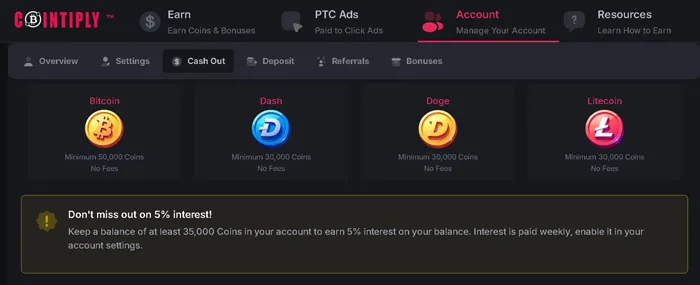
You need 30,000 coins to request a payout. You also need a crypto wallet, because crypto is the only way they pay. The threshold is the same for Bitcoin, Dogecoin, Dash, and Litecoin, and for the last three the site also shows the cash equivalent: $3.
And I think $3 is too little for something you earn one click at a time.
The only choice you get is which cryptocurrency, since they don’t offer anything else. But once you request a payout, it’s processed within 24 to 72 hours.
Honeygain
According to their website, they have over 12 million users and have processed one million payments. These are their own numbers (not from an independent audit), so I’m reporting them as stated. The app launched in May 2019 and is operated by Swarmbyte Inc., a company registered in Albany, New York. Honeygain runs a crowdsourced network, meaning it collects bandwidth from people and uses it for web intelligence, content delivery, and market research.
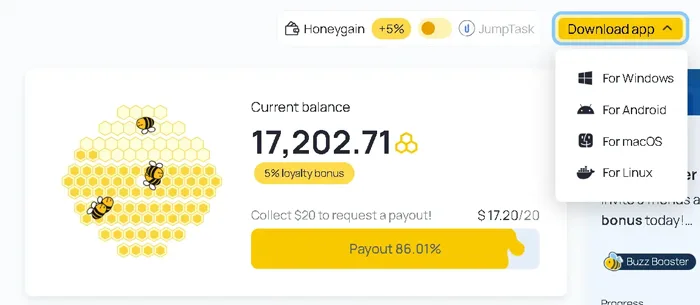
What you give in exchange is internet bandwidth that would sit unused anyway.
Getting started isn’t hard. There are four steps, and only the first one requires you to do anything:
- You create an account and install the app on your devices, whether they run Windows, macOS, Linux, or Android.
- You leave it running, and it works in the background without asking anything of you.
- You earn credits for every 10 MB of traffic you share.
- Once you reach $20, you request a payout through PayPal or in crypto, as JumpToken. This threshold is also the sticking point, because 10 MB at a time adds up slowly, and I think this is where most people give up, not at installation.
The sign-up bonus isn’t one of the steps, but it’s there. With a referral code, your account starts with $3 to $5 (the exact amount depends on the country you live in), which is already up to a quarter of the threshold.
The money arrives through PayPal, but not directly from Honeygain. The payout goes through Tipalti, a California-based payments company that tracks your earnings and handles the payment admin. You submit your request in the app or on the website, whichever is more convenient for you.
Is it worth waiting until your balance reaches $20? It depends on how much unused internet bandwidth you have at home. My list of passive income apps also includes Grass, Proxyrack, EarnApp, and ByteLixir, and I’ve written about each one separately.
Attapoll
You create an account and fill out a short profile, including your age, gender, occupation, and interests.
It’s not just a formality. I filled out the whole profile because that information is used to pick the surveys you get. Without it, the app has nothing to go on.
AttaPoll is free and works on both iPhone and Android. You share your thoughts on products, ads, and your lifestyle, and it’s one of those apps that pay you real money for your opinions, not points you have to convert into something else later. Most surveys take 1 to 5 minutes. They pay between 10 cents and $1 each, sometimes more.
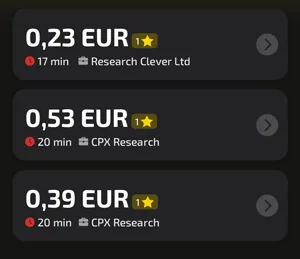
I’ve been keeping an eye on each survey’s star rating, the 1 to 5 stars shown next to the estimated time and the payout (for me, that’s the most useful detail on the screen). You’re more likely to qualify for the ones with more stars.
How much do you need to earn before you can withdraw? $3 via PayPal, $2.50 via Revolut.
I checked the withdrawal thresholds before taking any surveys.
Payments to PayPal and Revolut arrive almost instantly, while gift cards and bank transfers take 1 to 2 business days. None of the methods charge a fee, so the amount you see is the amount you get.
Twenty-five 10-cent surveys, or three $1 surveys, and you’ve reached the Revolut threshold.
HeyCash
Without a verified PayPal account, you won’t see the money. If your email address isn’t the same on HeyCash and PayPal, the payment won’t go through smoothly.
Most of the time, the money arrives within 1 to 3 business days, but your first withdrawal might go through a verification check, so it can take a bit longer.
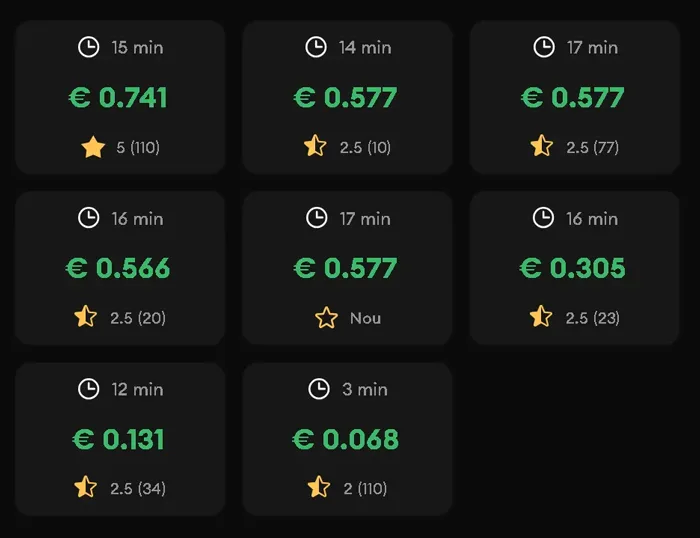
The minimum cash-out is 5,000 points. One thousand points equals one dollar, so that works out to five dollars. That seems like a low threshold for an app built around small tasks. You can cash out through PayPal or redeem the points for gift cards, with over 65 to choose from.
And who runs this GPT-style platform? Prime Insights Group, an American market research company. HeyCash itself launched in 2024, also in the U.S.
I found 8,266 reviews on Trustpilot and an overall score of 3.8 out of 5, and 3,181 of those reviews were posted in the last 12 months. So we’re not talking about a score left over from launch (I checked the dates because an old 3.8 and a recent one don’t mean the same thing).
They don’t ignore you if you leave a bad review. They do reply to negative ones. It’s just that the replies seem templated or written by AI. I read a few of them, and they all point you to the same thing: emailing support.
An easy-to-use interface, plenty of casual games, and small payouts that come fast: that’s the praise you see over and over.
You can install it from Google Play or the App Store, or go straight to HeyCash.com, then sign up with your email, Google account, Apple ID, or Facebook. Sometimes it also asks you to confirm your email. That takes a little while. You earn points from surveys, offers, and games, and with games you get paid for reaching certain levels (not just for opening the game).
So use the same email address everywhere from the start, and your first withdrawal won’t get held up in verification.
Final Thoughts
All you need is a phone, a few free minutes, and the couch you’re already sitting on. That’s it. The rest is up to you. Download two or three of the seven apps listed above, try them one at a time, and stick with the ones that fit your daily routine. I tested all of them myself before putting them in this article, but what works for me won’t necessarily work for you.
If an app bores you, drop it after a few tasks and don’t spend any more time on it. Apps that pay you real money have a company behind them that you can actually look up, so if you can’t find out who runs one, skip it, because it might not pay at all. We won’t get rich from any of them (it’s extra money, not a main income). And the money only adds up if you log in often, because a single session doesn’t bring in much. Consistency is what counts here.
Is it worth it? I think so, as long as you don’t expect more from them than they offer.
Open them one at a time instead of scrolling through social media, and keep the ones you don’t feel like deleting.