

Aticlix promises that you can make money online without investing anything, with just a few clicks. I came across it recently, and what I wanted to find out most was whether it’s a legit site that’s worth your time or a scam. I also wanted to know what it is and whether it works.
So far, I’ve tested hundreds of GPT and PTC sites, the ones that pay you for what you do on them or for clicks. I tested Aticlix thoroughly and compared it to those sites.
There are a lot of ways to earn money online. You can sell your skills or products, get paid for what you post, or do paid tasks online. And more people than ever are looking for them. Aticlix is one of those ways, and below I’ll show you everything you’ll find on it, the way I saw it from the inside, so you can decide if this is the path you want to take.
What is Aticlix and how does it work?
Aticlix is a site that pays you for two kinds of things. First, you watch ads for a few seconds and get fractions of a cent for it. That’s the PTC (Paid-to-Click) part. Second, you do paid online tasks from companies the site partners with, like online surveys or testing apps on your phone, and you get small rewards for them. That’s the GPT (Get-Paid-To) part.
My info on Aticlix comes from the site itself. It launched on April 20, 2020, it goes by the name Aticlix or ATiCLiX, and it says it’s part of a network it calls ATiGROUP. For contact info, it lists the email [email protected] and the city of Rome, Italy.
You can actually earn money on Aticlix, so it’s a legit site. But the fact that it pays doesn’t yet tell you whether it’s worth the time you put into it.
You can only tell how good it is from how it works, meaning the ways you can earn on it. I’ll go through them one by one below.
Surveys and Offerwalls
In my account, the Offerwalls / Surveys section has six tabs, and behind each one is a partner from outside AtiClix. AtiClix doesn’t put its own online surveys here. On these tabs, you earn cents for completing a survey, testing a phone game, or signing up for an app.
You’ll find the tabs under Earn Money, in Offerwalls / Surveys. AtiClix opens them in a window on the site, lined up across the top. Each tab loads an ad company’s list of paid online tasks, and that list is called an offerwall.
I took the options and numbers below from my own account, and they’re the ones for my country. Yours will probably look different. How many surveys show up depends only on your country and the partners, and there’s no fixed daily limit. If you find differences from what I have, tell me in the comments.
In my account, the six tabs are:
- CPX Research (shows up as Cpxresearch): paid surveys only
- Timewall: surveys, small tasks (subscribing or registering on websites), phone games
- Lootably: surveys, app installs, phone games
- Gemiad (or GemiWall): surveys, apps, games, clicks
- Revtoo: surveys and app offers, filtered by Android, iOS, or Desktop
- Sparkwall: games and website sign-ups
Bitcotasks, the ad partner (“Ads Partner”) on the front page, is separate from these tabs. I’ll tell you about it in its own section below.
For surveys, if you’re 18, stick to just two of the tabs: CPX Research and Timewall. In my account, the first one shows 10 surveys at once on a page, and the second shows 15 on its main grid.
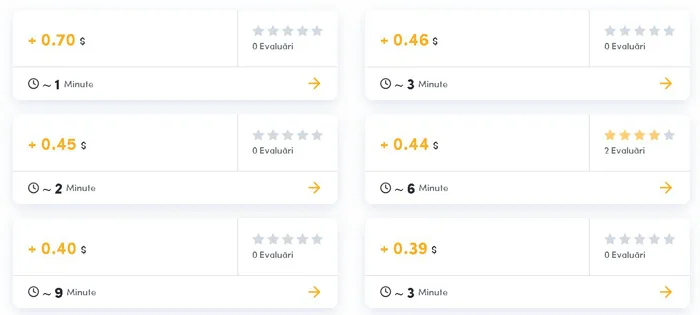
On Timewall, I came across a big orange banner that says “Complete Your Profile”: if you fill out your profile, you get access to the well-paying surveys. The partners ask you for this basic info (your age, gender, zip code, and occupation) before the regular surveys. And even with your profile done, every survey on CPX Research and Timewall starts with questions that check whether you match what the paying company is looking for. Your answers can get you screened out of the survey, and then you get nothing.
Most of the surveys I saw pay between 12.7 and 54.95 cents ($0.127–$0.5495) for 3–13 minutes. On CPX Research, most are between $0.27 and $0.46 for 1–9 minutes. The lowest I saw were on Timewall: 2.95 cents ($0.0295) for 1 minute and 5.55 cents ($0.0555) for 3 minutes. The highest was also on Timewall: 87.5 cents ($0.875) for 15 minutes. Next come two on CPX Research: 75 cents ($0.75) for 15 minutes and $0.70 for 1 minute. Out of all of these, look for the short ones, under 6 minutes, that pay $0.30–$0.70.
The big numbers on Lootably and Sparkwall, like +147K or 138,720.80 on the app and game offers, aren’t dollars. They’re each site’s points, on its own scale, and these offers usually require spending real money or weeks of playing. So on those two, skip the complicated casino offers and the ones that need a deposit.
Once the partner lets AtiClix know you’ve finished the survey or the app task, what you earn goes into your main balance, which starts at $0.000000. My most important advice is not to let your AtiClix balance grow much. Withdraw your money to FaucetPay or in crypto as soon as you reach the minimum, because AtiClix deleted users’ accounts once, at the end of 2025, and its forum has complaints about pending payments that haven’t been resolved.
Earn money with micro tasks online
Under Micro Tasks, Aticlix pays you to promote Aticlix itself or write reviews about it on social media and review sites. You get between 2 and 15 cents per task. Aticlix shows this section with a “NEW” label and presents it as simple paid online tasks on social media.
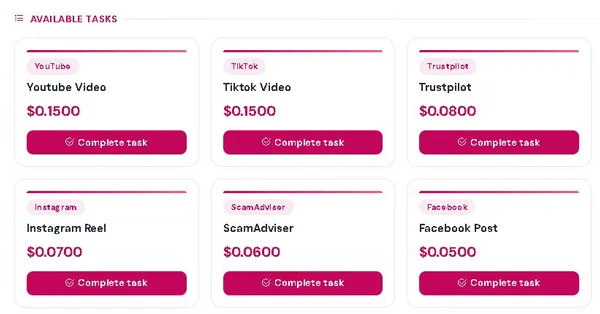
My account had 12 tasks, each one on a different platform. The two video tasks pay the most. They’re on YouTube and TikTok, where you make or post a clip. The rest pay less, with most between 5 and 8 cents. Here are all the amounts, from highest to lowest:
- Youtube Video: $0.15
- Tiktok Video: $0.15
- Trustpilot: $0.08
- BlackHatWorld: $0.08
- Instagram Reel: $0.07
- ScamAdviser: $0.06
- Facebook Post: $0.05
- Reddit: $0.05
- Quora: $0.05
- Pinterest: $0.05
- Twitter/X: $0.04
- Telegram: $0.02
You pick a card, and its link takes you off Aticlix to the platform the task is named after. You do what the task asks there, then upload a screenshot to Aticlix as proof. Nothing shows up in your balance until an admin manually checks the screenshot and approves it.
You get one submission per task, and you can redo a task that gets rejected. There’s a strict limit, and it’s written in the task box: after 5 rejections, you get blocked. So read each task’s requirements carefully to avoid reaching those 5 rejections.
The whole list is worth $0.85, and that’s only if every task gets approved. If you still want to try it, start with the easy tasks that take little work, like Telegram and Twitter/X, and do them from a secondary social media account. Then check whether the admin adds the money to your balance.
View ads and earn money
During my test, my account had 14 main ads. Altogether, they pay you $0.0145, not even a cent and a half, and they ask you to wait 185 seconds, which is just over 3 minutes.
This part of Aticlix is called Paid-to-Click. It’s a way to make money online without investing anything. For each ad, you open a site, stay on it for 5 to 30 seconds, and get between $0.0005 (half of a tenth of a cent) and $0.002 (two tenths of a cent).
The 14 ads are split into three tiers, and the time and pay depend on the tier. Here’s what they looked like in my account:
- Tiny Ads: 7 ads, $0.0005 each, 5 seconds
- Fixed Ads: 3 ads, $0.001 each, 10 seconds
- Standard Ads: 4 ads, $0.002 each, 30 seconds
To get to them, you go to Earn Money and choose View Advertisement. The DIRECT label on each card means the money goes to your main balance. To earn it, you click EARN, open the page, and wait until the timer runs out.
If you want more than the 14, or you’ve already finished them, there are also over 100 partner ads at $0.0005 each. A hundred of them add up to $0.05. You unlock them from the “Watched all the ads? Earn even more!” banner at the bottom of the page by clicking CLICK HERE. A flower captcha pops up, “Please solve captcha to surf PTC Ads,” and you solve it by clicking the icon with the matching blue flower. After that, the extra ads open (“Watch 100 more ads”).
With those included, most of the ads on Aticlix pay between $0.0005 and $0.001: 10 of the 14 main ones and all of the partner ones.
So you have something to compare it to, there are also other sites with paid online surveys and online tasks. Sproutful is a simple online survey site, and it paid out when I tested it, so you can use it as a benchmark when you’re wondering whether small amounts are worth the minutes they take. Surveoo promises up to 8 euros per survey. Compared to ads that pay less than a cent, that’s a lot, but the amounts you actually get are much smaller. KnowledgePanel is a research panel that has been around for a long time, and you can only join by invitation. Members get cash, points, or gift cards for their opinions about products and news. It’s an example of a selective panel, which is different from a site that’s open to everyone where you click on ads.
What is Lucky Click?
Lucky Click is a grid of squares, and some of them hide a prize. There are 100 squares, colored and numbered from 1 to 100, laid out in 8 rows of 12, with 4 more in the last row. To find out if you picked a square with a prize, you click it, look at an advertiser’s page (like you would with regular paid-to-click ads), solve a captcha, and you don’t find out until the end whether the square had anything behind it.
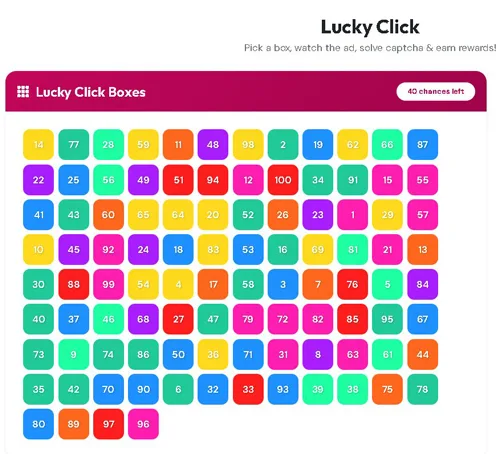
You get 40 tries a day, so out of the 100 squares, you can open 40 at most. That’s 40 ads and 40 captchas for a chance at a prize worth pennies, and you aren’t even told how much it is. With regular ads, you know ahead of time what you’ll get: between $0.0005 and $0.002 per click. So Lucky Click ends up paying less than they do. When you figure out how much you can earn on Aticlix, leave Lucky Click out, because it’s a waste of time.
If you still want to see it, you’ll find it in the Earn Money menu, marked NEW.
If you want to compare it with other paid online task sites, game sites and crypto faucets, where your pay doesn’t depend on which square you land on, take a look at these three:
- EarnLab: You get paid here after you finish games and tasks, so you have a reference point to see whether the small amounts are worth the hours you put in. It’s an international Get-Paid-To site with a cleaner look
- FireFaucet: You know ahead of time how much you need before you can withdraw: $2.50, paid in crypto through FaucetPay. Points add up automatically (auto-claim), and the payout rate goes up as you complete tasks
- Tester Buddy: It’s a site for testing mobile games, and it works right from your phone’s browser, while grids where you click on ads only work on a computer
How do achievements bonuses work?
In my account, the Achievements Bonus has six levels. The first one gives you $0.10, the sixth gives you $10.00, and all six together add up to $18.60. You can only get them in order. Level 1 is marked Active Level, and the other five are labeled Locked Level. Their buttons show a lock and the text “Complete Previous Level.”
Every level also requires active people you bring in through your invite link, and even Level 1 requires one. The clicks and paid online tasks you do yourself count too, but without those people you won’t get any of the bonuses. If you’re working on your own, you stay at $0.00 here.
The page is in the Earn Money menu, and it’s called Achievements. At the top, it shows what you need to do in four steps: Complete Tasks, Claim Bonus, Level Up, and Repeat. So you finish the goals for a level, claim the bonus, move on to the next level, and start over.
Each level has five goals. Offerwalls counts the dollars you earn from offers, and Referrals counts the people who sign up through your link. PTC Clicks counts the Paid-to-Click ads you view, Faucet counts the claims you make, and Shortlinks counts the shortened links you complete. In my account, the counters on Level 1 show 0/1 for Referrals, 0/25 for both PTC Clicks and Faucet, 0/10 for Shortlinks, and $0.00/1 for Offerwalls, which means you have to earn $1 from offers. Until you finish all five, the level shows 0/5 Tasks and the Complete Tasks button stays locked.
Here are the numbers for each level, the way I found them in my account:
- Level 1: bonus $0.1000, Offerwalls $1, Referrals 1, PTC Clicks 25, Faucet Claims 25, Shortlinks 10
- Level 2: bonus $0.2500, Offerwalls $2, Referrals 2, PTC Clicks 50, Faucet Claims 50, Shortlinks 25
- Level 3: bonus $0.7500, Offerwalls $5, Referrals 5, PTC Clicks 100, Faucet Claims 100, Shortlinks 75
- Level 4: bonus $2.5000, Offerwalls $10, Referrals 10, PTC Clicks 250, Faucet Claims 250, Shortlinks 100
- Level 5: bonus $5.0000, Offerwalls $25, Referrals 20, PTC Clicks 250, Faucet Claims 250, Shortlinks 100
- Level 6: bonus $10.0000, Offerwalls $50, Referrals 35, PTC Clicks 250, Faucet Claims 250, Shortlinks 100
From Level 4 on, PTC Clicks, Faucet Claims, and Shortlinks stay at 250, 250, and 100. Only the offerwall amount and the number of people you bring in go up, and that number reaches 35 on Level 6.
How does Faucet Claim work?
Every time you claim on the Faucet, Aticlix sends a very small amount straight to your FaucetPay account, in whichever of the seven cryptocurrencies you pick. If you haven’t heard of it, FaucetPay is a crypto wallet where you can receive even very small amounts without losing part of them to high network fees.
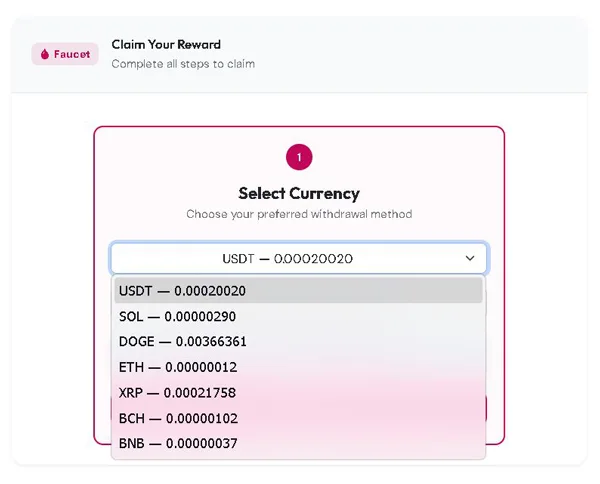
Each claim gets you $0.0002, which is two hundredths of a cent. The site lets you claim up to 25 times a day, so if you claim all 25 times, you end up with $0.005, or half a cent. For 25 claims done one at a time, that’s way too little for the time you put in. The Faucet does let you skip withdrawals on Aticlix, which is where the main bottleneck is, but that doesn’t change the amount. I’ll get to withdrawals further down.
If you already have FaucetPay, the Faucet is a way to check whether Aticlix really sends small payments to your wallet right away. If you’re collecting the 25 claims for the Level 1 box under Achievements anyway, this is where you do them. Other than that, there’s no point.
To claim, click Faucet Claim in the top menu. The page that opens has two fields:
- In the first one, “1. Select Currency,” you pick the currency.
- In the second one, “FaucetPay Email / Username / Wallet,” you enter your FaucetPay email, username or wallet address.
- Click Continue and solve the captcha. Only then does the amount go out to your wallet.
The same page shows how many claims you have left, in the “25 Remaining chances today” counter.
If you look at the currency list, each currency shows how much you get per claim:
- USDT: 0.00020020
- SOL: 0.00000290
- DOGE: 0.00366361
- ETH: 0.00000012
- XRP: 0.00021758
- BCH: 0.00000102
- BNB: 0.00000037
What are Bitcotasks?
I found Bitcotasks in the Earn Money menu, listed as Bitco PTC Ads 100+. Under Offerwalls Partners, it shows up as “Ads Partner.” It doesn’t belong to Aticlix. It’s a Paid-to-Click ad wall from another company. The ads there are paid online tasks: you visit a site, stay on it for 2 to 60 seconds, and get paid for each visit.
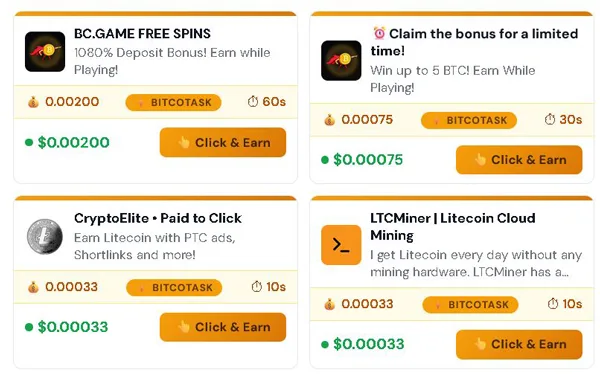
To get paid for an ad, stay on its page until the timer runs out. You open it with the orange Click & Earn button, and if a verification check pops up, you complete it. On the main banner in the ads section, Aticlix says that what you earn here is added to your balance every 5 minutes.
Treat any site you open from an ad as one you don’t trust, and close the tab as soon as the timer ends. You’ll also see “mining” or “200% profit” sites among them. Don’t create an account on them, and don’t send them any crypto.
When I tested it, there were 87 ads across two pages. The lowest payout is $0.00005 and the highest is $0.00200, but almost all of the ads pay either $0.00008 or $0.00020. Here are all the amounts I found, from highest to lowest:
- $0.00200: 1 ad, 60 seconds, BC.GAME FREE SPINS, top left on page 1
- $0.00075: 3 ads, 30 seconds each
- $0.00033: 3 ads, 10 seconds each
- $0.00020: 25 ads, 5 seconds each
- $0.00010: 1 ad, 2 seconds
- $0.00008: 45 ads, 2 seconds each
- $0.00005: 9 ads, 10 seconds each, on page 2, for example, Bitcotasks Faucet List, Bitcotasks Shortlinks list and Join Bitcotasks Telegram
I added up all 87 ads, and the total comes to $0.01439, which is under 1.5 cents. I also added up the timers: 487 seconds, or 8 minutes and 7 seconds of waiting alone. With page loads and captchas, it takes almost 10 minutes. For a cent and a half, it isn’t worth the effort or the risk. If you change your IP by mistake, your account could get blocked.
With Revenue Share, you’re the one putting in the money: anywhere from $10 to $5,000, which stays locked for 40 or 45 days. The site promises you’ll get it back with a total profit of 8% to 15%. That’s 108% to 115% of what you put in. To me, this part is high risk.
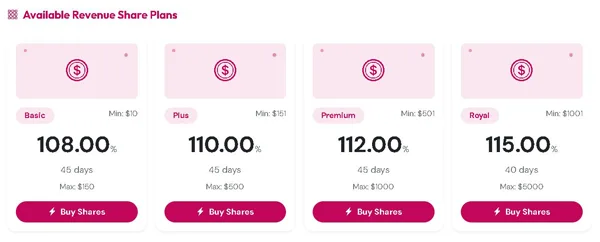
The site has 4 fixed plans. You pick one and put in an amount, and it stays there for as long as the plan lasts, which is a fixed 45 or 40 days. You don’t have to click anything: the profit is calculated and added automatically every day at 00:00 server time. You can’t take the money out before the plan ends. Only when the plan is over do the amount you put in and the profit show up in your balance, and from there you can withdraw the money or buy new shares.
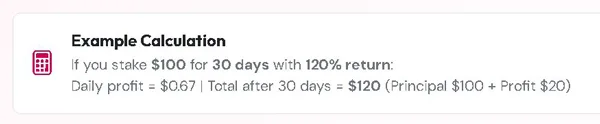
I also found an Example Calculation box on the page, showing $100 put in for 30 days at 120%: a daily profit of $0.67 and $120 at the end. None of the plans run for 30 days or pay 120%. The site left the template example there as filler text. Here are the actual plans, with what you get back at the minimum and maximum amounts:
- Basic: $10 to $150, 45 days, 8% profit (you get back 108%). $10 becomes $10.80 ($0.80 profit), $150 becomes $162 ($12 profit)
- Plus: $151 to $500, 45 days, 10% profit (you get back 110%). $151 becomes $166.10 ($15.10 profit), $500 becomes $550 ($50 profit)
- Premium: $501 to $1,000, 45 days, 12% profit (you get back 112%). $501 becomes $561.12 ($60.12 profit), $1,000 becomes $1,120 ($120 profit)
- Royal: $1,001 to $5,000, 40 days, 15% profit (you get back 115%). $1,001 becomes $1,151.15 ($150.15 profit), $5,000 becomes $5,750 ($750 profit)
Take the Basic plan. For 80 cents, you keep $10 locked up for a month and a half, and for $12, you’re risking $150. There’s no point. The only guarantee is an anonymous site with strict rules: no refunds. My advice if you’re 18: don’t put a single dollar of your own money into the Revenue Share plans.
If you want to make money online without investing, there are rewards apps and passive income apps that don’t ask you to lock up hundreds of dollars in risky plans. With Pawns.app, you share your unused internet and take quick online surveys. You earn small amounts passively and can cash out starting at $5 through PayPal or in crypto. ByteLixir also pays you for sharing your internet, a fixed amount for every gigabyte. You don’t deposit any money and it takes little effort, so it’s truly passive income. EarnApp is a passive income app with a good reputation. It runs in the background on your computer or phone and pays.
Refer a friend
On Aticlix, you have two kinds of referrals, meaning people linked to your account, and each kind has its own section in your account. Some you bring in yourself with your invite link, which doesn’t cost anything. The site calls these direct referrals. The others you rent and pay for.
When someone joins through your link, you get 20% of everything they earn, for life. How much that comes to depends on what they do on the site. For a $0.50 online survey on CPX Research or Timewall, your share is $0.10. Ads add up to a lot less. All 14 of today’s main Paid-to-Click ads pay $0.0145 combined, and your share of that is $0.0029, less than three-tenths of a cent.
A real person you bring in also unlocks the first level of the Achievements Bonus (Level 1), worth $0.10, on top of your 20% from their surveys. Every level there requires direct referrals. So your link is worth giving to friends who live in a different home and have their own internet. Just don’t give it to anyone who would use the site from your home Wi-Fi or from your device, because that gets the IP blocked right away.
To copy your link, log into your account and go to the Affiliate tab. The link is in the Your Referral Link box, and the pink button next to it copies it. The people who sign up through your link show up in the Your Referrals table. For each one, next to their name (Referral), you can see how much you’ve earned from them (Earnings), how many clicks and offers they’ve completed (Clicks + Offers), when they signed up (Ref Since), and where they came from (Comes From).
Rented referrals are active members who signed up on Aticlix without anyone inviting them. You pay for them from your Purchase Balance to have them for a period of time, the way it’s done on Paid-to-Click sites. In the Rented Referrals table, you can see how much you’ve earned from each one (Earning) and how active they are, meaning how many clicks they’ve made (Clicks), their average clicks per day (Avg), and when they last clicked (Last Click). You can also see their name (Referral), when they signed up on the site (Ref Since), and when your rental expires (Expires). From that same table, you can turn on autopay, which renews the rental on its own every day with money from your balance.
The site’s public pages don’t say how much a rental costs or what the minimum activity rules are. Don’t spend your money on rented referrals. Payments on Aticlix aren’t refunded, and there are unresolved complaints about withdrawals left pending, which I’ll get to below.
How do people get paid?
You can only cash out once you have $3 in your balance, and that amount is the same for every method. Your earnings go into your balance directly in dollars and are tracked to the fifth or sixth decimal place. For example, one ad click earns you $0.0005, and a survey earns you $0.50.
As I mentioned above, the 14 main ads together earn you $0.0145 a day. With those alone, you wouldn’t reach $3 until after more than 200 days of clicking them every day. Realistically, the only way to get to $3 is through the online surveys on CPX Research or Timewall, where a survey pays roughly $0.30 to $0.88.
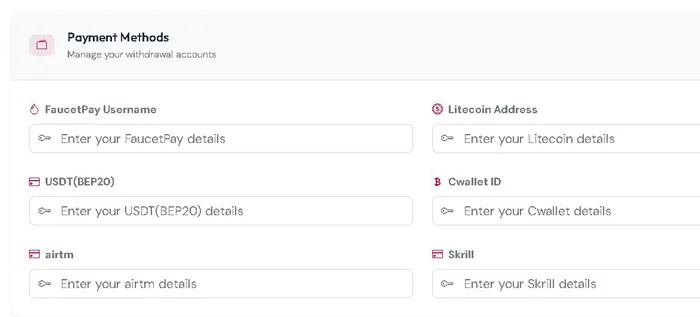
Aticlix doesn’t offer gift cards. Instead, you get six withdrawal methods, and each one asks you for something different:
- FaucetPay: your username on FaucetPay, a crypto wallet for very small amounts
- Litecoin: your Litecoin address, on the LTC network
- USDT (BEP20): your details for Tether, a cryptocurrency with a stable value, on the BNB Smart Chain network
- Cwallet: your ID on Cwallet, a crypto and digital wallet
- Airtm: your details for Airtm, a digital dollar wallet where you exchange money directly with other people
- Skrill: your details for Skrill, an e-wallet
The faucet has its own payouts, which go straight to FaucetPay, as I wrote in the section about it.
If you decide to keep going until you reach $3, you start the withdrawal from your account settings. Under “Payment Methods,” enter the address or username for each method. Only after that can you request your money. Make sure the wallet address you enter there is one you haven’t used on another account.
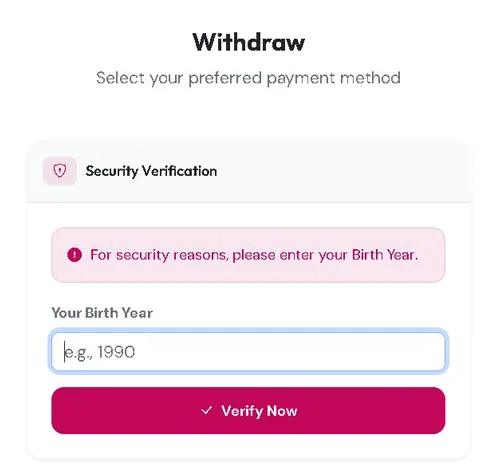
Then, when you go to the “Withdraw” page, the screen is blocked by a “Birth Year” check that asks for your birth year, and you can’t choose a method until you get past it. Remember the exact year you entered when you signed up.
In recent forum posts, people say they received their FaucetPay payments, but their Airtm withdrawals stayed stuck. So cash out to FaucetPay or Litecoin as soon as your balance reaches $3.
How do you ask for help?
The main way to get help is to open a ticket in the Support Center. Under the form, it says you’ll get a reply within 24 hours, that support is available 24/7 and that there’s end-to-end encryption. But on the site’s forum, I saw recent complaints about payments that have gone unanswered for weeks. There’s no live chat or phone support.
With payment complaints left unanswered like that, don’t expect support to get your money back if something goes wrong on Aticlix. Never put your own money into the site, because deposits aren’t refunded and help from support is slow.
To submit a ticket:
- Go to the footer at the bottom of any page and click Contact Support in the Quick Links column. This opens the Support Center, which has two tabs: New Ticket and My Tickets.
- In the Subject field, briefly say what the ticket is about, pick an option from the Priority list, and then fill in the Description.
- Click Submit Ticket.
Keep it short, but include all the payment information up front: the exact dates of the transactions and your FaucetPay or crypto wallet details.
To open the forum, click the Forum button in the top bar on the homepage. The forum is small, with 102 topics and 152 posts split between two categories: News and Announcements and Payment Proofs. Payment problems end up in Payment Proofs because the forum doesn’t have a Help or Bug Reports category. The complaints I mentioned are there too, among the 84 topics and 122 posts in that category. News and Announcements has 18 topics and 30 posts, and the admin’s latest post, from November 12, 2026, is about a 20% deposit bonus.
The other two options are Telegram and email. For Telegram, log in and look under Follow Us in the footer, where you’ll find a single gray icon with a paper airplane. The address [email protected] is publicly listed as the official contact.
What people really say about Aticlix on Trustpilot?
Aticlix has a 4.3 out of 5 rating on Trustpilot from 790 reviews, but only 40 of them are from the last 12 months. The other 750 are older. The rating looks good, but it tells you more about how people saw the site before than about how much you can rely on it now. Trustpilot lists Aticlix under advertising agencies, and the company hasn’t invited customers to leave reviews recently.
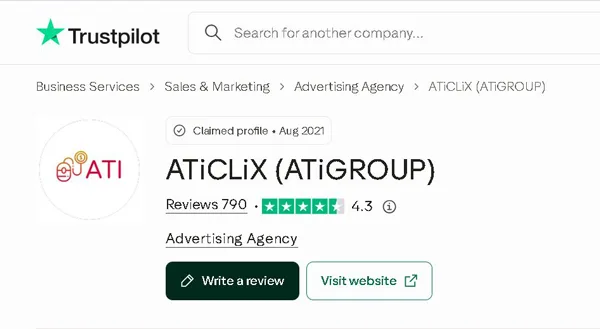
Here’s how the reviews break down by stars:
- 5 stars: 68%
- 4 stars: 12%
- 3 stars: 8%
- 2 stars: 3%
- 1 star: 9%
The newer reviews show more clearly what the site is like now, so I read the ones written between mid-2025 and November 2026. They’re mixed, and the few from the past year include some clear complaints.
On payments, they contradict each other. Several reviews from July and August 2026 mention fast withdrawals, along with the many ways to earn. One 1-star review from November 2026 says only this: the admin doesn’t respond and the site doesn’t pay. The company hasn’t replied to any negative reviews on Trustpilot, so it hasn’t replied to this one either.
Many of the 5-star reviews describe it as a trustworthy site for making a little money online in your spare time without investing anything. One review from August 2026 adds that you won’t get rich, but the site is legit and pays if you put in the work. One complaint shows how much work that means: it can take months of clicking to reach the $3 you need to withdraw, and the person who wrote it expected something different.
Aticlix pays 8 cents for a review, and on a site where you earn from clicks, that’s a reason not to rely on the stars alone. A 5-star rating from someone who admits they haven’t cashed out any money doesn’t tell you what you want to know: whether you get paid once you reach the $3 minimum. On Trustpilot, filter for 1-star reviews and sort by newest. Then compare what you find with the site’s forum before you decide whether to use Aticlix.
Who can use Aticlix?
To join Aticlix, you just need to be at least 18 years old. It doesn’t matter what country you’re in, and signing up is free.
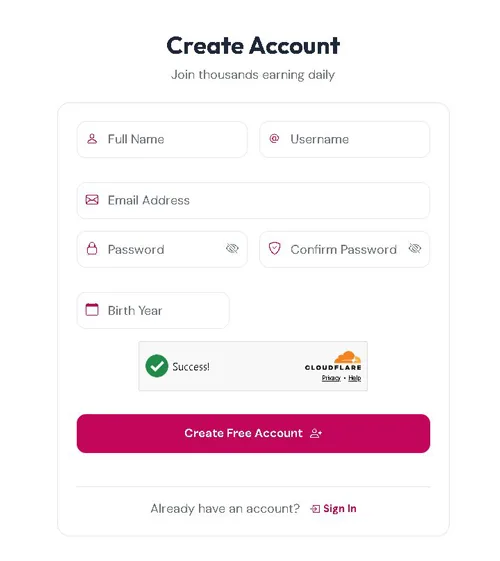
You can only create an account with your email. You can’t sign up with an account you already have, like Google, Facebook, Apple, or a crypto wallet, so you fill in everything by hand on a single form: your full name, a username, your email address, a password (which you type twice), and your birth year. At the end there’s an automatic Cloudflare check, which is how the site makes sure you’re not a robot. If you pass it, you’ll see a green check mark that says “Success!”
The birth year you enter here becomes your security key when you want to withdraw your money, and Aticlix uses it exactly as you typed it. So if you sign up, use your real birth year and write it down somewhere.
Can you use it on your phone?
On a phone, Aticlix only works in the browser. The menus, the online surveys from CPX Research and Timewall, and the mobile game offers in the Lootably and Revtoo offerwalls all load and fit on the screen. That’s because the site is built on Kfscript, using web cards that adjust to the screen size. Lootably and Revtoo sort their offers by Android and iOS.
But on a phone, you can lose your account. If you use Aticlix while you’re walking down the street or after you’ve turned off Wi-Fi, your account can be permanently banned, and everything you’ve earned toward a withdrawal goes with it. This happens because of two rules in the site’s Terms. One says Paid-to-Click ads can only be viewed from a desktop or laptop in a regular browser, so you’re not allowed to view them on a phone. The other automatically bans any account that views ads from more than one IP address within 24 hours.
It’s easy to break the second rule on a phone, because it often switches from your home Wi-Fi to 4G or 5G mobile data or to a public Wi-Fi network, and each network means a different IP address. The biggest risk is on mobile data, where you break both rules at once. The ban can come without warning, even when you’re close to the $3.00 minimum payout.
So if you’re going to use Aticlix, use it on a laptop or desktop and stay on one network: your home Wi-Fi. On your phone, stick with sites that have real mobile apps. Aticlix isn’t one of them. As of November 26, 2026, it didn’t have an official Android or iOS app on Google Play or the App Store.
Is Aticlix worth it?
Aticlix isn’t worth your time. It also depends on how much time you can put in and what you want from a site where you make money online without investing anything, but for me, the reasons below matter more.
The first reason is trust, and the problems here are serious. At the end of 2025, the site shut down suddenly and old accounts were deleted. Its forum also has unresolved complaints about payments. Withdrawals can stay pending. The domain is registered anonymously, so you don’t know who is behind the site. And it pays 8 cents for reviews that look fake.
The second reason is the money. You earn money from ads and paid online tasks, and you don’t earn much. Most tasks pay fractions of a cent, so it takes weeks to reach the $3.00 you need before you can cash out.
The good part is the online surveys from CPX Research, Timewall, and Lootably, which are fine. But you can also find them on dozens of safer, better-known Get-Paid-To sites that pay their users properly. So don’t sign up here.
If you already have an account and your balance is close to $3.00, cash out through FaucetPay or Litecoin as soon as you reach that amount, and then stop using the site. Until then, take a few short online surveys using only one laptop and your home Wi-Fi.
If you want to tell me how Aticlix went for you, or if you have a question or comment, let me know in the comments below. I’d love to hear from you.