
Paid surveys are one of the most common ways we earn a little money or other rewards on top of what we already make. But first, you need to find the right site.
I’ve tested lots of sites like this over the years, so I can tell pretty quickly whether one is worth using or not. This time I checked out OfferNation to see how it works, what rewards you can get there, and above all, whether it’s a legitimate site or a scam.
Below, I’ll go over what’s good about it and what isn’t, so you know what to expect before you create an account.
Then you can decide for yourself whether it’s worth signing up. Let’s get started!
What is OfferNation and how does it work?
OfferNation is a website and phone app where you earn small amounts of money from online surveys and from testing apps or games. It’s been running since 2012, and it still is.
It’s also a legitimate site, in the sense that it really does pay. But a site that pays isn’t necessarily worth your time. Being legitimate doesn’t tell you that. You only find out once you see how earning works there, how much each method pays, and how hard it is.
I like to know who’s behind a site I’m handing my data to. For OfferNation, that’s 99 Ventures Ltd, a UK-registered company. Both the UK’s company register (Companies House) and the company’s profiles show that it’s run by Alan Stables, its director.
According to 99 Ventures itself and its ESOMAR listing, the company also runs a few other sites and tools:
- SuperPay.Me: launched in 2012
- RewardingWays: launched in 2011
- MoreSurveys: launched in 2023
- Scripteed: a member management system
- DataSample: survey integration via API
Going by those launch years, the company has been building sites like this since at least 2011, which I find a little reassuring.
So how do you actually make money on it?
There are five ways: paid surveys, offerwalls (where you download apps, play games on your phone, or sign up for paid trials), referrals, contests, and promo codes. I’ll go through each one below.
The surveys you find under Surveys aren’t made by OfferNation. They come from outside market research companies. OfferNation just acts as a kind of middleman: it sends you to them and collects them all in this tab.
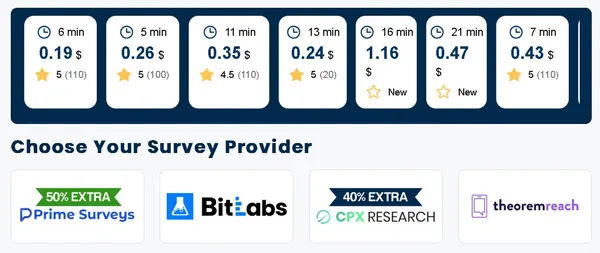
It’s the first item in the left-hand menu, right above Games and Offers. Open it and you’ll see the surveys as cards you can click. Each card shows roughly how long the survey takes (1 Min, 4 Min, 16 min), what it pays ($0.22, $1.12, or $1.16), and how people have rated it, from 1 to 5 stars, with the number of reviews next to the rating or a New label. Some show a crossed-out amount with a higher one next to it in red, for example $0.80 crossed out and $1.12 beside it. That’s a promotion. The provider is paying a bonus for that survey.
The same details are what you use to pick your surveys. It’s best to start with short, well-rated ones: 4.5 or 5 stars and 1 to 7 minutes.
Further down, under “Choose Your Survey Provider,” you can pick a provider directly and open its page to see its full list of surveys. These are the providers I found in my account:
- Prime Surveys
- BitLabs
- CPX Research
- TheoremReach
- inBrain.ai
- PureSpectrum
- OnSurveys
- Your Surveys and Revenue / Revenue Universe
When I looked, Prime Surveys and CPX Research had banners offering 50% and 40% extra, and they’re also a good place to start for as long as those promotions run. Fill out your profile once, honestly, and then give the exact same answers to every provider.
So how much does a survey pay?
Usually between $0.19 and $1.62. My account had 17 surveys, paying anywhere from $0.11 to $1.16, with most falling between $0.20 and $0.74. The lowest was a one-minute survey worth $0.08, which a promotion bumped up to $0.11. I couldn’t find an official minimum, since the terms don’t mention one. Lengths varied widely: 1, 2, 4, 5, 6, 7, 11, 13, 16, 18, and 21 minutes.
Those are only my numbers, though. You might see different surveys with different payouts and lengths, since it all depends on where you live.
Once you finish a survey, the money is credited automatically: the partner confirms the completion to OfferNation, and the amount is added to your balance. Larger rewards, meaning anything over a threshold they set, are automatically held for 60 days for extra security checks, though, and that’s a long time to wait for your money. What can cost you your entire account is something else. Never log in with a VPN, and don’t take surveys on school Wi-Fi or a public network. If you do, your account gets closed for good, and it happens right when you go to cash out. To me, that’s the worst part: building up a balance and losing it at the very last step.
These surveys aren’t for you if you get frustrated easily when you spend 5-10 minutes on screening questions and then see “Sorry, you did not qualify” at the end, meaning you’re not who the survey is looking for. Or if you want a guaranteed hourly rate.
If you want to compare OfferNation with other sites, I’ve also written about Surveyon, SurveyLama, and NiceSurveys on the blog, as I mentioned earlier.
Earn Money with Offerwalls
When you click Offers in the side menu, you’re actually opening other companies’ ad networks, built into OfferNation. This is an offerwall: a board of tasks from companies that pay you to download an app, hit a certain level in a mobile game, sign up on a website, or try a paid subscription.
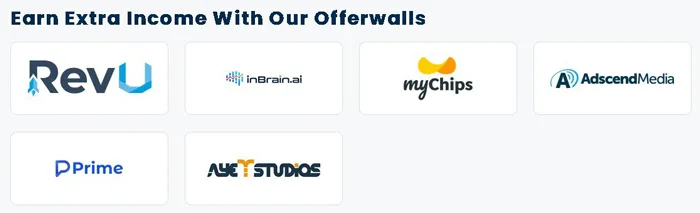
These offers can pay a lot more than surveys, especially on myChips, ayeT-Studios and RevU. I like that here, we don’t get kicked out of a survey anymore.
Right now I have 6 active partners in my account, listed under “Earn Extra Income With Our Offerwalls”:
- RevU (Revenue Universe): apps, sign-ups and multi-step games
- inBrain.ai: mostly surveys, mixed in with the offerwalls
- myChips: lots of app installs and games that pay per level
- AdscendMedia: mobile games, apps, quizzes and sign-ups
- Prime (Prime Earn / Prime Surveys): promoted games that pay out in stages, and surveys
- ayeT-Studios: mostly apps and in-game progress, on Android and iOS
The list changes now and then, because OfferNation rotates its partners. And they aren’t exclusive to OfferNation. Other paid-task sites use them too, such as Timebucks, FireFaucet or Earnopolis, and if you’ve used any of those, I’m sure you’ve already come across them.
You click a partner’s logo and pick an offer (say, getting to level 20 in a game). Then you install the app or sign up through their link specifically, because that link is what they use to track you. The network uses your phone or your browser cookies to check that you’ve never had the app before and that you got as far as the offer requires.
But finishing the offer isn’t when you get paid.
I read in section 4 of OfferNation’s terms, updated on February 5, 2026, that your reward only shows up in your account after the company behind the offer confirms you’ve finished and pays OfferNation. And even then, any reward above a preset amount is automatically put on hold for 60 days while they run fraud and security checks, and you can only withdraw it after that.
The strictest rule is in section 2. You can’t complete the same offer twice, even if the first time was on a different site or rewards app. If you’ve already done an offer on Timebucks, for example, you can’t do it here as well. They treat that as fraud and close your account.
There are four kinds of offers. Multi-step games are free to download, and they pay small amounts for the early levels and more for the higher ones, as long as you reach them within a set time frame, usually 14 to 30 days. With shopping, utility or entertainment apps, all you do is install them, open them, or create a free account. With paid trials and subscriptions (streaming, VPN, finance apps, subscription boxes), you pay a little out of pocket first to get a bigger amount back as cashback, and honestly, I don’t like spending money to make money. And then there are short browser quizzes and sweepstakes entries, mostly on AdscendMedia and RevU, which pay a few cents each.
So how much does each offer pay?
The smallest ones pay a few cents (about $0.01 to $0.15), while a typical offer pays between $0.20 and $5. OfferNation’s terms don’t put a cap on it. Big games with lots of stages, plus offers on RevU, myChips or ayeT-Studios that require a deposit or a paid subscription, can go up to $20 and even past $100 in Tier-1 countries (the ones with the highest payouts), but only if you complete every stage. Except that you often only reach the last tier after weeks of struggling or after putting real money into the game, and that’s where you can end up losing money.
To make it work for you, do these three things:
- Aim for small and mid-range milestones. Simple installs and early or mid-game levels pay $0.50 to $5 within a few days. That’s better than working weeks on end for a final $50 level the network might not register.
- Set up your phone’s privacy settings before you tap the offer. On iPhone or Android, allow the game to track you when it asks, never use an ad blocker or VPN, and download over mobile data or your own home Wi-Fi.
- Take screenshots of everything. Get one of the offer requirements before you start and another of your in-game profile ID right after installing, so you have proof if you need to open a ticket with the offerwall.
And if you’ve already downloaded most of the popular games onto your phone at some point, I wouldn’t bother with offerwalls at that point. The network sees you as someone who’s had them before and drops you from the offer.
Playing games
You play a game that’s new to you and get paid every time you hit a target level, but most of the money is tied to the final level. The games section is worth taking seriously: it pays a lot more than surveys, especially if you play games on your phone anyway.
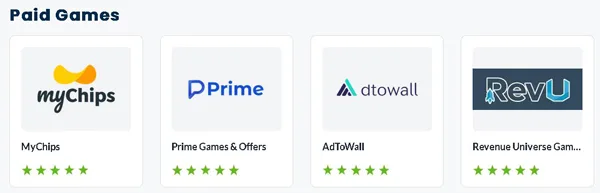
I went into Games from the left-hand menu and landed on the Paid Games page, where I found four cards, one for each game offerwall: MyChips, Prime Games & Offers, AdToWall, and Revenue Universe Games. That’s what shows up in my account. You might see more, but I doubt you’ll see fewer. When you pick one, you get a list of games, each with its own set of goals (the site calls them milestones) and a countdown timer, such as “Reach level 25 in 14 days.” You click the link or scan the QR code with your phone, and it takes you straight to the App Store or Google Play to download the game.
Then you play. The partner tracks your progress through a code your phone uses for ads, and when you hit a target level, it lets OfferNation know so the money gets added to your account.
The game has to be completely new to you, meaning you’ve never installed or played it before, either on that phone or under your Apple ID or Google Play account.
And what if I’ve already played it on another rewards site?
Then it won’t count, because you can only get paid for a game once, ever, no matter which site or app you used.
Nearly every game offer right now pays out in tiers, whichever of the four offerwalls you use, and this is the important part. The first steps, like installing and opening the game or reaching level 5, earn you a few cents. The ones in the middle, around levels 20 to 50, are worth a few dollars. Most of the listed payout is tied to the final steps: level 100 or higher, or an in-game purchase. The purchase is optional, but you’re the one paying for it.
Per game, the totals look roughly like this:
- Minimum: a few cents (about $0.01-$0.25), for installing the game and getting through the first tutorial steps, such as reaching level 2 or 5
- Typical: $0.50-$10, for a few days of casual play covering the early and middle levels, without spending anything
- Maximum: $50-$100 or more, for completing every tier of a game
Those maximums show up in the US, the UK, Canada, and Australia, where players get both the most games and the most money per level, because game studios pay more there to attract players. Here in Europe, we see the same four offerwalls as everyone in Asia and Latin America, but we get fewer games and noticeably less money per level. And even in those top countries, reaching the final level almost always means playing heavily every day or buying in-game packs with your own money.
And every game has a deadline. The timer starts the minute you tap Install and usually runs anywhere from 7 to 30 days. Say you reach the final level an hour after the timer runs out. Nobody’s going to pay you for that step, and losing a whole step by an hour feels harsh to me.
Personally, I’d stop at the middle tiers, where you make a few dollars per game without spending anything.
Refer a friend
OfferNation no longer gives you a percentage of what your friends earn. Now you get a fixed, one-time bonus of $2, $3, or $5 for each friend you refer, but only once that friend has earned and cashed out $10.
The amount depends on your friend’s country, and the $10 withdrawal requirement is the same everywhere:
- US, UK, Canada, and Australia: $5
- Europe: $3
- Rest of the world: $2
I like being able to see these amounts right on the screen instead of guessing at percentages, but the condition attached to them is harder to meet than it looks.
Is this better than before?
For the first $10 a friend earns, yes. OfferNation used to give you 10% of everything your friend earned for life (or rather, for as long as they kept using the site), which comes to $1 out of their first $10 (I did the math myself), and now you get $3 if they’re from Europe. But the $3 stays $3 no matter how much more they earn, and you don’t see a cent until they cash out. If they just sign up, or cash out less than $10, you get nothing. Say you send your link to a friend who tries the app for 10 minutes and quits at $1.50. You get $0.
Building passive income from referrals is much harder now, especially if you don’t have your own TikTok, YouTube, or Discord audience in the US, UK, Canada, Australia, or Europe. It’s worth sharing your link if you already create content online, run a page about offers or games, or know people outside your household who actually spend enough time on survey and gaming apps to cash out $10 or more.
Don’t refer family members or roommates on the same Wi-Fi as you, because that will get your account blocked!
You’ll find the link in your account, on the Referral Program page. Right under “Your Unique Referral Link” there’s a box showing your link, with an icon to its right that copies it in one click. The link looks like https://offernation.com. Some older ones also had ?refid=12345 on the end. Send it to someone who doesn’t have an account yet. They sign up through your link and take surveys, complete offers, or play games.
My account clearly states that the payment goes through automatically as soon as the person I referred successfully withdraws $10, and I don’t have to ask anyone for anything. All I have to do is wait.
How do levels in OfferNation work?
OfferNation’s level system is simple. Every dollar you earn raises your level by 1, and at certain thresholds you get a fixed cash bonus. It’s a nice extra for anyone who’s active on the site anyway, but the bonus really is small, and I’ll show you exactly how small below.
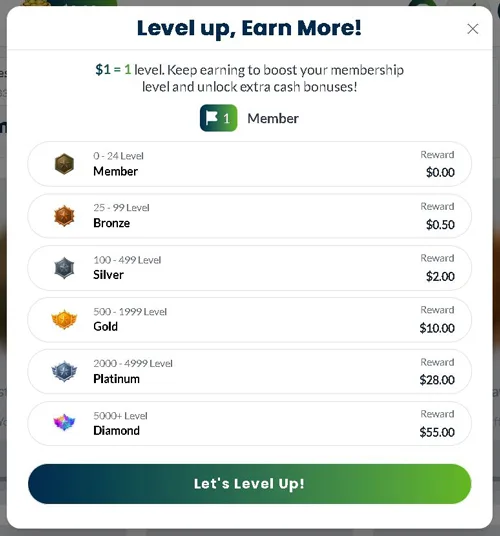
There are 6 tiers, each covering its own range of levels, and your level is simply the total you’ve earned so far, in dollars:
- Member: levels 0-24 ($0-$24), no bonus
- Bronze: levels 25-99 (from $25), $0.50 bonus
- Silver: levels 100-499 (from $100), $2 bonus
- Gold: levels 500-1,999 (from $500), $10 bonus
- Platinum: levels 2,000-4,999 (from $2,000), $28 bonus
- Diamond: levels 5,000 and up (from $5,000), $55 bonus
I added up the five bonuses that actually pay something, from Bronze through Diamond. They total $95.50. That’s about 1.91% on top of $5,000 in earnings. The bonus goes up with each tier, but the thresholds go up too, and much faster.
So how far can you realistically get?
Bronze is easy to reach. A few $0.50 to $1 surveys every now and then, or a few quick milestones in a game, will get you to $25 and the $0.50 bonus. Silver, at $100, is doable too. If you play multi-milestone mobile games on MyChips or RevU, you can get there in a few weeks or months and pick up $2.
From Gold up, it’s a completely different story. A typical survey pays $0.20 to $1.20. Getting to $500, let alone $5,000, takes a lot of work day after day, for months or even years, either on the higher-paying games or by constantly promoting your referral links. To me, that’s too much work for a $10 bonus at Gold.
I wouldn’t put in even one extra hour just to reach the next tier.
How to cash out on OfferNation?
Right now, my account only has two cash payout options: PayPal and Skrill. You’ll probably have more, from Amazon and Walmart gift cards to Wise and crypto like Bitcoin.
Of the two, I’d go with PayPal. The minimum is only $3 and the maximum is $250, while Skrill lets you withdraw between $5 and $100. Plus, PayPal works for everything you earn (surveys, games, offerwalls, referrals), but Skrill only makes sense if surveys are all you do.
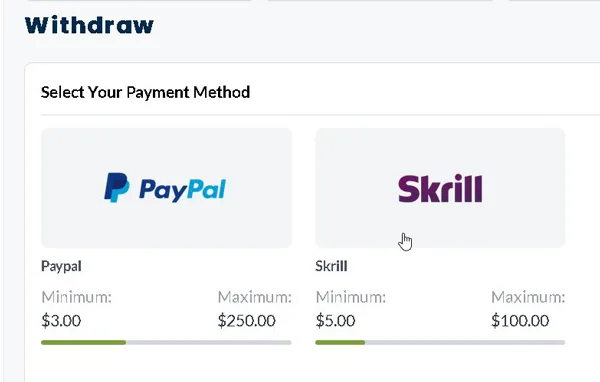
Your balance is shown straight in dollars, with no points to convert, and cashing out is simple, clear, and fairly quick. The money usually arrives in 8 hours or less.
But OfferNation doesn’t let anything slide when you withdraw. One mistake with Skrill’s rules, a PayPal name that doesn’t match the one on your account, or a VPN running, and you lose your whole balance. Say you have $50 and request a withdrawal with your VPN on. You’re left with zero. So before you hit Withdraw, make sure your PayPal account is verified and under exactly the same first and last name as your OfferNation account.
How much should you let your balance build up, then?
As little as possible. Cash out every time you reach $3 to $5, instead of waiting until you have $50 or $100 in your account. Make your first three withdrawals on separate days. That unlocks instant PayPal payouts and also fills up the progress bar for the “3 Withdrawals” achievement.
Losing everything over a name that’s spelled differently seems harsh to me.
How do you ask for help?
There’s no one to talk to in real time, because OfferNation doesn’t have live chat. Instead, you get the FAQ, where you can find answers without having to write to anyone, and tickets (basically messages to support that you write and track from your account). There’s also an email address, [email protected], but it’s meant for when you can’t get into your account anymore and have no way to open a ticket.
The questions sit right above the ticket buttons, and each one expands when you click it. They’re written in plain language, the way anyone would ask them, not like a technical manual, which I liked. There are a few small typos too (one question reads “Is OfferNation.com and can I join?”, and “Refferal” shows up in another).
I clicked “See All” and counted 29 questions, grouped like this:
- Getting started and trust: whether the site is trustworthy, how you make money, whether it pays, whether you can sign up, whether there are fees
- Surveys, offers, and missing rewards: why a reward didn’t come through, what to do when you can’t find surveys or offers, how to access them, reversed rewards, how to contact survey companies and offerwalls
- Payments, locks, and verification: how long it takes to get paid, a payment you requested that hasn’t arrived, where to see your payment requests, locked funds, identity verification, changing your payment account
- Account and rules: suspended accounts, whether you can have more than one account, changing your password, account history
- Referrals: where to find your link, how to invite friends, whether there’s an affiliate program
- The 2026 game features: how the daily streak works, what WinOn3 is, where to see your achievements, how to level up, how to rank up
- Extra help: what to do when you need more than this
Those are pretty much the same problems anyone runs into when they’re new to the site.
So why read these first?
Because support closes any ticket right away if the list already answers its question. Before you write to them, check “Why wasn’t I credited?” and “I have funds that are locked” in particular.
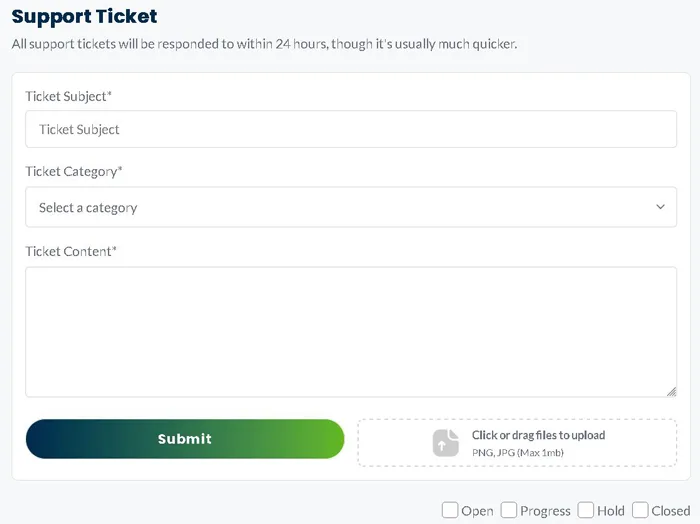
Only then do you click “+ Create a Support Ticket” in your account. You choose a category, write a subject and your message, and you can attach a PNG or JPG screenshot up to 1 MB. The screenshot really matters, because it’s your proof. It’s worth using a clear one, like the end screen of a survey you completed or your PayPal email verification. A ticket created this way is automatically linked to your account ID, and you can follow it under “View All Support Tickets”, where it moves through four statuses (Open, Progress, Hold, and Closed).
For common issues, support is fast and well organized, and they’ve promised in writing to reply within 24 hours. But it won’t be a lifeline if you run afoul of the rules. If the system blocks you automatically for security reasons, support very rarely lifts it.
I’d have no problem contacting them about a missing reward. For a blocked account, I wouldn’t count on them.
OfferNation on Trustpilot
When you open OfferNation’s Trustpilot page, the first number you see is 2.3 out of 5, labeled “Poor,” based on 901 reviews. But 73% of those reviews give 5 stars.
So why is the score so low?
Because OfferNation doesn’t send people there anymore. In April 2024 they stopped inviting their customers to Trustpilot and put up a big “IMPORTANT NOTICE!” on the page, distancing themselves from the site. Since then, only 8 reviews have come in over the past 12 months (not even one a month), and those are the ones that matter most, because Trustpilot gives more weight to recent reviews when it calculates the score.
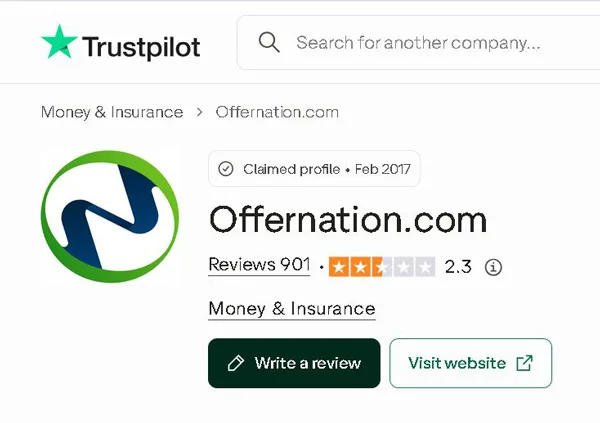
Here’s how all 901 reviews break down by star rating:
- 5 stars: 73%
- 4 stars: 10%
- 3 stars: 3%
- 2 stars: 2%
- 1 star: 12%
Add them up and 83% are 4 or 5 stars, while only 12% are 1 star. The 2.3 comes from that handful of new reviews, which count for more than hundreds of older ones.
I don’t judge OfferNation by the 2.3 alone, but I don’t judge it by its 5-star rating on Feefo either. Feefo only counts people who made it through identity verification and got paid. Trustpilot collects the upset ones: people who lost their accounts.
And most of the new Trustpilot reviews are 1 star, from people whose accounts were closed permanently or who got kicked out of surveys. Those are actually the reviews I find most useful, because every major complaint comes down to the traps I told you about earlier: you used a VPN or a shared Wi-Fi network, your name or ID didn’t match when you requested a payout, or you let too much money build up in your account instead of cashing out to PayPal every time you hit $3.
They didn’t scare me off the site. They just showed me what to watch out for.
Can anyone join OfferNation?
You can join OfferNation if you’re at least 18, and you don’t pay anything, not to sign up and not later on as a membership fee.
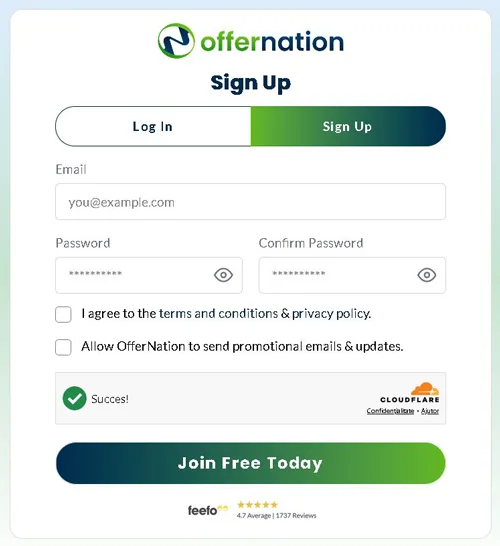
Setting up your account is quick and takes two steps.
I looked on the sign-up page for one-click buttons to sign in with Google, Apple or Facebook, but there aren’t any. You only get the standard form with email and password, plus a Cloudflare check that confirms you’re human, not a robot. You enter your email address, choose a password and re-enter it, then check the box saying you agree to the terms and the privacy policy. That box is required. The second one, for promotional emails and news, is optional.
They run your email address through Seon.io (that’s what section 4 of the privacy policy says), and this is where you really do need to be careful. A temporary, throwaway address can get your account automatically flagged as suspicious or even blocked. You’re better off signing up with the address you normally use.
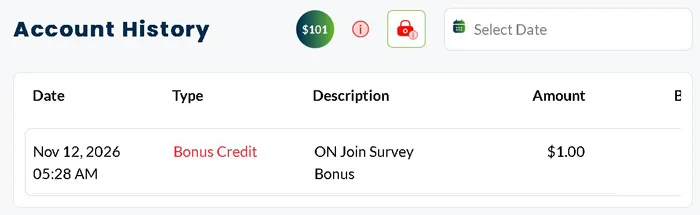
After you confirm your email, a window pops up asking you to fill in your profile: a username, your date of birth in the American MM/DD/YYYY format (month, day, year) so they can see you’re at least 18, and your mobile number with the country code. All three are required. As soon as you’re done, $1 shows up in your account as “Bonus Credit,” labeled “ON Join Survey Bonus.”
And what about ID?
Nobody asks for it when you sign up. You set up your account and start taking surveys without a passport, driver’s license or selfie. They do ask for it, though, before paying out your withdrawals. Two companies handle this: Verisoul and ComplyCube. You turn on your camera and take a live selfie, then a live photo of your ID (or a utility bill). You have 14 days to finish from the moment they ask. The photos you upload are deleted within 24 hours, or within 7 days if they need a second document too. I’m not a fan of uploading photos of my face, but at least they’re clear about how long they keep them.
The big “$101 Free Cash Rewards” banner sounds a lot better than it is. The $1 for signing up is only step one, “Create Your Account,” on a list called the “$101 Bonus Checklist.” The other $100 unlocks bit by bit, and only once you hit milestones that take a while to reach. Here are a few of them and what each one pays:
- Cash out on 3 different days: $0.10
- Cash out on 10 different days: $0.20
- Cash out on 50 different days: $0.50
- Earn $75: $0.70
- Gold Rank (level 500, or $500 earned): $10
- Platinum Rank (level 2,000, or $2,000 earned): $28
- Diamond Rank (level 5,000, or $5,000 earned): $55
You already know these ranks from the level system. I added up the first three and got 80 cents, and that’s for cashing out on 50 different days. The big money is in the ranks, which you only reach after earning hundreds and then thousands of dollars on the site, up to $5,000.
I’m not counting on the other $100.
Can you use it on your phone?
Yes, OfferNation works on your phone, and you have two options: you can go to offernation.com in your browser, since the site is designed for small screens too, or you can install their official app. But the app doesn’t give you anything the site doesn’t, and I’ll explain why below.
It’s called “OfferNation Make Money Online,” it’s free, and it’s published by 99 Ventures Ltd. You can get it on Google Play for Android and on the App Store for iPhone.
I looked it up in both stores to see what people who’ve installed it have to say. On Android, it has 2.7 out of 5 stars from 158 reviews and more than 10,000 downloads, and it was last updated on August 18, 2026.
For iPhone, I checked the US App Store. There, it has 3 out of 5 stars, but from just 2 ratings. One is a 5-star rating from August 8, 2023. The other is a 1-star rating from May 7, 2024, left by someone who complained about being disqualified after getting 95% of the way through a CPX survey (which is more about the survey than the app). The latest update, version 1.1.0, is from December 17, 2025, and its release notes only mention a change to the age rating.
Two ratings don’t tell you much.
And the app doesn’t have anything extra to show you either, because it’s really the same site opened in what’s basically a browser, and its preview screenshots are out of date. You get the exact same features and bonuses by opening offernation.com in your phone’s regular browser.
Is OfferNation worth it?
Yes, OfferNation is a legitimate site, not a scam. It’s run by 99 Ventures Ltd, an established UK company, and you can actually get some money out of it, because the minimum withdrawal is low and payouts go through PayPal.
The best part is how fast they pay. That’s assuming you follow the rules and get through verification without any issues.
But the rules are very strict. Their terms allow them to take your whole balance over a minor mistake, a technical glitch, or anything they decide (by their own standards) is a problem. And they’re very quick to close accounts. Something else I don’t like at all is that they’ve left review sites anyone can post on, like Trustpilot, so they get to pick what we read about them. If a site is holding my money, I want to be able to read the complaints too.
It’s fine for anyone who sticks to one account, reads the rules carefully and follows them exactly, and doesn’t count on what they earn there as a main or steady income. Anyone who wants to build up a decent amount faster will get more out of other sites. You’re better off looking at the top 7 paid survey and task apps, which all pay well and almost all have a low minimum withdrawal, so you don’t have to wait long for your money.
And if you stick with one of their sites anyway, keep in mind that OfferNation is pretty much a copy of two of their other sites, Superpay.me and Rewarding Ways, with the same offers and surveys. Personally, I think those two are a little better. There’s no point in signing up for all three. Pick one and build up your balance there.
Have you had a chance to try OfferNation? I’d really love to hear about it in a comment below, and the same goes if you have a question or just want to tell me what you think!