
We all browse websites and apps, and no one pays us for it. We rarely tell anyone what we think of them, and most of the time we don’t even care that much.
Userfeel makes a promise that sounds very convenient: money for testing websites and apps from home, sitting on the couch. I expected a scam. I don’t really trust promises like that, especially when they ask for so little effort.
I was wrong. Userfeel isn’t a scam. But if you sign up without knowing what you’re getting into, I’m afraid you’ll waste a lot of time. And that time is a cost too, even if you don’t see it in your account and it adds up without you noticing.
What did I find after I set up an account? Below, I’ll tell you everything I saw, so you can decide whether it’s worth your time before you sign up.
What is Userfeel and how does it work?
We’ve all gotten stuck at least once on a website or in an app, unable to find the next step. Product teams and agencies want to know exactly where that happens on their sites and in their apps, and that’s what Userfeel is for.
The official description is long: a remote usability testing and user experience research platform. I find it simpler to explain through what a person does there. You try out a website or an app from home, and the company finds out where you got confused. For that, it gets AI-based research tools and observations from real people, meaning testers like me.
The site sells to other companies, so it works on a business-to-business model. A company buys a subscription or credits, uses them to start a test, paid testers complete the tasks in the test, and Userfeel makes money from sitting in the middle, between the people who pay and the people who test. They say they have over 1 million testers in their panel. I have no way of counting them myself. And the site is still fully active.
It’s trustworthy, because the money really does come in. I used to think a site that pays is automatically worth it. But it isn’t. An honest site can take more of your time than it gives back in money.
Whether it’s worth it shows in how it works, more exactly in the earning methods. Below, I go through them one at a time, and for each one I’ll put the minutes it takes next to the money.
Get paid to test
I figured that on Userfeel you’d make your account and start the paid tests right away. But before your first cent, you have to go through an entry process, and the step that matters most in it is a test nobody pays for.
The process has 4 steps, in this order:
- Go through the tester documentation and the FAQ
- Install their recording app from the official link
- Find the qualification section in your account, where the practice test is (at the start, it’s the only one that counts)
- Record the whole practice session and submit it
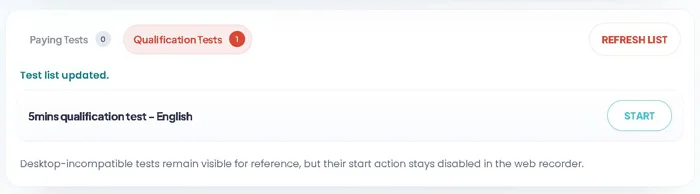
The main page of your account has two parts, one with the paid tests and one with the qualification tests. The practice test is in English and takes 5 minutes. They use it to check your equipment and your voice. Then a team on their side watches the recording and checks whether the sound is very clear, whether you say out loud exactly what you’re thinking, and whether you can follow the instructions of a sample scenario. For 5 minutes, I didn’t fuss about the money, because this test is a lot like what you’ll do on the paid ones.
Their network has over a million verified people, who test in more than 40 languages, and all the tests come directly from Userfeel’s clients, not from partner platforms. A million people also means a lot of people who want the same spot. Once they approve you and you join the group of certified testers, invitations come by email every time a client orders a test aimed at your age, where you live, and what you do for work. Sometimes a few short screening questions follow, which check whether you fit exactly the profile the client wants. And tests fill up very fast after they show up. If you open the email late, you may find the test already taken by someone else.
Pay is based on minutes and on the test format. The 5-minute test pays $3, the 20-minute test $10, the 40-minute test $20, and the 60-minute test $30. I divided each amount by its minutes. The 20-, 40-, and 60-minute tests all pay 50 cents a minute and only the 5-minute one pays 60, so the shortest one pays a little better. The qualification test would also have been worth $3, if anyone had paid for it.
The paid test comes with strict rules, and whether they approve your session depends on them:
- Work only in a completely quiet room, with your microphone on, either the built-in one or an external one.
- Talk nonstop, out loud, and say your thoughts as they come to you, in the language of the test.
- Use the site the way any customer would, and don’t try to analyze it like a technical expert. This part came most easily to me, because that’s exactly what I am, an ordinary customer.
- Stay within the client’s scenario, without opening other pages or wandering around the site.
- When a form asks for details, enter only made-up details. Your real card number, home address, and phone number never show up in the recording, for your own safety and to prevent fraud.
- Turn off your VPN or proxy before the test, and don’t turn it back on while you’re recording.
- Record the screen you’re working on if you have more than one monitor, so the client can see every click.
I liked the made-up details rule, because it protects your card and address even if the recording goes to a client you don’t know. The quiet part is harder. You don’t get a completely quiet room whenever you want one.
And noise in the room is actually one of the reasons a session can be rejected outright, by the client or by the people who check it on their end, and then you get no money for it. You also lose the money if you don’t finish all the tasks in the scenario, if the sound comes out unclear or muffled, if someone calls you during a test on your phone and the recording gets interrupted, or if there’s a technical error and the video doesn’t upload to their servers. The lost time is worst on long tests, because a rejected 60-minute test means $30 you won’t see. I worry about the upload error, because there the mistake isn’t yours and you still don’t get paid. And no test escapes the review.
Worse than a rejected test is being removed from the group. False information about yourself at sign-up, meaning exactly the information they use to match your invitations, or a VPN left on gets you kicked out right away. With a rejected test you lose its pay. Here you lose all access to tests.
UserTesting, Testable Minds, TestMate, Tester Buddy, and Pulse Voices are other similar sites, which I’ve reviewed separately. Userfeel’s pay is the same per minute on almost all the tests, and that seems fair to me. The hard part is getting to it.
Answer profiling and screener question
Survey invitations come to me by email, or I find them in the tester dashboard. They only reach me when the company running the survey is looking for a profile like mine. The company picks people from the panel based on profile traits, the languages they know, and a few demographic checkboxes, and if the answers I saved in my profile match, I get the invitation. The profile is worth filling out carefully and honestly, because it’s the only thing companies use to find you.
There’s no other way to get surveys. Userfeel doesn’t have a separate page for consumer surveys, it doesn’t have offerwalls, and it doesn’t have offers from external networks. The companies that work with the platform build their surveys directly in Userfeel, as quantitative research that quickly gives them some numbers. And there are no routers that send you to other people’s surveys, because the site only works with its own private panel of testers. That part reassures me, because I don’t end up on sites I don’t know.
But an invitation doesn’t mean a spot in the survey yet. There are still a few short screening questions, which you answer honestly and which show whether you’re in exactly the group they’re looking for. The same email goes out to several testers, and the open spots run out very quickly. Opening an email later can mean losing a spot, even if your profile matched.
The platform keeps track of how participants behave, with an internal performance score, anti-fraud algorithms, and manual quality checks. If your answers contradict each other, if you go through the questions too fast, or if you leave weak feedback, the session can be thrown out without pay. That scares me a little, because all the work up to that point goes to waste without earning a single cent. And honestly, I don’t know how fast counts as too fast.
A VPN is banned during any part of the session, and so is a hidden proxy.
The spots require you to move fast, but the questions require patience. Only the email needs to be opened quickly. With the questions, the money comes from patience.
How do you get paid?
Money from Userfeel doesn’t make it to the bank on its own. I expected an automatic payout, at least once a week, and Userfeel doesn’t have anything like that. I’m the one who requests every transfer. This part scares me a little, because if I forget, the money stays in the wallet and nobody sends it out for me.
In my case, the path to withdrawing the money looked like this:
- I finished the test, my video went into a review queue, and the clients or someone from the Userfeel team reviewed it manually, while the money sat as a pending balance for about 7-8 days (a long wait, but at least I know a person looks at it, not a program).
- I got the approval, and the money moved to the wallet in the dashboard, into the balance I can withdraw.
- I opened the dashboard on my computer and went into the wallet menu.
- I typed in the exact amount I wanted to take out and submitted the withdrawal request.
Since the review takes about 8 days, a personal calendar helps a lot. If you write down the day you finished the test and add 8 days, you know exactly when the review ends, and you stop logging in to your account for no reason.
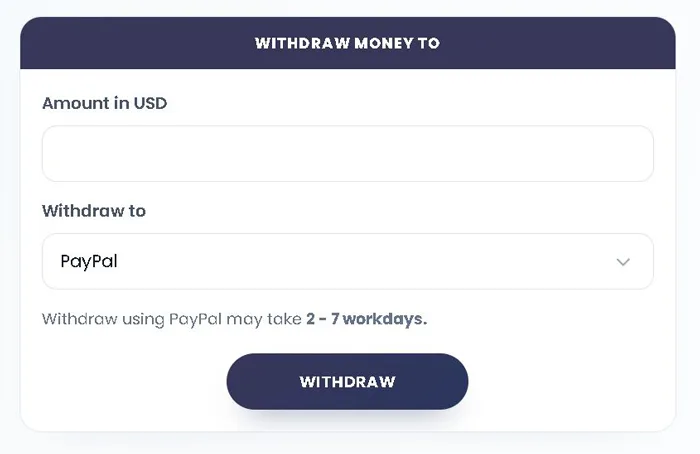
And what reaches the wallet is real money. I’m glad all my earnings show up directly in dollars, with no points to convert into money, because that way I know for sure how much I have. Withdrawals work mainly through PayPal and through direct bank transfer in certain countries.
When I take the money out, I log in from my computer and not from my phone, because it’s safer that way, and I check carefully that the payment email is exactly the one I signed up with. A small difference between the two can cause errors with the transfer, and that’s the last thing I want for money I worked for.
Anyone who’s just starting out needs patience, because the first earnings stay pending for at least a week while the team reviews the tests. And you also have to remember that you’re the one who goes into the account settings and requests the transfer, because the platform doesn’t send the money to the bank on its own.
But that’s exactly what reassures me. Not a cent leaves the wallet unless I request it.
How much money can you make?
I expected Userfeel to send me tests fairly often, because the hourly pay looks very good. But there are very few open tests, and that’s a problem for everyone, both people who have just signed up and people who log in often. I’d log in to my account and a lot of the time there was nothing to do, so you can’t count on having work every day.
How many invitations reach you depends a lot on the country you live in. Clients target their products at specific markets, and people in the main Western countries get more invitations than people in other regions. Userfeel also says the star rating clients give you helps decide how many tests you get, and testers with high ratings are automatically favored for the next invitations. But that information comes from them, and I had no way to check it.
When you do get a test, there’s no fixed hourly rate. You get paid an amount per test, and that amount goes up with the length of the test. I divided each payment by the minutes the test required and got:
- the 5-minute test: $3, $36 an hour
- the 20-minute test: $10, $30 an hour
- the 40-minute test: $20, $30 an hour
- the one-hour test: $30, still $30 an hour, the highest payment for a single test
Which option is better? It depends on what you’re counting. The 5-minute test has the best hourly rate, at $36. The one-hour test brings in the largest amount from a single test. I’d have been fine with any of them, as long as they came more often.
You can see how rarely they come from what people write on Reddit, in the r/usertesting subreddit. One tester from the UK made $10 in a whole year and $20 the year after. Someone else made only $20 in almost two years of having an account. I added up the first tester’s amounts, and it comes to $30 over two years, exactly what a single one-hour test pays. It frustrates me to see that, because a good rate is no use without tests.
After the screening questionnaires, what’s usually left is $10 or $20 earned over a few months. And when you finish a test, the money doesn’t come right away. The test sits in review for about a week, and only then can you withdraw the amount. That week doesn’t bother me. It’s nothing compared to how long you wait for a new test.
It’s worth filling out your profile completely, because some clients look for people with a very specific profile, and one field left blank can keep you out of their tests without you ever finding out you would have been a good fit for them. When an email about a test comes in, it’s worth logging in right away. The other members take the open spots in a few seconds, and it’s a shame to lose $30 over an email opened too late.
Userfeel isn’t a main source of income. It’s a small bonus on the side, good for someone who’s just starting out and wants to earn $10 every now and then, without expecting a lot of tests. For a more serious amount, you use it alongside other panels.
And $10 that comes in every now and then is money I don’t turn down.
Userfeel on Trustpilot
When I read what testers write on Trustpilot, the money part puts me at ease. Several of them say Userfeel is a trustworthy site and that payment reliably arrives in PayPal once the test is approved. And I don’t take that for granted.
But reliable payment only helps if you have something to test. The strongest recurring complaint is the lack of tests, and a few people say they waited months on end for a single invitation. Anyone who signed up for a little extra money coming in regularly ends up with more waiting than money, and that’s where the frustration in the reviews comes from. It’s a shame. Because the hard part, the payment, does work here.
Anyone who does manage to get a test can still run into two surprises. The recording software sometimes doesn’t recognize the built-in microphone on a Mac or iPhone, and the test gets rejected. The person does the whole test and ends up with no money because of software that doesn’t work. The second surprise is the low pay for the time required. One tester got $3 for a 40-minute test, which works out to 7.5 cents per minute. I’m stingy with my time, and 7.5 cents a minute doesn’t convince me.
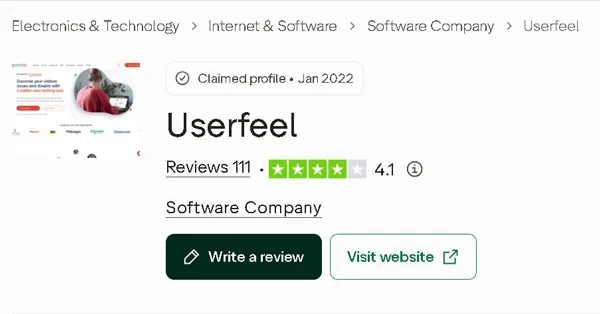
The ratings show the same split. Userfeel has 111 reviews on Trustpilot, with an average of 4.1 out of 5 and the “Great” label. With an average that good, I expected few 1-star ratings. These are the percentages for each rating:
- 1 star: 24%, almost one in four reviews
- 2 stars: 4%
- 3 stars: 4%
- 4 stars: 10%
- 5 stars: 58%
Added up, 4- and 5-star ratings make 68%, 1- and 2-star ratings make 28%, and only 4% sit in the middle, at 3 stars. Rounded, that comes to roughly 70% good or neutral opinions against 30% bad ones. Almost everyone came with a firm opinion, one way or the other.
How recent are these opinions? Only 23 of the reviews are from the last 12 months, and the other 88 are older. But I haven’t come across anything that would have suddenly changed what people think of the site: no massive data breach and no change in the rules. I don’t think the older ones are out of date.
The reviews don’t come only from testers. The companies that order tests write them too, on G2 and Capterra, and they’re much happier. They’ve left 105 reviews on G2 and 16 on Capterra, with an average of 4.5 out of 5 on both sites. Of those 121, about 85% are good and 15% are bad. The companies praise how easily they can set up an unmoderated test, how quickly they get the video recordings back, and how much the AI tools help them compile their findings. But the pay-as-you-go pricing, with no required subscription, also comes up often, and many of them see it as a big advantage over the competition. And I fully understand them.
What the companies are unhappy about also has to do with the testers. Their quality varies: some answer without going into detail, and others don’t actually have the profile they claimed. They also write that the page where you put together highlight clips from the recordings is clunky, and that managing the credits in your account doesn’t always go smoothly. One verified customer says he got testers who didn’t match the profile he asked for, requested a refund, was turned down, and then support ignored him. It’s just one story, but if I were the one paying for the tests, I’d want to know someone will answer me when something goes wrong.
Red flags you should never ignore
When a site pays people to do tests, my first fear is that it’s a scam. With Userfeel, I didn’t find any verified evidence of large-scale fraud, unpaid testers, or consent forms designed to trick you. Complaints about rejected tests are isolated, and they show up on every testing site.
The recording is what puts me on edge. The test is done with your screen and microphone on, and the privacy policy says openly that the companies that order the test can use the video however they want. It also asks you to hide anything personal or to give made-up details. I liked the honesty. But watching what ends up in the video, like an open email or a notification, is entirely up to you. Check your screen before you start the test!
I also read the terms. The service is provided “AS IS”, Userfeel’s total liability is capped at the amount the client paid for its project, and the client also accepts the risk that the testers, who work independently, may see its intellectual property. This part concerns the clients, but it shows how little the company takes on. If something goes wrong because of a video, I don’t expect anyone to protect me.
Who can use Userfeel?
When I went to the official Userfeel site, I headed straight for the big blue “Sign up for free” button. I thought that was where everyone signed up. But the form behind that button isn’t for testers. The right one is all the way at the bottom of the page (in the footer), at the “Get paid to test” link, and you have to scroll through the whole page to get to it. It’s a shame that the biggest button is the one that sends you somewhere else, because that’s where anyone visiting for the first time will go.
Signing up doesn’t cost anything, and there’s no entry fee to pay. I liked that. A site that pays you to test has no reason to charge you to let you in.
The form asks for a lot of personal information. The required fields are:
- first and last name
- email address, twice, for confirmation
- the country you live in and time zone
- year of birth
- gender, marital status, and whether you have children
- native language and the languages you speak fluently
- your web experience
- payment method and payment email
For the payment method, I had only one option, PayPal, and I don’t know if other people see more.
The rest of the fields are optional, and you can leave them blank. They range from the devices you test on, the education you’ve completed, and your annual household income to your employment status and type, the type of community you live in, how much you use social media, and your LinkedIn profile link. I was relieved that household income is one of them, because it’s not something I put on a form lightly.
Once you’ve filled everything in, you click “Apply for tester” and get a confirmation link at the email address you signed up with.
And all of this only counts if you’re 18 or older. Userfeel operates in over 40 countries, but no one under 18 can sign up from any of them.
Can you use it on your phone?
Userfeel has an official app for tests done specifically on mobile. You can find it on the App Store for iOS and on Google Play for Android.
Getting to my first mobile test took 4 steps:
- In the store, I found the app called Userfeel, published by Userfeel Ltd., and downloaded it.
- I logged in with the details I had from signing up. I was hoping I wouldn’t need a new account. And I really didn’t, because the profile, notifications, and balance fully sync between the site and the app.
- I gave the app permission to use the microphone and turned on the screen recording options.
- When I got an invitation to a mobile-only test, I opened the app, read the instructions, and started the live video recording of my screen.
I’m a little wary when an app asks for access to my microphone and screen. But here, that’s exactly what the test is: a screen recording.
The Android version has been downloaded more than 500,000 times worldwide. The iOS version has 3.1 stars out of 5, is 30.4 MB, and is rated 4+ for age. It’s not a score that reassures me. But it comes from only 93 ratings, very few compared to the more than 500,000 downloads on Android, and I don’t put much weight on it.
Is Userfeel REAL or FAKE?
When I joined Userfeel as a tester, I was hoping for a small but steady income. That’s also what most of us look for on a testing site. Tests, though, show up very rarely, far too rarely for the number of people waiting for them, and I’m not the only one who’s disappointed. Many users complain about the same thing.
You might think a site with so few tests isn’t legitimate. That’s not true. Userfeel is real and has been around for a long time. It connects researchers at companies with testers like me, but it’s built primarily for the companies. They pay only when they need a test, without the hefty subscriptions of the big enterprise platforms, and they get the findings quickly, with help from AI. It seems like a sensible system to me for anyone who works in UX research or as a product manager and wants quick feedback now and then, without a moderator guiding the test.
I’m on the other side. And from this side, Userfeel can’t be the main source of income for anyone who needs a steady stream of tests.
If you want a place where you can earn money consistently, take a look at the list of the best survey and GPT apps. They all have good earning potential, and wherever you live, you’ll find at least one to sign up for.
And if you’ve tested on Userfeel or have a question about it, I’ll see you in the comments!