
Companies that need a lot of small jobs and people who’ll do them for a little money. That’s pretty much how people describe Microworkers to those who haven’t heard of micro-tasks. I visited the site, and I can tell you that description is pretty accurate. It’s a huge marketplace for small jobs that pay small amounts.
Maybe the name sounds familiar. Micro-tasks are one of the best options for anyone looking to make some extra money online. But any site like this needs to be checked out first, because you don’t want to work for someone who ends up scamming you.
So, is Microworkers trustworthy, or does it belong on the list of sites to avoid?
To find out, I tested it myself. I signed up for an account, checked out the kinds of jobs available there, looked for complaints that might give you reason to be concerned, and weighed how much you get paid against how much work you put in.
Everything I found is below, with all the details. You’ll know right from the start what to expect, and you’ll easily be able to tell whether the site is right for you or not.
What is Microworkers and how does it work?
On Microworkers.com, you take on small digital tasks posted there by companies (known on the site as “Employers”), complete them quickly, and receive a very small amount of money for each one, the kind that only adds up if you collect it bit by bit.
All you need to do them is a phone or a computer. No experience is necessary. Just attention to detail.
They call themselves a global crowdsourcing platform, meaning lots of small jobs divided among a large number of people, and they’ve been in business since 2009. According to their numbers, over 4,946,628 workers have collectively completed more than 217,755,838 tasks.
In this review, I’m focusing on two things. What does the site offer you as a worker, and is it worth signing up for to earn some extra money online? First, let’s look at the different ways to earn money and what you actually do for each one.
Micro jobs and tasks
The work here comes in small pieces, micro-jobs that you choose from a list right after you create an account. I had 1,738 on my list, which is quite a lot, even though the selection is even wider on the largest micro-task sites.
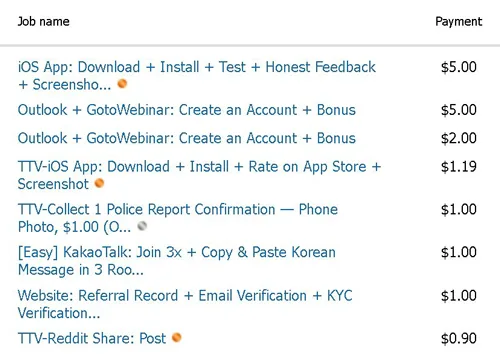
To narrow it down to what interests you, you can filter the list by category. There are 9 categories, which naturally fall into five types of work:
- “Annotation & Tagging” and “Categorization” involve labeling. In the first case, you box or outline specific objects in photos or video frames, such as all bicycles or all traffic signs, and this helps artificial intelligence learn to “see.” In the second, you move items into their respective folders (a garment is a “summer dress,” “winter jacket,” or “formal suit”) or arrange photos from an event in chronological order.
- “Transcription” and “Translation & Validation” require an eye for detail. In the first task, you decipher a blurry photo, such as a crumpled receipt, a license plate, or a handwritten name, and type the letters and numbers into the box exactly as you see them. In the second task, you read short sentences that have already been translated and check that they sound natural, not like they were written by a robot that doesn’t know grammar.
- “Content Moderation” and “Sentiment Analysis” rely on your judgment. You go through social media posts, public ads, and short videos and flag those with offensive language, scary images, or adult content, meaning anything that violates community guidelines. Or you read a short message or a tweet full of emojis and say whether the person who wrote it seems happy, angry, confused, or neutral.
- “Data Mining & Extraction” and “Software & App Testing” take you online and on your phone. You play the role of a digital detective, checking online to see if a company’s address and phone number are correct, or copying the technical specifications of phones and hotels into a spreadsheet. Or you install a free app on your phone or a secure browser plugin and check whether it launches, whether it freezes when you click, and whether it looks clean on the screen.
- “Surveys & Feedback” are short surveys with multiple-choice questions about the products you choose, your favorite brands, and some basic information, such as your age range and hobbies.
Most of them take just a few minutes. However, there are also tasks that take much longer and pay too little for the time you spend on them, and with those, you’ll end up losing out on your time. It all depends on what you choose.

When you see a task you like, click on it and read the details, starting with a description that tells you how many items are left to complete, how much you’ll earn for it, roughly how long it will take, and how long you’ll have to wait for it to be reviewed and approved. Only then will the money be deposited into your Microworkers account.
These jobs make up the bulk of the site and are very similar to what you’ll find on similar sites like Clickworker, Sproutgigs, or RapidWorkers.
With surveys, things are a little different. Paid surveys sometimes appear in that category, but I’ve come across very few. The ones I did find almost always came from other members who were promoting a survey offer and getting paid for it. This means there’s another person between you and the survey, and the reward is much lower than what you’d get on a real survey site. For such small amounts anyway, an extra middleman is too much. If you want surveys on sites designed specifically for that purpose, I’ve tested MarketAgent, Surveoo, and GreenPanthera, and you can find my reviews of them.
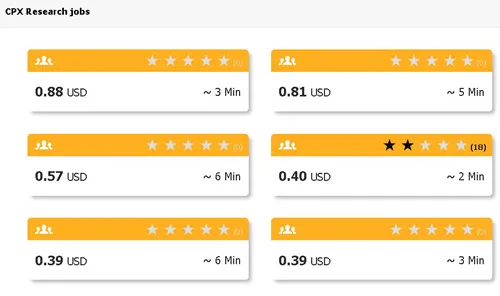
There’s also a second, less obvious way to access surveys. On the page listing all the jobs, next to the number of surveys you can take right now, you’ll see “Partner jobs available to you:” (it also appears in the image above), along with a list of survey providers. I only had three providers listed there. CPX Research showed me 28 surveys, paying between $0.33 and $0.88 each, and next to it were Bit Labs and myChips.
Honestly, I complete these surveys elsewhere, on the survey sites that pay the best, like Timebucks or FireFaucet, because many of them have exactly the same surveys. If you generally like Microworkers, it doesn’t hurt to know that you can find them here too, on CPX Research, Bit Labs, and myChips. However, the providers vary depending on where you log in from, so others may appear in your account, even more than just these three.
Microworkers KYC verification process
The money on Microworkers won’t reach you until you prove who you are with documents and photos. There’s one more step to take, a small one, without which you won’t even see the jobs.
When I opened my (free) account, the job list was locked. You unlock it by linking your account to a phone number or an online wallet that’s actually active, and there are three ways to do this.
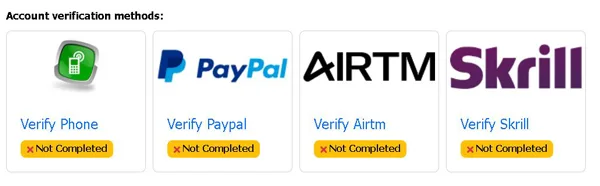
If you choose the phone option, you enter your cell phone number on your profile page, and the site sends you a one-time PIN via text message. You enter that PIN on the site, and that’s it, you’ve linked your phone. With PayPal, the account must already be active and verified, and the email address on file there must match, letter for letter, the one on Microworkers. Skrill and Airtm work the same way, requiring an active wallet and automatic, real-time email verification. If the addresses don’t match, the link is rejected immediately (if you have multiple email addresses, double-check which one you used when you registered).
Once you’ve completed this step, you’ll be able to view jobs and take on small tasks. But you won’t be able to withdraw money yet.
There’s a $1 threshold for that. As soon as your balance reaches that amount, the system sends you an automatic alert to complete the KYC (Know Your Customer) identity verification. You’ll need to upload three photos. The first is a clear, full-page photo of a valid government-issued ID, such as a passport, driver’s license, or national ID card. The second is a simple close-up selfie for facial recognition. The third is also a selfie, this time with the same physical ID held next to your cheek, so that both are visible in the frame.
The verification process is manual and takes anywhere from 48 hours to over 30 days, depending on the quality of the photos you upload. However, I’m less worried about the wait and more concerned about how much personal data you’re giving away just to earn your first dollar.
How do you get paid?
When you request money from Microworkers for the first time, instead of money, you receive a letter.
The request automatically triggers an address verification process, your balance remains frozen in your account, and a unique 6-digit activation code (Activation PIN) is sent to your home via regular mail, which may take up to 4 weeks to arrive. You enter it on the website, and from then on, your address is verified permanently. You can only withdraw your money after this step.
How you get your money is something you want to know in advance about any site where you work online, and this is exactly where Microworkers makes you wait. I haven’t gone through their verification process and can’t tell you how well it works. I don’t have the patience for that. I’d be happy to verify my identity by phone or email anytime, even if it’s an extra step, because they also need to know that their members are trustworthy. A paper letter from an international site is a whole different story, especially when many survey sites pay quickly, some immediately or almost immediately. Getting your money should be the easy part.
Once your account is verified, the payment methods are good, with a minimum threshold of $9 for most of them. The threshold alone isn’t enough, though. You also need to have enough in your account to cover the fees, because Microworkers takes 10% on withdrawals, and the payment processor takes its cut as well. Here’s the total percentage taken out of your earnings, from the cheapest to the most expensive method:
- Payoneer, starting at $20, 15% (of which 5% goes to the processor)
- Skrill, starting at $9, 16.5% (6.5% to the processor)
- PayPal, starting at $9, 17.5% (7.5% to the processor)
- PIX, only in Brazil, starting at $20, 20%, one dollar out of every five
- Dwolla, only in the U.S., starting at $9
On PayPal, for example, with an active balance of $10.00, the site’s 10% fee has already been taken (they deduct it as soon as you submit the tasks). Another 7.5%, or 75 cents, is deducted from your verified PayPal account, and you receive $9.25 in your wallet. It seems like small change, but it adds up with every withdrawal.
I think these fees are high, and I’d look into them before signing up for a Microworkers account, not after.
How much money can you make?
On Microworkers, you tap an emoji, copy numbers from a receipt, or draw a box around an object in a photo, and each task like this is done quickly. That’s exactly why you’re paid in cents. The amount goes up depending on how complicated the task is:
- Data annotation for artificial intelligence, where you draw boxes around objects in an image so the AI can learn to recognize them. It requires 10–15 minutes of meticulous attention to detail and pays between $0.50 and $1.50 per task, the highest pay on the site.
- App testing and sign-ups, which involve installing a secure app, exploring it, and submitting a screenshot at the end, for $0.25–$1.50 or more, in 5–12 minutes.
- Transcription and data entry from blurry images containing receipts or license plate numbers, taking 2–4 minutes for $0.05–$0.25.
- Clicking and sorting, meaning you choose the emoji that matches the emotion of a post or place a piece of clothing in its category, in 30–60 seconds, for $0.02–$0.07. For 2 cents, honestly, you won’t even have time to get bored.
Between 2 cents and a dollar and a half seems like a big difference, but on a per-minute basis, the numbers are getting closer. If you complete a 7-cent click in half a minute, you make 14 cents per minute, and if you complete a $1.50 annotation in 10 minutes, you make 15 cents for work that requires you to stay focused the whole time. A one-cent difference. At the lower end, the ratio is 2 cents to about 3 (and with annotation, you have to keep your eyes glued to the screen the whole time). Is 15 minutes of concentration worth 50 cents?
In my experience, you make more money on the big “get-paid-to” sites, which also have a lot of tasks every day.
On Microworkers, no matter how hard you work, you won’t make a full-time income. With that hope in mind, disappointment is almost certain.
Microworkers Trustpilot
On the site, a task often pays between $0.01 and $1. These are very small amounts. The real trouble, however, comes when you want to withdraw the money you’ve earned this way, and that’s what most people write about.
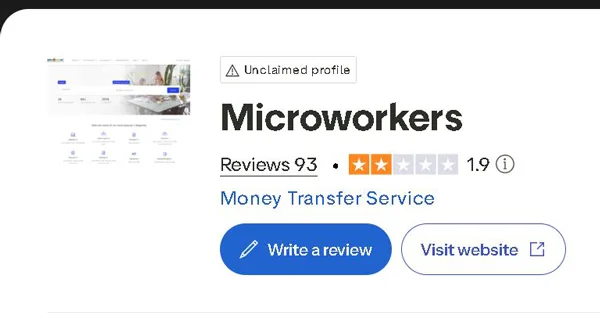
I went through several hundred reviews on Sitejabber, Trustpilot, and ComplaintsBoard, where Sitejabber has 82 reviews with an average rating of 2.4 and 75% of them being one-star reviews, Trustpilot has 93 (combined from multiple domain variations) with an average rating of 1.9, and ComplaintsBoard has 25 complaints, 84% of which remain unresolved.
Out of a sample of about 200, roughly 75% are negative, and their reasons are similar:
- Delayed withdrawals. Some waited for months for a PIN, while others had their payments rejected due to a minor discrepancy during KYC (identity verification).
- Sudden account bans, occurring right after a withdrawal request, with the explanation “Multiple Accounts” or “Proxy/VPN.” This leaves you without an account and without the balance you worked for, so I would take this risk very seriously.
- Customer support where tickets receive either an automated message or no response at all.
- A confusing interface, complained about by both workers and employers, with a job-matching system that throws errors like “TTVSlot-E0001” when you try to take an available job.
You can come to terms with the low pay from the start, even if you don’t like it. But you’ll never come to terms with having your account closed right when you ask for your money.
The older complaints, from 2011–2019, mainly concerned PINs sent by mail, while those from 2023–2026 mention rejected KYC verifications, fees charged on inactive accounts, and immediate bans based on IP addresses.
The other group, about 25%, consists of a few people who have been on the site for a long time. They confirm that the money eventually arrives (provided you strictly follow the KYC and IP rules), although, as they also point out, the payout is very small.
Even this quarter is slightly exaggerated. Among the positive reviews, I found a few that seemed templated or displayed an enthusiasm that was hard to believe, such as “Good site for dating” (on a task-based website) or praise written in broken English, which appear to be fabricated or made up.
Without them, the positive portion would be even smaller.
Red Flags you should never ignore
The money you’ve collected stays in your account until you withdraw it, and almost all the risks are related to that balance, the account itself, or your personal information:
- Manual PIN verification. Several users, independently of one another, claim that they intentionally drag it out until you give up on the money.
- Account closure. The terms allow them to close your account at any time, for any reason or no reason at all, as they see fit, whether they notify you or not.
- Inactive account fee. If you go 365 days without any activity, the terms state that they’ll deduct $5 per month from your balance, down to zero or until they close the account. Whatever you’ve saved up bit by bit is gone just like that.
- Links from employers. Some workers say they were penalized when they refused to post external links leading to phishing or malware, even though the site’s rules prohibit them.
- The 2013 privacy policy. It doesn’t outline the data rights you have today, doesn’t specify the legal basis for how they use your data, and doesn’t require consent for cookies, which poses a compliance risk for anyone in the EU or the UK.
The PIN and links remain allegations (credible, but still allegations), and I have no way to verify them. The other three were written by them, in their rules.
That’s enough for me. I’d only risk what I can afford to lose.
Who can use Microworkers?
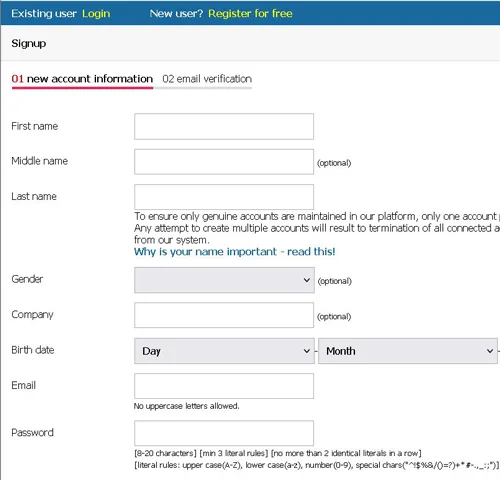
When I created my account, I clicked the “Register” button at the top right of the page, was taken to the registration form, and completed it field by field with all the required information:
- first name, last name, and a middle name (if you want)
- gender (optional)
- company name (optional)
- day, month, and year of birth
- email address
- password
- home address (a real one), including the ZIP code, city, region, and country where you live
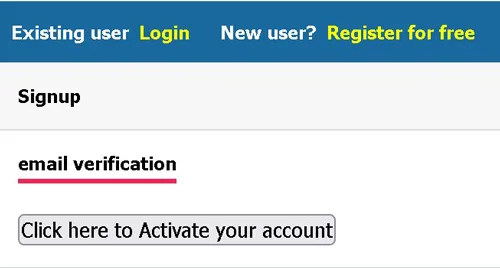
I clicked “Submit,” received a confirmation link via email, clicked on it, and was then able to log in. Choose your email address wisely (one that you actually use). Temporary email addresses aren’t allowed, and you won’t be able to use an account created with one.
The country in your email address isn’t just a box to check. You can only complete tasks while physically located in the country where you registered. If you log in from another country, for example while traveling, or if you hide your location with a VPN, the site’s security system will flag your profile. And it does so immediately. I’m afraid that simply forgetting to turn off a VPN is enough to get you into trouble with your account.
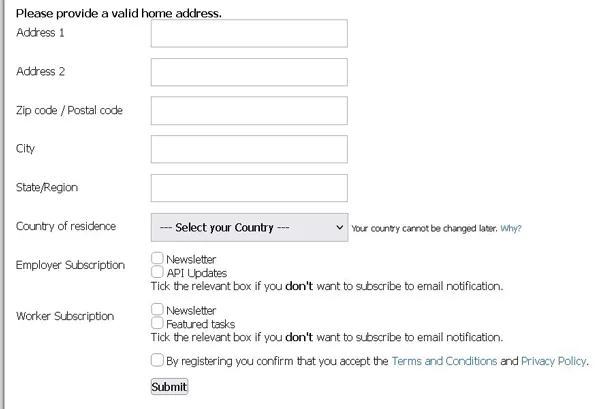
Otherwise, it doesn’t really matter where you live. The site attracts people from over 190 countries, from the United States and the United Kingdom to Kenya, India, and the Philippines. It’s just that not everyone sees the same tasks. Some are available everywhere, while others are only available in certain countries, because employers run their campaigns by region. When an employer wants feedback only from the United States, Canada, or Western Europe, someone from another region won’t be able to see that task in their account.
For them, that task simply doesn’t exist.
Can you use it on your phone?
On a phone, Microworkers opens in the browser, just like any other website, because they don’t have an official app. That’s how I used it, and the page fit on the small screen well enough for me to find jobs without having to search too hard and to read what each one required, although sometimes I had to zoom in or out a little with my fingers.
It’s not entirely convenient. It works, though, and for a website without an app, that’s what matters.
In the App Store and on Google Play, you’ll come across apps named Microworkers. None of them belong to the website. They’re guides or programs where you can jot down your tasks, created by people who have no connection to Microworkers, so the name doesn’t mean they’re affiliated with the site.
For the small tasks you can tackle when you have a few spare minutes, your phone is very handy.
Is Microworkers LEGIT or SCAM?
I like that on Microworkers you can work from anywhere in the world and that you can find a good number of tasks almost everywhere, and most of them can be done without much effort.
The trouble starts when you request payment. The pre-payment verification takes a very long time, the commission they deduct upon withdrawal is, in my opinion, unreasonably high (and every fee hits your pocket), and you need a lot of patience before you can actually speak to someone from customer support.
What’s worse is something else. Their rules are strict, and often you don’t know exactly what they’re asking for, the legal terms haven’t been updated, inactive accounts are charged a fee, and even a minor discrepancy with your IP address or during identity verification (KYC) can lead to your account being closed. And this happens just when you’ve reached the withdrawal threshold. You work your way up to the threshold, and just when you’re about to get your money, you could lose your account along with everything you’ve earned.
The money does come through, though, and the site has been around for a long time, so we’re not talking about a scam. It’s just that only those who strictly follow its rules receive it, even if they don’t understand all of them. It’s a legitimate company, but for the average person, it means a lot of work and quite a bit of risk.
I think it’s only suitable for someone from a country with a very low cost of living, who can overlook a difficult-to-use interface, low hourly earnings, and the possibility of losing their account at any time. If you live in a country with stricter regulations, you’re better off not creating an account, because your data isn’t protected as it should be.