

If you’re looking for paid survey sites, you’ll come across PrizeRebel quickly. It’s one of the best-known sites of its kind, along with Timebucks, Earnopolis, and FireFaucet (I wrote a review of each one, if you want to compare them to PrizeRebel).
On PrizeRebel, you earn points for small things you do online, like market research surveys, short videos, apps you download to your phone, or offers where you sign up for other services. Sites like this are called get-paid-to sites, or GPT for short, and the name says exactly what happens there. They pay you to do something.
PrizeRebel is legit. It does what it promises.
But on PrizeRebel, you don’t pay with money. You pay with your time and your patience. A survey here, a video there, an app you install and forget about on your phone, and the time goes by without you keeping track of it. What you can’t see right away is how much all of that is worth in money at the end. How many points do you need before you feel like it was worth it?
Below, I go through PrizeRebel piece by piece, including everything you see once you’re inside the site, so you have all the details when you decide whether to sign up. Just don’t sign up before you get to the end!
What is PrizeRebel and how does it work?
PrizeRebel pays you in points for market research surveys (companies want to know what people think) and for small online tasks. Then you redeem the points for cash or gift cards, and you don’t pay a cent to join. Sites like this are called “Get-Paid-To” sites, meaning you get paid to do something, and the name really does say it all. You won’t see how much these points are worth, or how much time it takes to earn them, until you get to the ways to earn below.
It’s a legit site, and it has been around for a long time. According to its profile on the BBB (the Better Business Bureau, where people file complaints about companies), the company behind it is iAngelic, Inc. The company is registered in Nevada and based in Valencia, California. It does business as PrizeRebel and started on March 13, 2007. This is the company responsible for your data and the money you earn on the site.
On that same profile, I found two complaints in the last 3 years. That’s not even one a year! And none in the last 12 months.
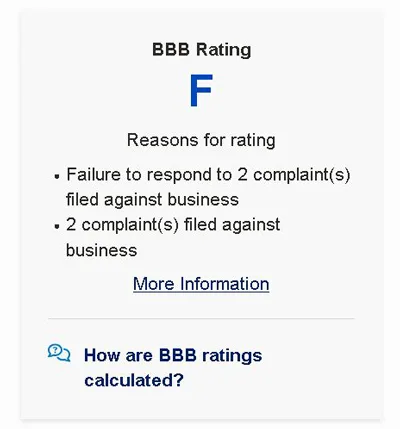
Still, the BBB gives the company an F, the lowest grade in its system, and it isn’t BBB accredited. The F doesn’t come from complaints. It comes from how the BBB sees the company’s transparency and from the fact that it isn’t accredited. Having few complaints is a good sign. But on a site where you share your personal data, transparency is something I pay attention to as well, even if I don’t have a number to put next to it.
It’s up to you to decide how much weight one letter carries next to two complaints in 3 years.
Paid surveys online
The survey section on PrizeRebel asks you to fill out a profile before it shows you any surveys. You enter your age, gender, ethnicity, where you live, what you do for work, how much you earn, your housing situation, whether you have kids, and your health and shopping habits.
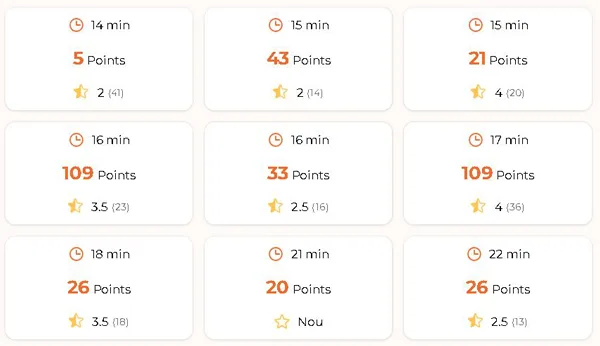
Once the profile is done, the tabs show up in a row at the top of the page. Each tab is an outside market research company that pays you in points for your answers (you’ll also see them called survey routers or walls). Here are the ones in my account, with the number of survey cards I counted on each:
- Prizerebel, the site’s main tab
- Prizerebel 2, 11 cards
- Cherries, 10 cards
- Gold, 9+ cards
- Samplicio.us, 2 cards (the FAQ spells it Samplicious)
- Spectrum
- SaySo, no cards, just the message “There are no surveys available at this time”
- inBrain, not open in my country, with “We are not available in your country yet” on the screen
The most I found on a single tab was 23 cards. Counting those, there are at least 55 surveys, and that’s with SaySo and inBrain empty. How many you’ll see on a given day isn’t listed anywhere, because there’s no fixed number per day.
Each card tells you three things before you start: how long it takes (between 5m and 50m), how many points it pays (between 4 and 116), and sometimes how many stars other users gave it. The longest one takes ten times as long as the shortest. You can sort them by Best Match, Shortest Surveys, or Most Points, and the right choice depends on what you have more of. If you have a few free minutes, check Shortest Surveys. If you have patience, check Most Points.
But the card doesn’t guarantee you anything. At the start of the survey, each company asks you again how old you are, where you live, and what you do, plus a few things about the survey’s topic. Sometimes another round of questions comes halfway through, to check whether you’re exactly the person they need. So what was the point of the profile?
If you don’t qualify, you get 0 points. A survey usually takes between 5 and 30 minutes and pays between 4 and 116 points (sometimes more in the US). Say you get a 30-minute one and it screens you out halfway. You’ve spent 15 minutes for nothing, and you don’t get that time back.
On Cherries, you at least get some Time Points for the questions you answered, even if you don’t qualify. It’s not the pay for a full survey, just a small piece of it.
In the browser, there’s no point clicking random answers to finish faster. Start with the Prizerebel tab, where you can see the stars from other users and skip the one-star surveys, the ones that disqualify you every time (nice system, it really does save you from some wasted minutes!). Then move on to Samplicio.us and Cherries, answer every question the same way you did in your profile, and keep your VPN off the whole time. New surveys mostly show up on weekday afternoons, when the companies are looking for people again. I see them as something to do on the side when you have a little time, not as guaranteed pay for every hour.
All the numbers here come from my account. If you live in a different country, you’ll have different tabs and different rewards, smaller or bigger, and maybe you’ll find something on SaySo, which I didn’t.
Complete free offers and random tasks
The offers on PrizeRebel come from other companies. These companies give you points for downloading their games and reaching a certain level, trying their apps, creating an account with them, or watching some videos. You’ll find them under Offer Walls, where each company has its own offerwall, basically its own storefront of paid ads.
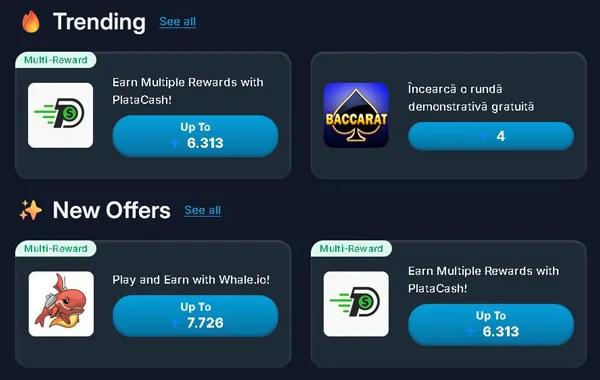
My account has 7 offer walls, set up as tabs in a row at the top: RevenueUniverse (it calls itself RevU once you’re inside, so don’t worry, you didn’t land somewhere else), inBrain, Tapjoy, MyChips (labeled “powered by LoyaltyPlay”), Adscend (or AdscendMedia), ayeT Studios, and ToroX. Click a tab and the partner’s store opens right inside PrizeRebel, with its own filters for Android, iOS, and Desktop/Web and its own sort options. If you sort by Payout High to Low, the best-paying offers move to the top. Those are exactly the ones with “up to” in front of them.
What you have to do for the points varies a lot from one offer to another:
- Android, iOS, or PC/Steam games, from RAID: Shadow Legends, The Grand Mafia, and Puzzles & Chaos to small puzzle and merge games. You download them and reach the required level or checkpoint within a set number of days.
- Non-game apps and computer programs that you install and open, like the Opera GX browser on ayeT Studios.
- Free trials and paid subscriptions, like Prime Video – Free Trial on Adscend.
- Sign-ups on partner sites, like CashInStyle, PlataCash, or BlueGem, on RevU and Adscend.
- Real-money casinos and sports betting, only for 18+ or 21+, depending on local law. You open an account, deposit, and play a minimum amount (here you’re the one paying before you see any points), for example 10 euros at Unibet or Pokerstars on ToroX. Next to them, there are also social casino slot games, where you don’t play for real money.
- Videos on ad-supported channels, like PixelPointTV on Adscend, split into categories like Sweets, Movie Buzz, and Tech Talk.
- Short quizzes and surveys right in the storefront, like polltastic on ayeT Studios or Cint Survey Router on Adscend, a router that sends you from one survey to the next.
The biggest numbers I saw were on Tapjoy, and all three are slot games. Rock N’ Cash Vegas Slot Casino shows up to 29,872 points, Slot Mate – Vegas Slot Casino up to 29,829, and HighRoller Vegas 19,226. Other offers over 10,000 are Slime Loop: Color Puzzle (16,403.75 on ToroX), Time Master (16,290.46 on MyChips), The Grand Mafia (16,192.58 on ToroX), and Merge Restaurant – iOS (11,027.65 on Adscend).
But “up to” adds up the points from every stage of the game, including the last ones, where you often have to keep playing or buy something in-game. How many people get to 29,872 without paying anything? And how long do they play to get there?
At the other end is a free quiz on RevU worth 2 points. I did the math, and the slot on Tapjoy shows almost 15,000 times more! Right above the quiz are a Baccarat task on ToroX and RevU (a demo or a sign-up) for 4 points, and Zinx – Android on Adscend for 13.1 points.
The usual offers fall between these two ends. Quick sign-ups, quizzes, and apps pay around 13-265 points, like Opera GX with 45 on ayeT Studios, CashInStyle with 49-65, and Prime Video Free Trial with 261.25 on Adscend. Small, simple games go from about 135 to 3,000 points. Happy Color has 139 on Tapjoy, Knit Match up to 735 and Pusher Master up to 1,100, both on ayeT Studios, and Car Sort! goes up to 2,945.77 on ToroX. On that same storefront, the casino offers pay less, 2,673.44 points each, and they ask you to deposit and play 10 euros.
If you’re over 18 and want to earn points faster than with surveys, where you can get kicked out every two minutes, skip the offers that need a card, a free trial, or a casino deposit. Forget to cancel just once, or lose the deposit, and you end up losing money, even counting the points. That leaves mobile games with multiple rewards, from about 700 to 3,000 points, on ToroX, MyChips, and ayeT Studios. Take a screenshot after each level you finish, before you close the game, in case the points don’t show up and you need to submit a missing points ticket. With these games, the first levels already pay out along the way, and if you quit halfway, the points for the levels you finished stay in your account.
Raffles and Contests
Under the Win tab in the top menu, PrizeRebel has two features that work in completely different ways. With Raffles, you pay 10 points for a ticket and wait for the drawing to see if you win a gift card. With Contests, you don’t pay anything. Everyone is automatically put on a 2-week leaderboard, and the people at the top get between 200 and 2,800 bonus points.
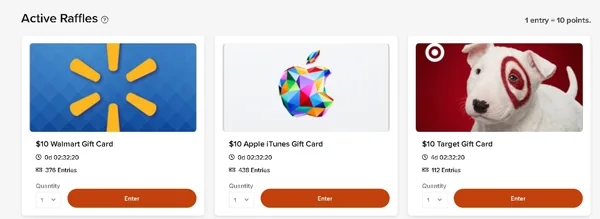
Raffles is a drawing you pay for out of your points balance. The page shows the prize cards. You pick one, type how many tickets you want in the Quantity box, and press Enter. The points come out of your balance right away, not when the drawing happens.
These were the cards in my account, with the number of entries each one had when I tested it:
- $10 Walmart, 375 entries
- $10 Apple iTunes, 437 entries
- $10 Target, 111 entries
- $20 Amazon.com, 147 entries
- $50 Amazon.com, 236 entries (fewer people than on the $10 Walmart card)
With one ticket for the Target card, you have a 1 in 112 chance. For iTunes, it’s 1 in 438. And each of the 437 entries there cost someone 10 points, so that’s 4,370 points spent on a $10 card. Why are people lining up for the small prize when fewer people entered the drawing for the $50 one? Winners are drawn at random when the timer runs out. More tickets mean more chances, but anyone who doesn’t win loses the points they spent and gets nothing back!
If you just turned 18 and you’re saving up for your first cashout, skip Raffles completely. You’d be paying for that 10-point ticket with exactly the points that would get you to a guaranteed $5 withdrawal (I cover the payment methods and the minimum for each one later, in the payments section). A ticket is a long shot, paid for with points you need.
With Contests, there’s nothing to click. There’s no sign-up button, and you don’t pay any points. Every user is entered automatically. The only things that count are surveys and offers that are completed and credited during the exact contest period (the points have to be in your account by the time the contest closes. Finishing the survey in time isn’t enough.)
There are three separate leaderboards. The numbers below are the live ones from my account at the time. I’ll say it again because yours could look completely different.
The first one, US Surveys, is only for people in the US. First place there had earned 1,481 points, for a 2,800-point prize. Places 2-5 get 2,600, 2,500, 2,200, and 2,000, and the people in places 16-20 had 952 down to 918 points, for prizes from 400 down to 200.
Next is International Surveys, the leaderboard for people outside the US. First place had 964 points and gets 2,000, which is more than double that. Places 2-5 get 1,700, 1,600, 1,500, and 1,400. The people in places 16-20 held their spots with 656 down to 615 points and get prizes from 350 down to 200.
Offer Walls is open to everyone who does tasks from the offerwalls, the lists of offers on the site. First place had 1,377 points, for a 1,600-point prize, and places 2-5 get 1,500, 1,300, 1,200, and 1,100. Here’s something that doesn’t fit with the rest: people were holding places 11-15 with 262 down to 210 points, for prizes from 500 down to 200. On the international survey leaderboard, 600 points would have left you below 20th place. Are that few people doing offerwalls?
If you’d rather know what you’ll get paid ahead of time, without putting points into a drawing and without leaderboards that are hard to climb, there are three sites to compare. OfferNation gets its surveys from outside market research companies, like PrizeRebel does. Each survey’s card shows the rating users gave it, from 1 to 5 stars, and sometimes a bonus from the provider. From there, you can pick the short surveys, the 1-7 minute ones, that get you to a withdrawal faster. ySense is owned by Prodege, the same company that owns Swagbucks, and it works directly in dollars, not points. For your day-to-day activity, it has the Daily Checklist Bonus, a bonus you know about ahead of time, with no public competition. Earnit.gg is newer. It’s a simple rewards site with surveys and offerwall tasks, for anyone who wants to try another site too.
If you stay on PrizeRebel, let the contests run in the background. The top spots go to people who earn day after day, and there’s no point trying to compete with them. Do your usual surveys and tasks, and if you do get a spot in the top 20 during a busier 2-week period, you get the bonus points for free, 2-3 days after the contest ends. But they won’t help you level up your account. Contest winnings and bonus points don’t count toward your level progress.
Refer a friend
Anyone who signs up for PrizeRebel through your link earns you a percentage of their points every time they finish a survey or a task from the offerwall (the page with offers from other companies that you complete for points). The percentage starts at 10%, goes up as your level increases, and gets added to your balance automatically, because that person stays linked to your account permanently.
Nothing is taken from them. They keep all the points they earn, and they don’t pay anything to be your referral. But nobody gets a sign-up bonus, not them and not you. It’s $0. So how do you convince them to join if they don’t get anything extra?
I did the math on a 2,000-point mobile game offer. If your friend finishes it, you get 200 without clicking anything. But this only works with people who actually keep playing games or taking surveys after they sign up, like classmates or online friends who live somewhere else. How many people like that do you know?
People who live with you are a different story. If you and your brother or sister, your parents, or your roommate use the same Wi-Fi or the same phone hotspot, PrizeRebel treats their sign-up as your second account (two people seen as one person with two accounts). It can ban both of your accounts and delete your points, the ones you earned as well as the ones they earned. Don’t invite them!
You get one link, exactly as the site gives it to you (you can’t add your name or any other word to it), and you can send it to as many people as you want. There’s no limit. But spending hours pasting it everywhere is a waste of time. You’ll earn faster if you do the mid-paying game offers yourself, not the small ones and not the big ones.
I found my link by clicking Invite in the top bar after I logged in (you can also go straight to the “Invite” tab). It shows up in a white box, starts with prizerebel.com, and has the orange Copy Link button next to it, plus icons to send it directly to Facebook, X, WhatsApp, Messenger, Reddit, Yahoo or email, and Discord.
How does the loyalty tier system work?
On PrizeRebel, not every point counts toward your level. Only points from surveys, offerwalls (the pages with partner offers), and referrals move your progress bar forward. You still get the points from contests, promo codes, raffles, Lucky Numbers, and other bonuses, but they don’t count toward your level.
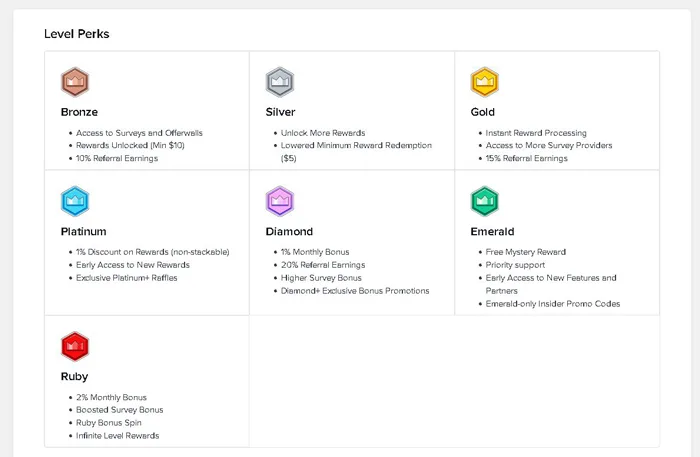
There are 7 levels, and you move up through them automatically as long as you keep earning from the three sources that count. Each level has 10 smaller stages, and at the end of each stage there’s a chest with a small reward waiting for you. You open the chest with the Claim Reward button. The big perks come when you move from one level to the next, though, and in my account they look like this:
- Bronze, where every new account starts. You get surveys and offerwalls, the minimum payout is $10, and you get 10% of what the people you refer earn.
- Silver. The minimum payout drops from $10 to $5, so it’s cut in half, and a few more rewards show up in the list.
- Gold. Rewards that are in stock are delivered instantly after your first verification, more survey providers become available, and you get 15% from referrals.
- Platinum. A 1% discount on rewards, which you can’t combine with another discount. You also see new rewards before other people do, and you can enter the Platinum+ raffles.
- Diamond. A monthly bonus of 1% of the points you earned that month, 20% from referrals (double what you get at Bronze), a bigger survey bonus, and Diamond+ promotions.
- Emerald. A free surprise reward called Mystery Reward, priority support, earlier access to new features and partners, and promo codes just for Emerald members.
- Ruby, the top level, launched in June 2026. The monthly bonus is 2%, and the survey bonus goes up too. At certain milestones, you spin the Ruby Bonus Spin wheel for extra points or gift cards. And the stages don’t stop at 10 anymore, so you keep getting stage rewards indefinitely.
By the way, the Platinum raffles and the Emerald codes are exactly the kind that don’t move your progress bar (they reward you for moving up, but they don’t take you any higher!).
Of all the levels, two make a real difference. Silver, where you can cash out at $5, and Gold, where reward codes arrive instantly. You get there at your own pace by doing surveys and mid-range mobile game offers (not the easiest ones and not the hardest ones). And every time a 10-stage bar fills up, you open your chest.
Above Gold, the perks are nice to have, but small. On a $5 gift card, the 1% Platinum discount saves you 5 cents. The monthly bonus at Diamond and Ruby grows along with what you earn, and you only start to notice it once you’re making hundreds of dollars a month. How many people make hundreds of dollars a month just from surveys and offers? And how long would it take someone who uses the site in their spare time to reach Ruby?
If this ladder seems like too much hassle for a few $5 withdrawals, I’ve written about three sites on my blog that handle moving up differently.
TestMate has no levels at all and no minimum payout for PayPal. It pays $7 to $10 USD for a 10- to 20-minute website test, so a single test earns you more than the Silver minimum payout. But invites don’t come regularly, and for now they’re only for people in the US and Australia.
Prolific doesn’t have ranks, chests, or point discounts either. Once your account is approved, you get direct access to academic studies and studies that help train AI programs. They pay a fair hourly rate, and you don’t have to climb any levels first.
PrizeBear is the most similar to PrizeRebel, with the same mix of mobile games, surveys, and apps to test, and a clear PayPal minimum payout from the start. But your money sits on hold for a while before you can withdraw it.
How to withdraw money on PrizeRebel?
PayPal withdrawals start at 500 points, which is what you need for “$5 USD PayPal Money – INTL.” That matches the site’s base rate of 100 points per US dollar, and with PayPal you actually get the full amount, without PrizeRebel keeping a single point. The Amazon card works the same way: 500 points for “$5 Amazon.com Gift Card*.” You can pick either one once you reach Silver level, and I’d stop at those two.
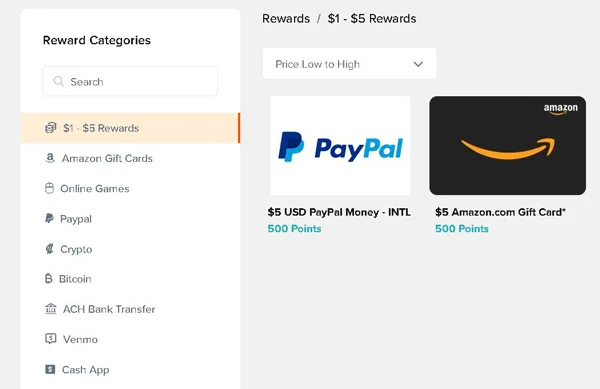
Before you request your first PayPal payout, compare the name and email on your PrizeRebel account with the ones on your verified PayPal account. If anything is different, the payment can end up in manual review (meaning it waits until a person looks at it), and your first payout stays stuck there.
The other methods depend on the country you live in. I’m sharing what I saw in my own account, but your list and numbers may look different. Gift cards, for example, also come in local currencies and smaller amounts, like 5 Canadian dollars for 346 points or 5 Australian dollars for 352. And when the currency isn’t the US dollar, or when the payout goes through a payment processor, PrizeRebel adds a few points on top of the base rate.
Here are the rest of the methods, with the minimum for each:
- Game codes and money added directly to your game account. “$10 Roblox Robux Game Card” takes 1,000 points, “10 EUR Steam Wallet EU” takes 1,140 (140 more than the $10 Roblox card), and “$25 League of Legends Riot Points” takes 2,400.
- Crypto, under “Rewards / Crypto.” “$5 in Free Bitcoins,” through Snapcard, costs 500 points, and “$5 Bitcoins reward,” through BitPay, costs 505 because BitPay takes 5 points for processing. But the BitPay card shows icons for Bitcoin, Dogecoin, Ethereum, Litecoin, and USDC.
- Bank transfer, under “Rewards / ACH Bank Transfer,” with the money sent through Tremendous straight to your bank account. “$10 ACH Bank Transfer (EU)” takes 1,050 points, and “$20 ACH Bank Transfer (EU)” takes 2,100.
- Venmo and Cash App, which only work in the US and aren’t an option at all for anyone living outside US.
With PayPal, $10 costs you 1,000 points. With a bank transfer, the same $10 costs you 1,050, because PrizeRebel keeps 50 points for every $10. At $20, the difference grows to 100 points, a whole dollar! On top of that, Tremendous can charge its own fees. Is it worth that many points just to get the money straight into your bank, when PayPal pays you without taking anything?
For crypto, if you only want Bitcoin, Snapcard gives it to you for 500 points. The extra 5 points at BitPay only make sense if you want Dogecoin, Ethereum, Litecoin, or USDC.
How do you ask for help?
On PrizeRebel, everything gets handled in writing, and a lot of the time you do it yourself. There’s a help center with 69 articles on the basic rules (it’s a Freshdesk, in other words a library of ready-made answers), plus the forms on the site that you use to send PrizeRebel a message. They don’t have live chat with a real person. There’s no official phone number either, and no official mobile app.
Where you send your message depends on what went wrong. If points didn’t credit for a game or an offer from the offerwalls (the lists other companies put on the site), you report it to the company behind that offer, in its support section inside the offerwall. That could be ToroX, ayeT Studios, MyChips or any other one. Include a screenshot. And what do you get if you write to PrizeRebel anyway? Maybe a week of waiting, and in the end their team still sends you to the company behind the offer.
Their Get Help form is for things that are actually on their end: a gift card code that didn’t reach you, a PayPal payment that didn’t go out the way it should have, or a question about your account.
Put everything you have in your first message, including the exact survey or offer ID and your screenshots, since every back-and-forth email holds you up a few more days. The reply can also land in spam, so check there too.
It’s hard for anyone whose account gets frozen. From what people have been writing lately, that’s exactly when PrizeRebel is slow to answer messages, with your points stuck in the account and no one you can call! I have no way of knowing how slow it is from one case to the next.
What users say about PrizeRebel on Trustpilot?
PrizeRebel has a 3.5 out of 5 rating on Trustpilot, from 789 reviews. That sounds calm and middle-of-the-road, except almost nobody is in the middle:
- 5 stars: 48%
- 4 stars: 15%
- 3 stars: 5%
- 2 stars: 4%
- 1 star: 28%, the second-largest group
Out of 789 people, that 48% is about 380 people who are very happy, and the 28% is about 220 who gave the lowest rating possible. Put together, the people who gave 3 or 2 stars don’t even make up a tenth.
So how do you end up with such a tame average? PrizeRebel doesn’t ask members for 5 stars, and it doesn’t give them anything for leaving them either. And the people who end up on Trustpilot are mostly the ones who have a reason to write: longtime users who are happy with the site, plus people whose accounts got flagged right when they requested a withdrawal.
Of all the reviews, 84 were written in the last 12 months without the site asking for them, and they give a pretty good picture of how PrizeRebel treats people now. For a free site where you collect points, a 3.5 rating with that many unprompted reviews in one year is normal.
It’s not a rating to be scared of.
I read the newest reviews, written between August and November 2026. People who are happy mostly mention the low minimum payout (so you don’t have to collect a ton of points before you see your first money). A few also say that on the higher membership levels, like Gold, PayPal withdrawals come through really fast.
People who aren’t happy complain about two things. A lot of them talk about getting disqualified from surveys. You answer questions for 10 or 20 minutes, and only at the very end does the site tell you that you don’t qualify. You get no points at all. Two of those in a row, 20 minutes each, and you’ve spent 40 minutes for nothing. Who still wants to take another survey after that?
The other complaint is more serious, and it comes from several people who wrote toward the end of 2026. Their accounts were blocked or closed for “identity verification” or “suspicious activity,” right when they went to withdraw their earnings. Some say that once their account was blocked, support didn’t answer a single one of their emails. So you collected the points, made it to the withdrawal, and you’re left with no money and no one to talk to!
You can use the site safely, but only if you strictly follow every one of its rules. The reviews don’t make it clear whether the people who were blocked broke any of them or not. The rules are worth reading before your first withdrawal, not after.
Red flags you should never ignore
The most serious complaint people have about PrizeRebel comes up right when they go to withdraw. Several people say they earned points for months without the site ever asking them for any ID. It was only when they hit withdraw that their account got locked, and it stayed locked until they sent in an official ID. Right when you want your money!
The rule does exist. It’s in section 3.A, which says you may be asked for ID, such as your driver’s license or passport. And it’s normal to be asked for ID when money is being paid out. But people aren’t complaining about the ID. They’re complaining about when they’re asked for it. Why not at sign-up? Why not when you earn your first points?
If support doesn’t answer your emails after that, your points stay in your account and you have no way to get to them.
With PayPal, there’s one more step you won’t notice at first. The payment isn’t automatic. A help article on their support site says you have to submit your request on a separate page, where someone reviews it manually, and that’s one more point where your payment can be denied.
The Loopholes in the Terms
The terms and conditions give the company a lot of loopholes for withholding your points or closing your account. I went through them, and these are the sections where you could lose something:
- Under section 4.A, the site doesn’t have to give you points for a survey, whatever the reason, even if you completed it correctly. You spend 20 minutes on it, finish, and you might not get anything for that time. This is where the complaints about disqualifications come from.
- If the company believes you broke the rules, section 2 lets it cancel your points and close your account without telling you and without being held responsible (it all comes down to “believes”).
- If you go 180 days in a row without logging in or earning points, your account is marked inactive and you lose all your points (section 3.B).
- If a reward is lost, stolen or damaged, they won’t replace it, and they won’t give your points back either (section 4.D).
- Under section 14, any dispute with the company goes to mandatory arbitration in Clark County, Nevada. That means an arbitrator decides it, not a regular court, and whatever the arbitrator decides is final. Under the same section, you also give up the right to sue the company together with other people.
Nevada is in the United States. And if you take a break from the site, it’s a good idea to remember the 180 days, because points you earned little by little can all disappear at once.
Your Personal Data
The privacy policy, last updated March 15, 2026, doesn’t hide the fact that you’re handing over information about yourself for a chance at rewards. Every survey you take also counts as your consent for other market research companies to learn your gender, age, ethnicity and household income. You put your age and gender on almost every form anyway. Household income is a different story.
Your data can also be sent to and processed in the United States, even if you take surveys from another country.
Who can use PrizeRebel?
You have to be at least 18 to join PrizeRebel. You can join earlier, at 16 or 17, but only with your parents’ permission. Your country doesn’t matter. They accept people from all over the world.
The rest of the rules are about your account. It’s one account per person and only one per household (that means the whole home, not just you, so if someone else who lives there also wants to earn points, they can’t). You also can’t use temporary email addresses or a VPN. And you have to confirm your email.
When you sign up, PrizeRebel doesn’t ask for a phone number or an ID. I didn’t see any field like that on the sign-up screen. But they reserve the right to verify your identity or your address before they pay you, and that check comes right when you request your first payout, $5 or $10. That’s also when they look at your real name. And what if you signed up with a made-up name or a throwaway email, just to see what the site looks like? You can lose the points you’ve earned up to that point the moment you try to cash them out!
The email you sign up with should be a personal one that you use all the time, and ideally the same one that’s on your verified PayPal account, so you don’t have two different addresses when it’s time to get paid. And sign up from your home internet, with your VPN turned off.
Signing up is free and takes less than a minute. I had three options: a Google account, an Apple ID (“Sign up with Apple,” which becomes “Sign in with Apple” when you log in), and the classic option with an email and a password. The first two work with one click. With the third one, you type in your email address, choose a password, click the eye icon if you want to see what you typed (a small thing, but a nice touch), and hit the orange Sign Up Now button. Later on, you can also log in with your username instead of your email, and the Remember me box means you don’t have to type everything in each time.
The form only asks for:
- your email (or a link to your Google or Apple account)
- a password
- a check box saying you’ve read the Terms of Service
- a check box saying you’ve read the Privacy Policy and agree to get emails from them
You can’t move on without checking both boxes. I checked the second one, emails and all, because you don’t have another option. At least you can unsubscribe anytime.
If you signed up with your email, you also need to click the confirmation link they send to your inbox. Without it, your account doesn’t have all its features, and you won’t get their reward announcements either. If your inbox is empty, check your spam folder too.
Can you use it on your phone?
On your phone, PrizeRebel only opens in a browser: Chrome, Safari, or whatever browser you have installed. They don’t have an official app on Google Play or the App Store. The site adjusts itself to the small screen, and on my phone I logged in, answered surveys and claimed my rewards the same way I do on my laptop.
You’ll still find their name on Google Play, though. When I searched for PrizeRebel there, apps like “PrizeRebel: Survey App Hints” and “Prizerebel Earn&Survey Insight” came up. Both say in their own descriptions that they’re independent guides with no connection to PrizeRebel, that they have ads, and that they can’t access your account or pay you (a guide that doesn’t pay, for a site that does). So what’s left of them besides the ads?
A shortcut does more than any of them. Add prizerebel.com to your phone’s home screen and you can open it with one tap, like an app, without going through Google Play and without the risk of installing one of those copies by mistake. Nothing in the store with the PrizeRebel name on it comes from PrizeRebel.
You’ll end up in the store anyway, but through the Offer Walls tab. The mobile games there send you to Google Play or the App Store, where you install the game and play it like any other. On an iPhone, this is when you need to turn off iCloud Private Relay (it hides where you’re connecting from) and the content blockers in Safari, and keep them off while you’re using PrizeRebel. If they’re on, the site may not see that you installed the game, and your account can get flagged as a proxy, as if you were using a different connection to hide where you are. All because of a setting you might not even know you have turned on!
Your phone is still a good option, especially for these games and for short 5-minute surveys.
How to delete PrizeRebel account?
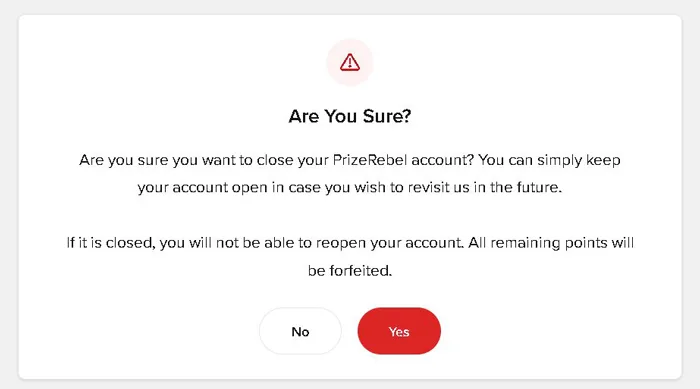
Once you close your PrizeRebel account, you can’t get back into it. And any points you haven’t redeemed for rewards are all lost along with the account. Other apps give you 30 days to change your mind and reactivate your account. PrizeRebel doesn’t give you a single day!
How many points do you have in your balance right now? Are they enough to get something? It’s worth checking your balance before you do anything else, because once the account is closed, there’s no way to get them back.
You don’t need anyone’s help for this. There’s no email to write and no reply to wait for. You close the account yourself from the site’s help page by following these steps:
- Log in at prizerebel.com and click the “?” in the top right corner, next to your initials, then click “Get Help.”
- Open the list under “Step 1 – What’s the problem?” and choose “Please close my account.”
- The “Are You Sure?” warning pops up on the screen right away.
- Click the red “Yes” button, and your account is closed for good. If you hesitate even for a second, “No” leaves it the way it was.
The “Yes” button only cuts off your access, so you can’t log in anymore. What the site knows about you is a different story. For your personal data, you need to send a separate request (you have the right to make one under GDPR) to their data protection officer, either through the “Contact” page or by emailing [email protected] directly. They say they delete your data without delay, except for whatever the law requires them to keep.
If losing access is all you need, you can stop at the red button. If you don’t want even your name left in their database, you still have one more email to send.
Is PrizeRebel worth it?
PrizeRebel pays. A lot of people write that they got their PayPal cash and gift cards exactly the way they requested them, and the minimum payout is low, only $5. For anyone who collects points on their phone in their spare time, that’s really good news, because you don’t have to build up a big balance before you see any money.
The site is run by iAngelic, Inc., a registered company, and has been since 2007. I looked for warnings from authorities or lawsuits against them and didn’t find anything. And almost two decades is a long time in the world of sites that pay you for surveys and offers, where many shut down as fast as they open. A scam wouldn’t have lasted that long.
But it’s a long way to your first $5. In its terms, PrizeRebel reserves the right to give you zero points for a survey you finished. Who reads the terms that far? In reviews, people complain about disqualifications like they’re an everyday thing: you carefully answer question after question, get close to the end, and only then does the survey tell you that you’re not who they’re looking for. Then it closes without giving you any points. All that time is wasted.
And when you finally request a cashout, the site can lock your account until you send a photo of your driver’s license or passport. If you don’t want to hand over your ID, find that out now, not after you’ve built up your balance!
Disqualifications get on everyone’s nerves, but some people just handle them better than others. If you get annoyed easily when you do the same thing over and over or when a survey kicks you out, you’ll hate PrizeRebel, and you’re better off skipping it. If you think of it as a few extra dollars in your spare time, disqualifications don’t make you lose your cool, and you’re fine uploading your ID, then PrizeRebel is a trustworthy site. It’s annoying at times, but the small payouts do come in.
How has PrizeRebel worked out for you? If you’ve used it or have any questions about it, leave me a comment below. I can’t wait to read it!